CDM-840 Remote Router MN-CDM840
Appendix D Revision 3
D–8
D.3.2 Troubleshooting
Confirm that the "Seconds since last LQRM" is being reset to ‘0’ periodically, which indicates
that the LQRMs are being received by the CDM-840.
Confirm that the proper Management IP Address appears in the CDD_880 Demod screen. It will
be populated automatically.
D.3.3 Monitoring ACM Performance
The CDM-840 provides several ways to determine the current state of the ACM system.
The current Tx and Rx ModCod, along with the Remote SNR, are displayed on the ‘Configuration
| WAN | Mod | ACM’ page (Figure D-3). The SNR displays values between -3.0 dB and +25.0 dB,
with a resolution of 0.1 dB. This page updates dynamically, so if a ModCod changes, the
parameters are refreshed.
This information is also available through the SNMP interface.
If you have access to an Oscilloscope in X-Y mode, the CDM-840 rear panel ‘ALARMS’ connector
provides analog voltages to monitor the constellation.
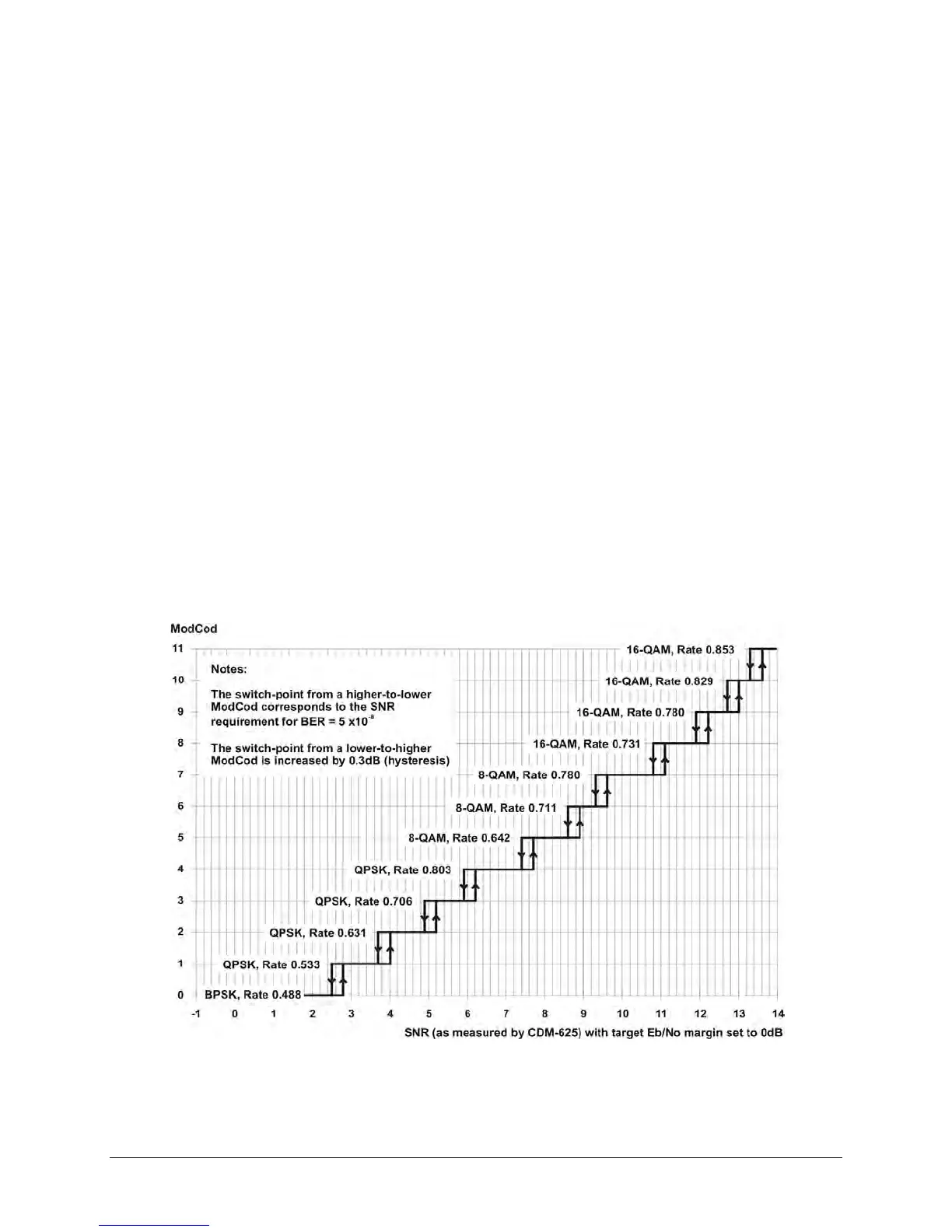
D.3.4 ModCod Switch Points
Figure D-4. CDM-840 – ACM ModCod Switch Points
The Figure D-4 graph shows the switch points with the Target Eb/No margin set to 0dB.
However, the switch points can be moved (increased) by configuring the Target Eb/No margin



 To Next Page