CDM-840 Remote Router MN-CDM840
Ethernet-based Remote Product Management Revision 3
6–44
Remote 1 Management IP Address
Remote 2 Management IP Address
Remote 192.168.1.1 and 192.168.2.1 will be added
Remote 1 Management IP Address
Remote 192.168.1.1 will NOT be added because the 10.1.2.0/23 route
is not completely "covered" by the QoS Subnet.
Packet #2 No VLAN
Packet #1 will go through the QoS Group and cause the Remote ID for
that Remote to be added to the Remote Sites list. Packet #2 and
Packet #3 do not match and will either go to another QoS Group or fall
to the Default Group.
6.3.3.2.3.2 Page Functionality Specific to Active QoS Mode
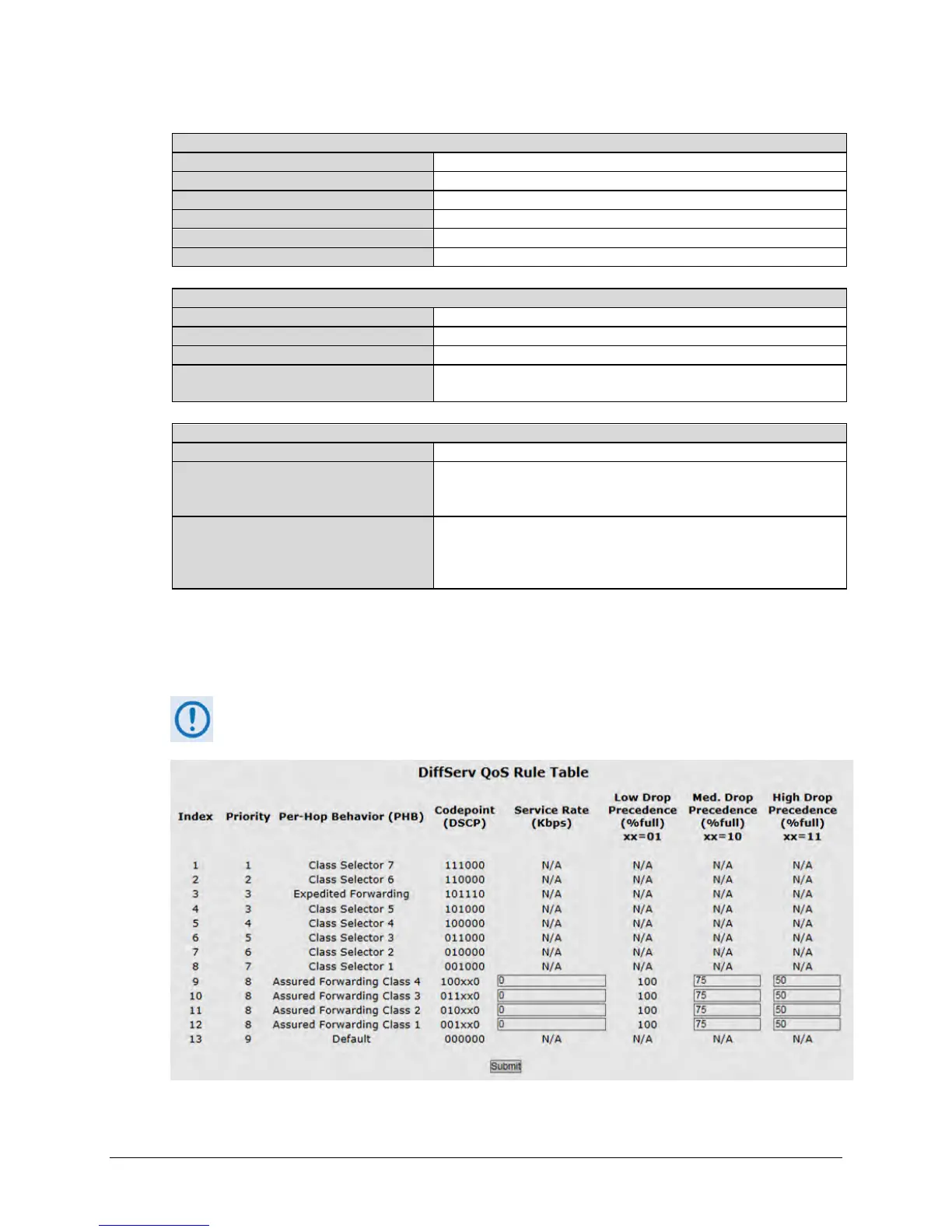
DiffServ (Differentiated Services) Rules Table
This table is accessible only when QoS Control Mode = DiffServ.



 To Next Page