CDM-840 Remote Router MN-CDM840
Ethernet-based Remote Product Management Revision 3
6–9
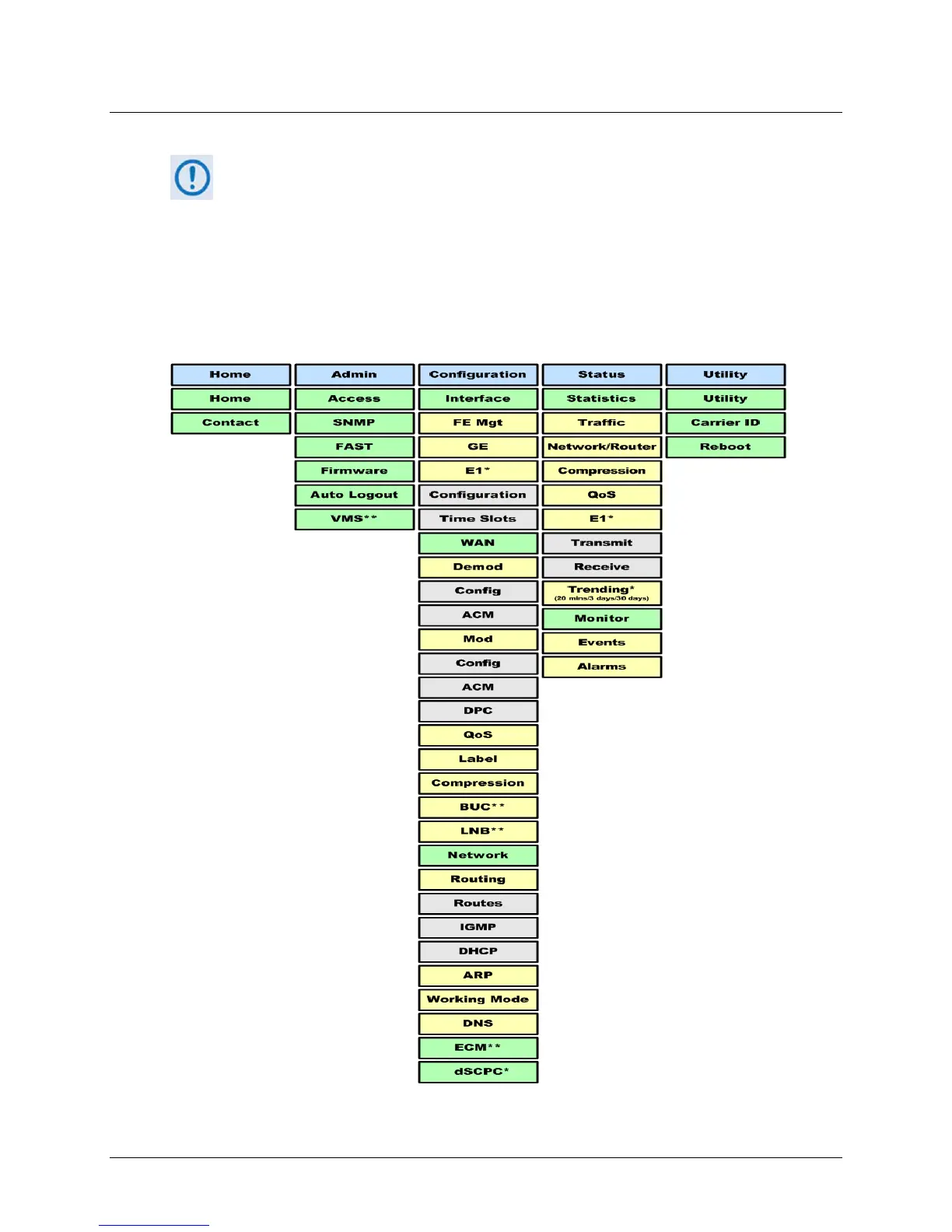
6.2.3.3 HTTP Interface Menu Tree Diagram
Any diagram block that is marked with (*) denotes a page that is functional only
when that optional FAST Feature has been purchased and activated. The diagram
block marked with (**) denotes that this page is functional only when a VIPERSAT
MANAGEMENT SYSTEM (VMS), and a Block Up Converter (BUC) OR a Low Noise
Block Down Converter (LNB) is installed and is recognized as operational.
Figure 6-3
Illustrates the menu hierarchy for the CDM-840 HTTP Interface. It features five
navigation tabs (shown in blue) located below the VFD at the top of each page. Primary page
tabs (green) and nested page tabs (yellow or grey) grant access to individual web pages.
Figure 6-3. CDM-840 HTTP Interface – Menu Tree (FW Ver. 1.6.2.5)



 To Next Page