CDM-840 Remote Router MN-CDM840
Ethernet-based Remote Product Management Revision 3
6–5
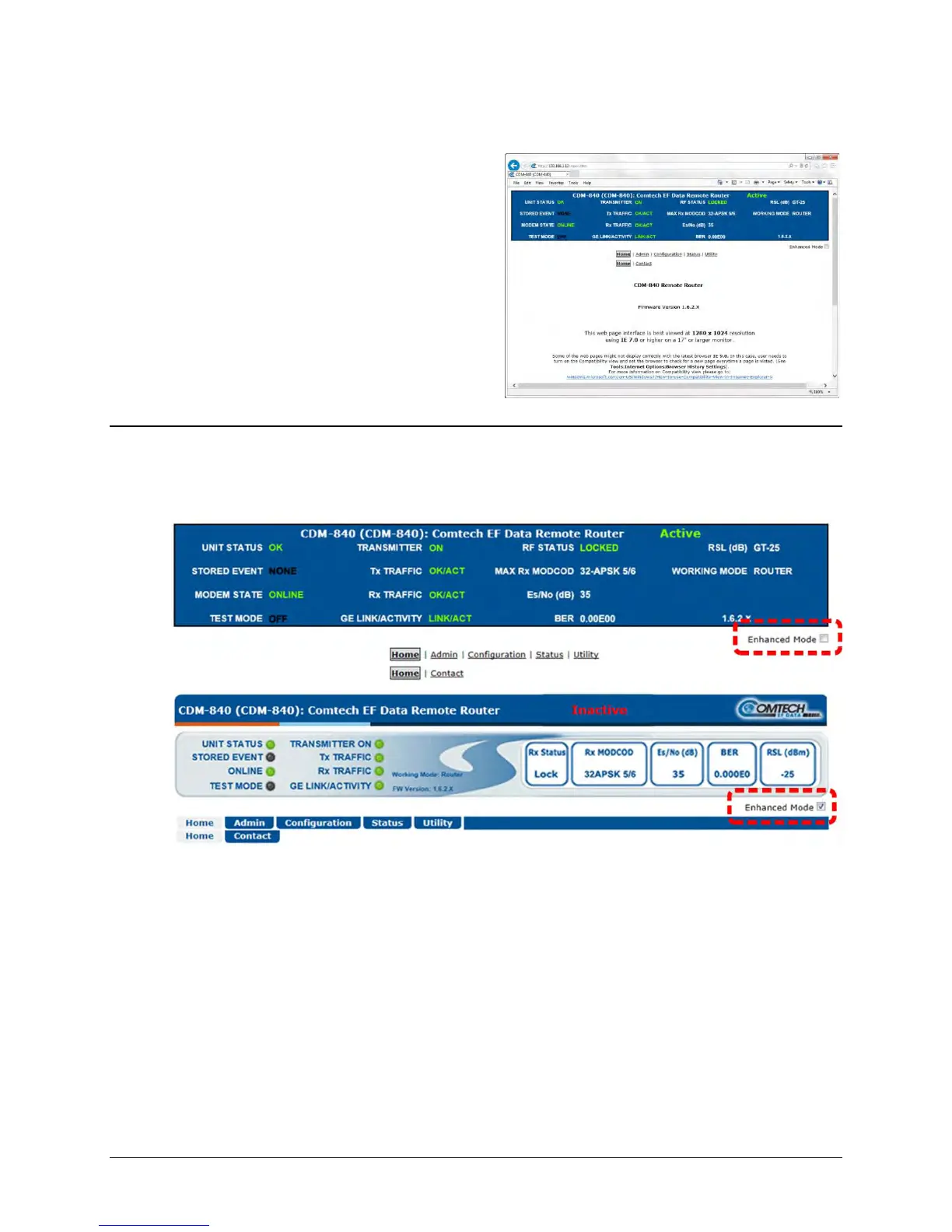
Enter the assigned User Name and Password – the default for both is comtech. Click [Log On].
If the User Name and Password are
accepted: The CDM-840 Remote Router HTTP
Interface Home page, similar to this example,
appears:
6.2.3.2 HTTP Interface – Operational Features
6.2.3.2.1 Virtual Front Panel
(TOP) Default Viewing Mode
(BOTTOM) Enhanced Viewing Mode
Figure 6-2. CDM-840 Remote Router Virtual Front Panel
The top of every page in the CDM-840 HTTP Interface features a read-only ‘Virtual Front Panel’
(VFP). The interface appearance differs based on the selected viewing mode – Default or
Enhanced Viewing Mode (Figure 6-2):
• The Default viewing mode features a text-based VFP and hyperlinks for web page access.
• Click the Enhanced Mode check box to change the interface appearance to the GUI viewing
format. The Enhanced Mode features virtual LEDs and navigation tabs for web page access.



 To Next Page