CDM-840 Remote Router MN-CDM840
Ethernet-based Remote Product Management Revision 3
6–38
6.3.3.2.2.3 Configuration | WAN | Mod | DPC
• See adjunct CEFD publication VMS v3.x.x VIPERSAT Management System User
Guide (CEFD P/N MN/22156)
• Appendix M. VMS DPC (DYNAMIC POWER CONTROL)
DPC is a selectable software feature operating independently on CDM-840s exchanging a UDP
message between the receiving unit (where the signal quality is being measured) and the
transmitting unit (where the power level is to be adjusted). This message contains link quality
status, which is directed to the transmit site on timed intervals, updating the link state.
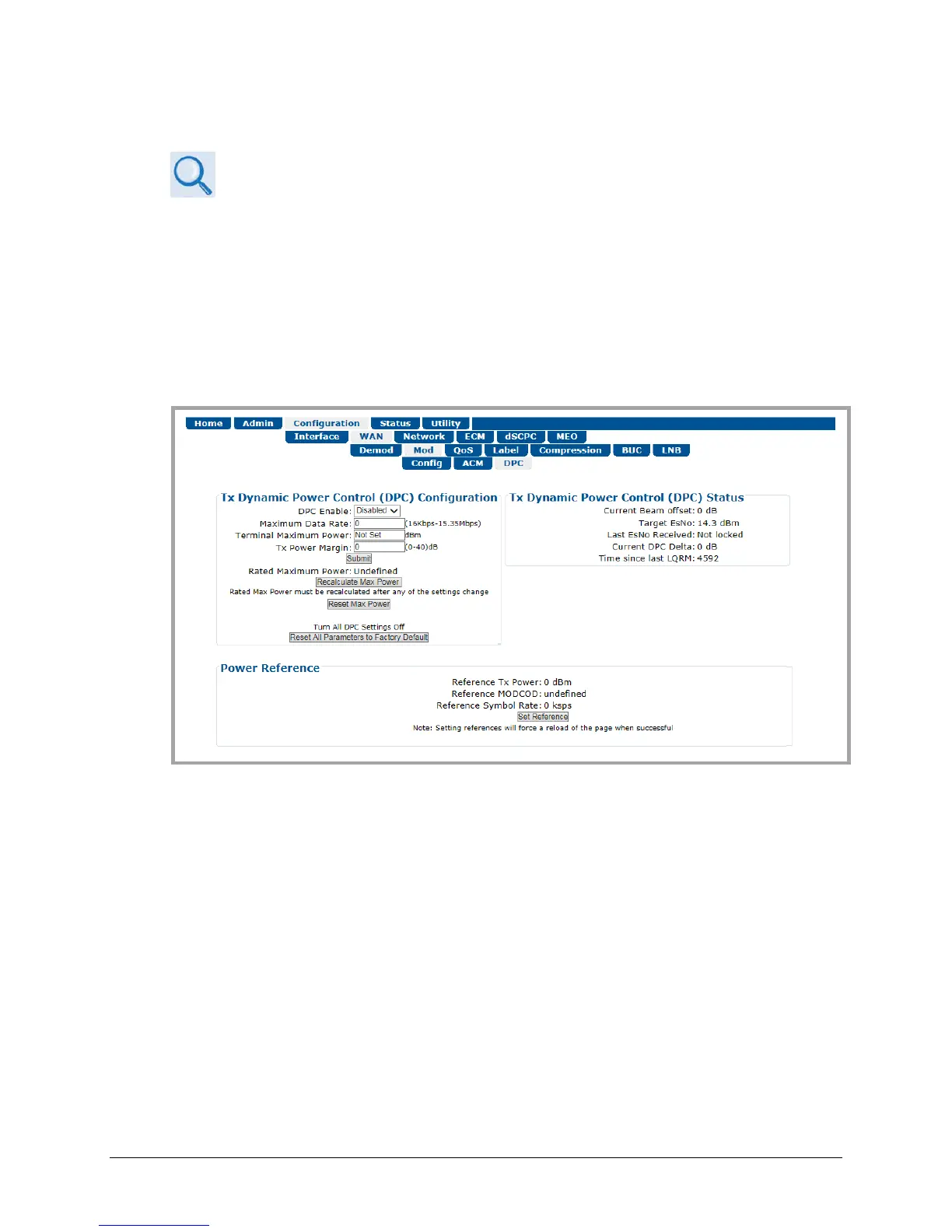
Use this page to configure and monitor CDM-840 Tx Dynamic Power Control operations.
Figure 6-20. Configuration | WAN | Mod | DPC Page
Tx Dynamic Power Control (DPC) Configuration
• DPC Enable – Use the drop-down list to select Disabled or Enabled.
• Maximum Data Rate (16 kbps to 15.35 Mbps) – Enter a maximum date rate value.
• Terminal Maximum Power – Enter a value, in dBm.
• Tx Power Margin (0 to 40) – Enter a value, in dB.
Click [Submit] to save.



 To Next Page