CDM-570A/570AL Satellite Modem with Optional Packet Processor
Revision 5
Ethernet-based Remote Product Management 7–20 MN-CDM570A
About Managed Switch Mode: Managed Switch Mode is Comtech’s IP modem intelligent
networking solution. It is intended primarily for operation in a point-to-point topology. It allows a
link to be set up with minimal configuration (no specific routes need to be configured).
When the optional Packet Processor is not installed, Managed Switch Mode provides support for
Layer 2 QoS, and Dedicated Management Port or Virtual Local Area Network (VLAN).
When you install the optional Packet Processor, advanced features such as Layer 3/4/5
(Advanced) QoS, Header and Payload Compression are available. Most are accessible only
under “Admin” user access.
Sect. 7.4.3.3.5 Config | Managed Switch
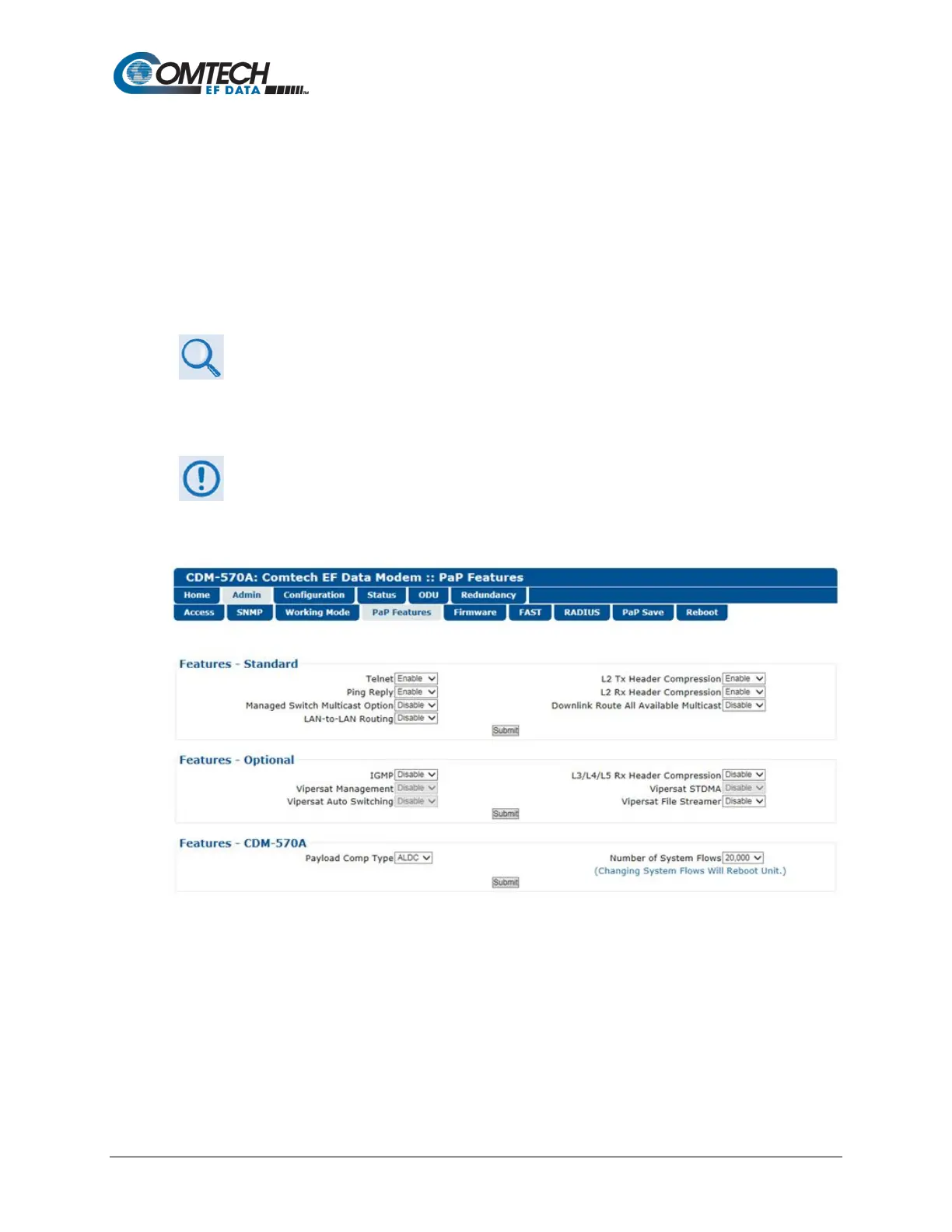
7.4.3.2.4 Admin | PaP Features
1. This page is available only when you install the optional Packet Processor.
2. If you submit any changes to this page, you must also open the ‘Admin |
Pap Save’ page (see Sect. 7.4.3.2.8
) and immediately click [Save PaP
Figure 7-8. Admin | PaP Features Page
Features – Standard
Use the drop-down lists to set operation as Enabled or Disabled:
• Managed Switch Multicast Option
• L2 Tx Header Compression
• L2 Rx Header Compression
• Downlink Route All Available Multicast
Click [Submit] to save.



 To Next Page