CDM-570A/570AL Satellite Modem with Optional Packet Processor
Revision 5
Optional Packet Processor - Serial/Telnet CLI Operation 9–46 MN-CDM570A
9.3.8.1.2 Satellite Modem > Configuration > Rx Configuration
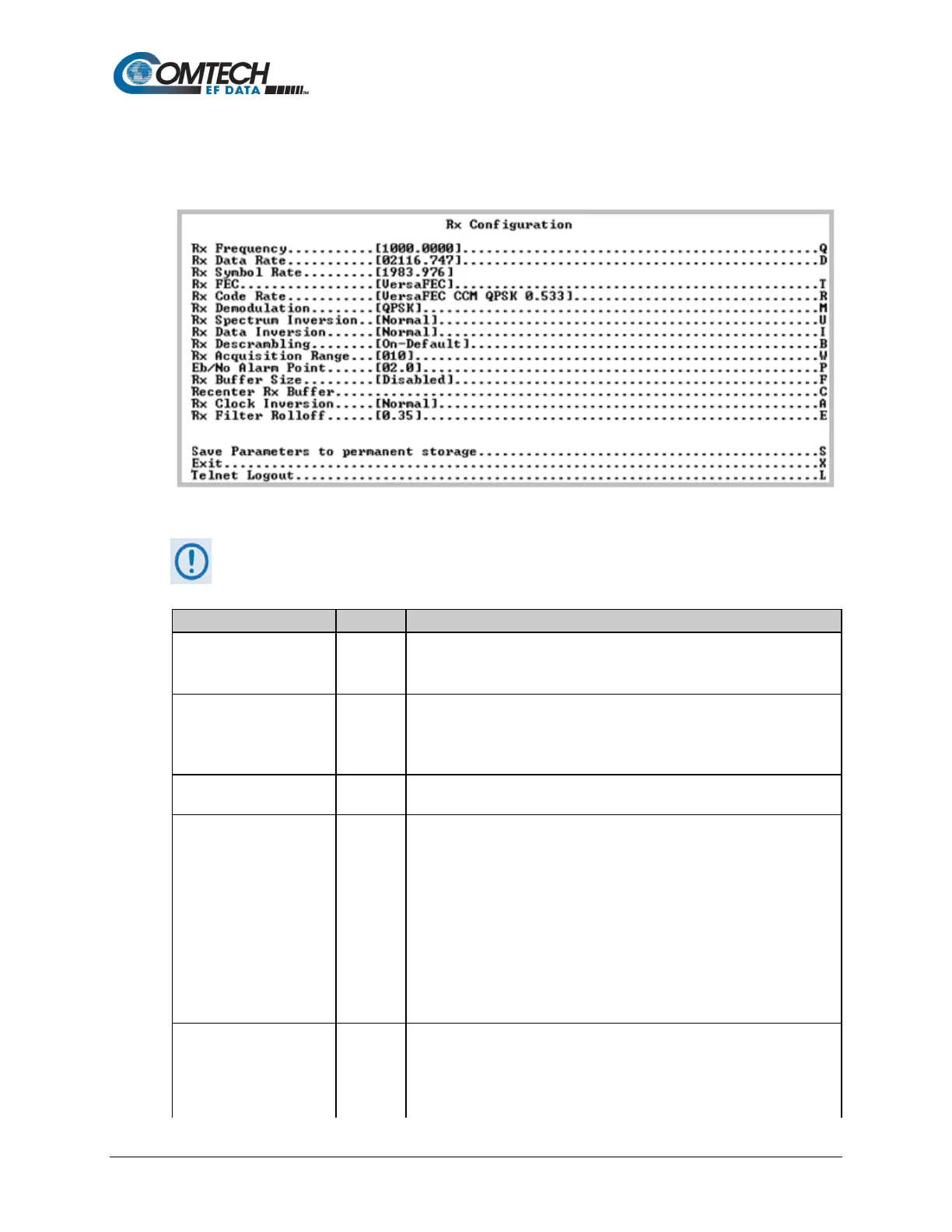
Open the nested Rx (Demodulation) Configuration page from the Configuration page.
Figure 9-31. Rx (Receive Modem) Configuration
Turbo FEC selections are displayed only if the optional Turbo card is installed.
Set the Rx frequency – valid ranges are:
• From 50 to 180 MHz for the CDM-570A (IF);
• From 950 to 1950 MHz for the CDM-570AL (L-Band).
Set the rate at which the Modem will receive traffic from the Satellite
Interface:
• Valid range is from 2.4 to 9980 kbps.
• Up to 5000 kbps and 9980 kbps are options that must be purchased.
Displays the corresponding Symbol Rate for the currently selected data
rate, decoder, rate, and demodulation scheme.
Select the Rx FEC type:
1 -- Uncoded
2 -- Viterbi
3 -- Vit+RS
4 -- TCM+RS
5 -- Turbo
6 -- VersaFEC
7 -- ULL
8 -- VersaFEC-2 Long
9 -- VersaFEC-2 Short
Select the Rx Code Rate:
1 – 5/16
2 – 21/44
3 – 1/2



 To Next Page