CDM-570A/570AL Satellite Modem with Optional Packet Processor
Revision 5
Optional Packet Processor - Serial/Telnet CLI Operation 9–84 MN-CDM570A
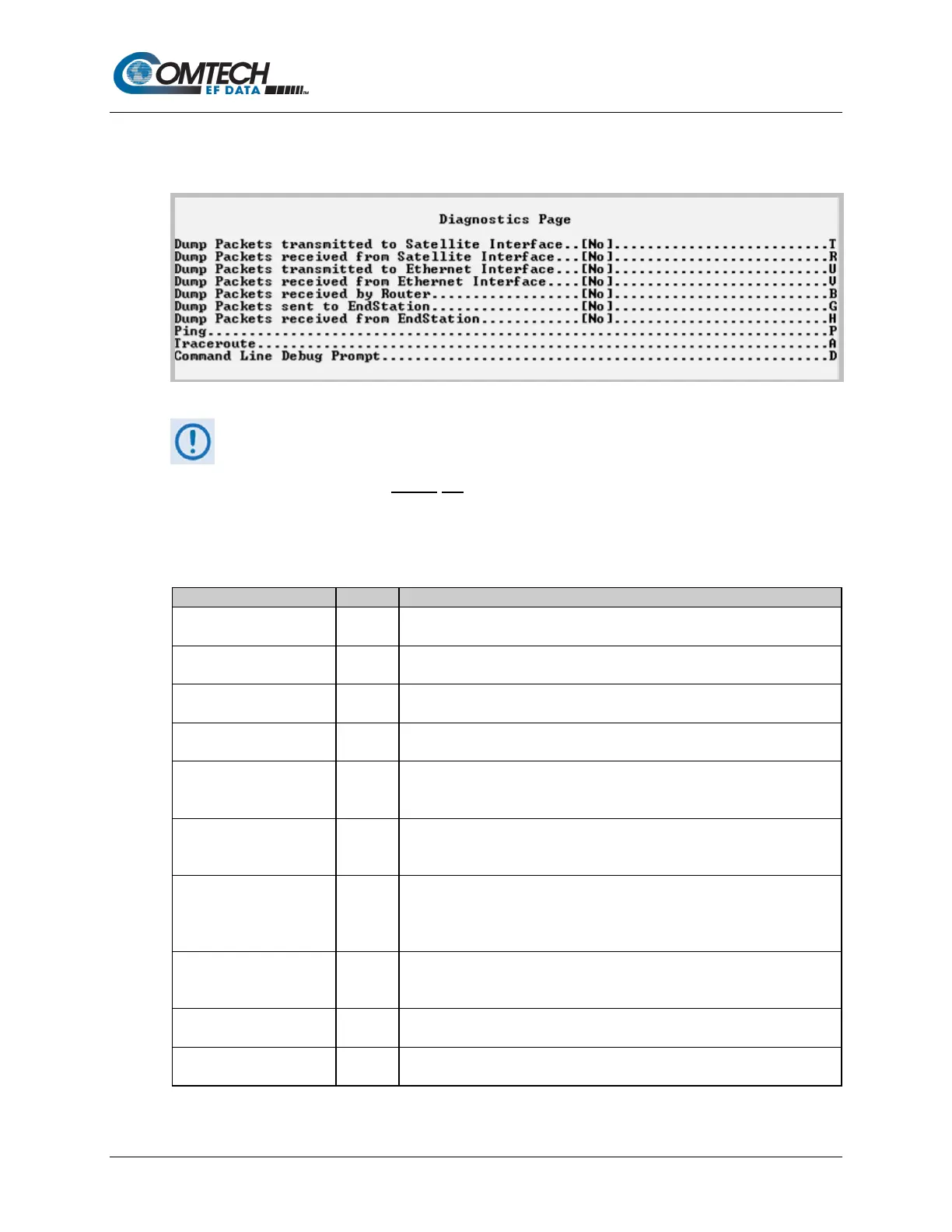
9.3.10.5 Operations and Maintenance > Diagnostics
Open the nested Diagnostics Page from the Operations and Maintenance page.
Figure 9-66. Diagnostics
Using Dump Packets Diagnostics Utilities
1. The Dump Packet Utilities will display a hexadecimal representation of
each packet and should
not be used when the Packet Processor is on a
“live” network.
2. Type the Hot Key a second time to terminate the dump operation. Each
selection toggles the value of the dump engine.
Dump Packets transmitted
to Satellite Interface
Toggle [Yes] to force the Packet Processor to dump a hexadecimal
representation of each packet transmitted over the Satellite Interface.
Dump Packets received
from Satellite Interface
Toggle [Yes] to force the Packet Processor to dump a hexadecimal
representation of each packet received from the Satellite Interface.
Dump Packets transmitted
to Ethernet Interface
Toggle [Yes] to force the Packet Processor to dump a hexadecimal
representation of each packet transmitted to the Ethernet Interface.
Dump Packets received
from Ethernet Interface
Toggle [Yes] to force the Packet Processor to dump a hexadecimal
representation of each packet received from the Ethernet Interface.
by Router
Toggle [Yes] to force the Packet Processor to dump a hexadecimal
representation of each packet received by the routing engine.
Note: Does not apply when in Managed Switch Mode.
EndStation
Toggle [Yes] to force the Packet Processor to dump a hexadecimal
representation of each packet received by and destined for this modem.
This traffic includes Pings, SNMP, Telnet, HTTP, and FTP traffic types.
from EndStation
Toggle [Yes] to force the Packet Processor to dump a hexadecimal
representation of each packet sourced from this modem and destined for
some other device. Select this to see what type of packets this modem is
Set the IP address in aaa.bbb.ccc.ddd format, set the number of pings to be
sent. Reports percentage of packet loss and round trip time (RTT) in msec
Set the IP address in aaa.bbb.ccc.ddd format. Reports min/avg/max RTT
for each hop in path.
Command Line Debug
Prompt
This is reserved for Customer Service and engineering use.
Type your password to access the debug command line.



 To Next Page