CDM-570A/570AL Satellite Modem with Optional Packet Processor
Revision 5
Introduction 1–6 MN-CDM570A
1.2.3 Physical Features
1.2.3.1 Front Panel Features
• Chapter 2. INSTALLATION
• Chapter 6. FRONT PANEL OPERATION
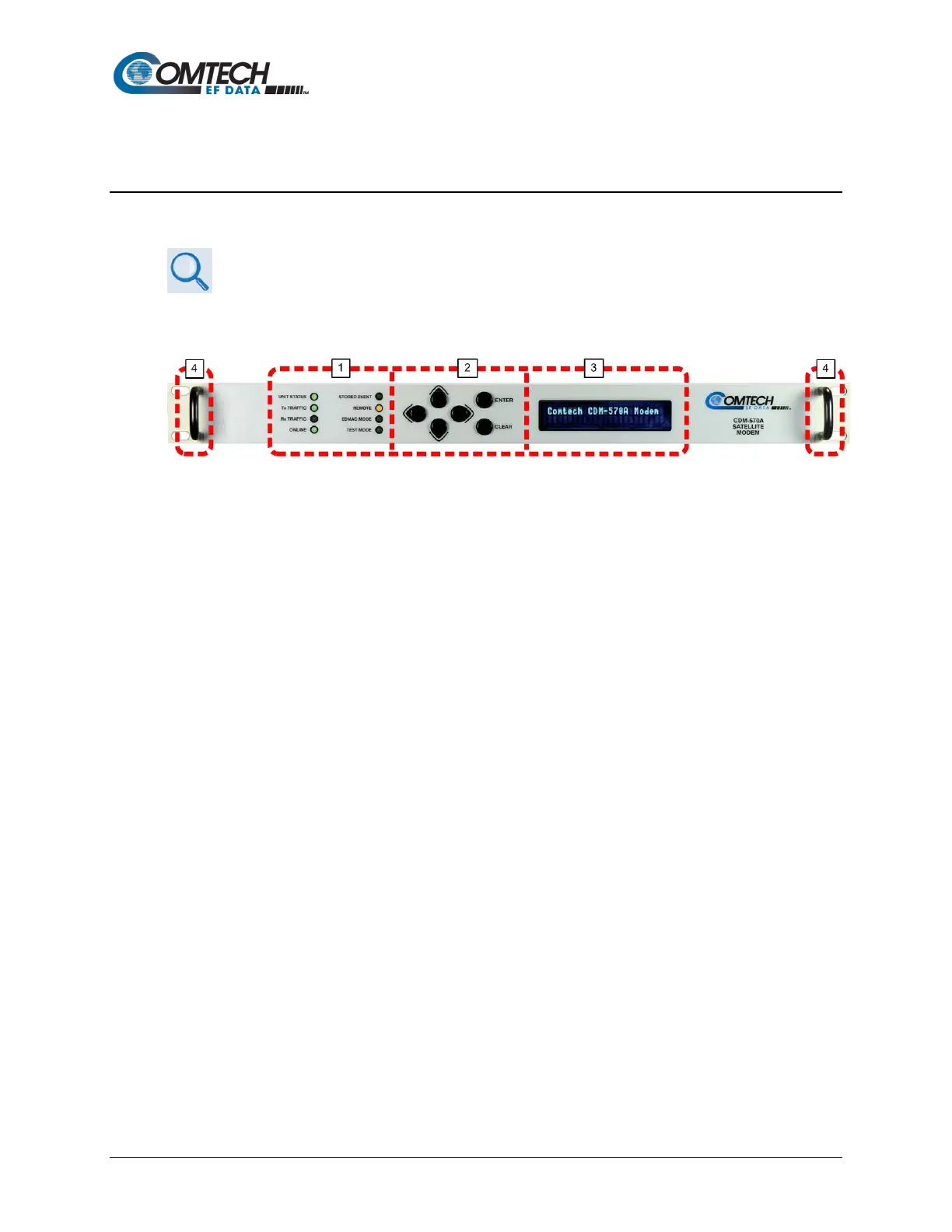
The Light-emitting Diode (LED) indicators, keypad, and the Vacuum Fluorescent Display (VFD)
(Figure 1-3) are described in detail in Chapter 6. FRONT PANEL OPERATION.
Figure 1-3. Modem Front Panel View (CDM-570A Shown)
1 LED Indicators
The LEDs show a summary status of modem operation.
2 Keypad
The keypad has six individual keys. The keys have a positive ‘click’ action that gives
tactile feedback. Use the keypad to enter data.
3 VFD
The VFD shows data, menus, prompts and messages. The VFD is an active display with
adjustable brightness. It shows two lines of 24 characters each. Nested menus show all
available options and prompts that guide you in carrying out required actions.
4 Rack Handles
In a rack enclosure, these handles help you install and remove the modem.



 To Next Page