CDM-570A/570AL Satellite Modem with Optional Packet Processor
Revision 5
Optional Packet Processor - Serial/Telnet CLI Operation 9–31 MN-CDM570A
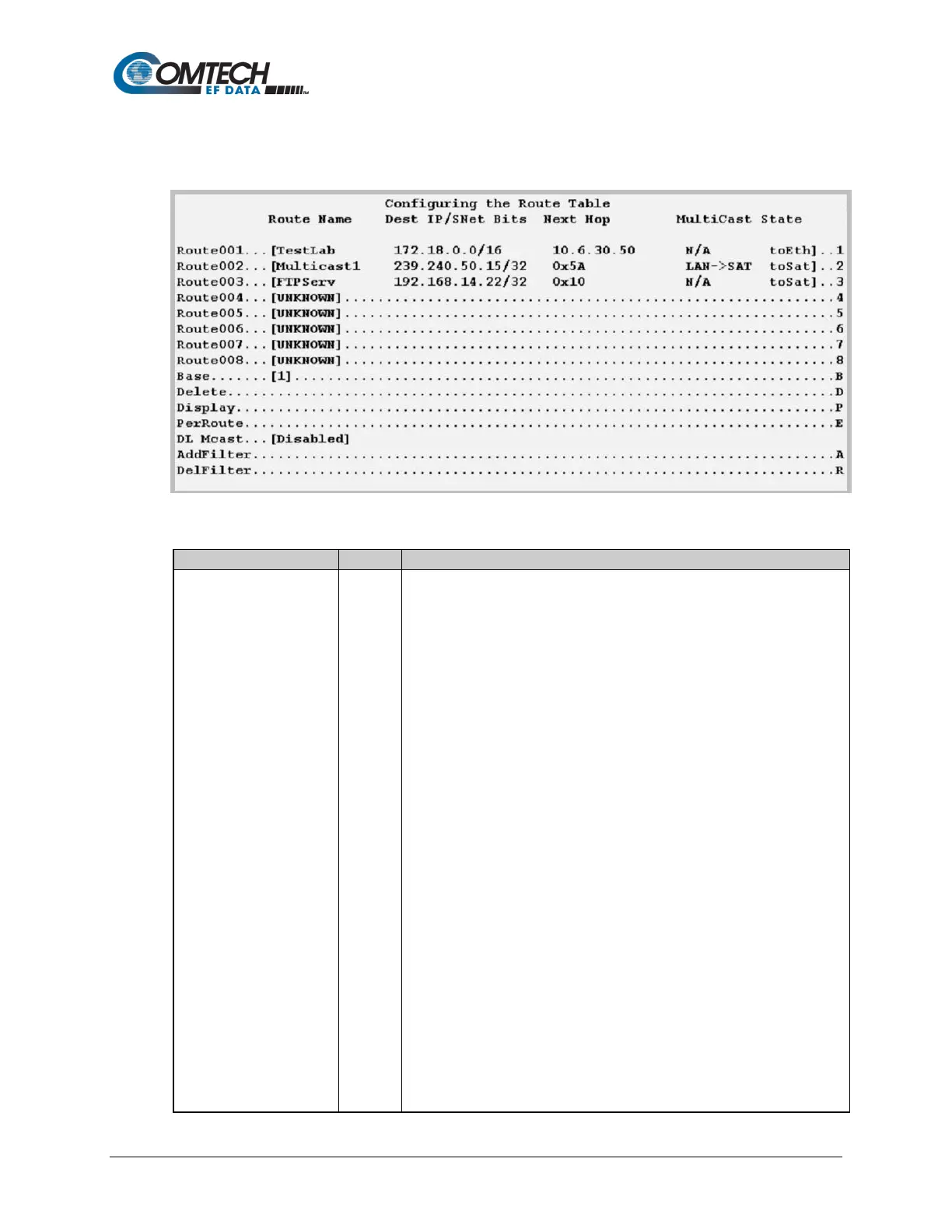
9.3.5 Route Table Configuration
Open the Route Table Configuration page from the Main Menu.
Figure 9-21. Route Table Configuration
Route256
(The current group of eight
of up to 256 definable
routes are displayed here)
Defines how to route received Packet Processor packets. Assigning an entry
in this table is similar to using the 'route add' command of machines that
support that command.
For each route, the CLI prompts you to define the following:
• Assign a name to reference the route. The assigned name cannot
contain any whitespace and must be unique.
• The destination address of an Packet of interest. The number of
network addresses that are governed by the selected destination entry,
i.e., subnet mask.
• The Next Hop IP address: This is the IP where the packet is routed
for further processing. The Next Hop IP Address for traffic to be sent
over the satellite will be the desired HDLC:
Point-to-Point – no HDLC address
Small Network – 0x1 – 0xFE
Large Network – 0x1 – 0xFFFE
Also, a route can be defined to have Packet Processor send traffic to another
IP address on the same subnet as the Ethernet interface.
• Optionally: If a Multicast address (224.0.0.0-239.255.255.255) is
provided as the destination IP address, then the following parameters
will be requested:



 To Next Page