CDM-570A/570AL Satellite Modem with Optional Packet Processor
Revision 5
Ethernet-based Remote Product Management 7–50 MN-CDM570A
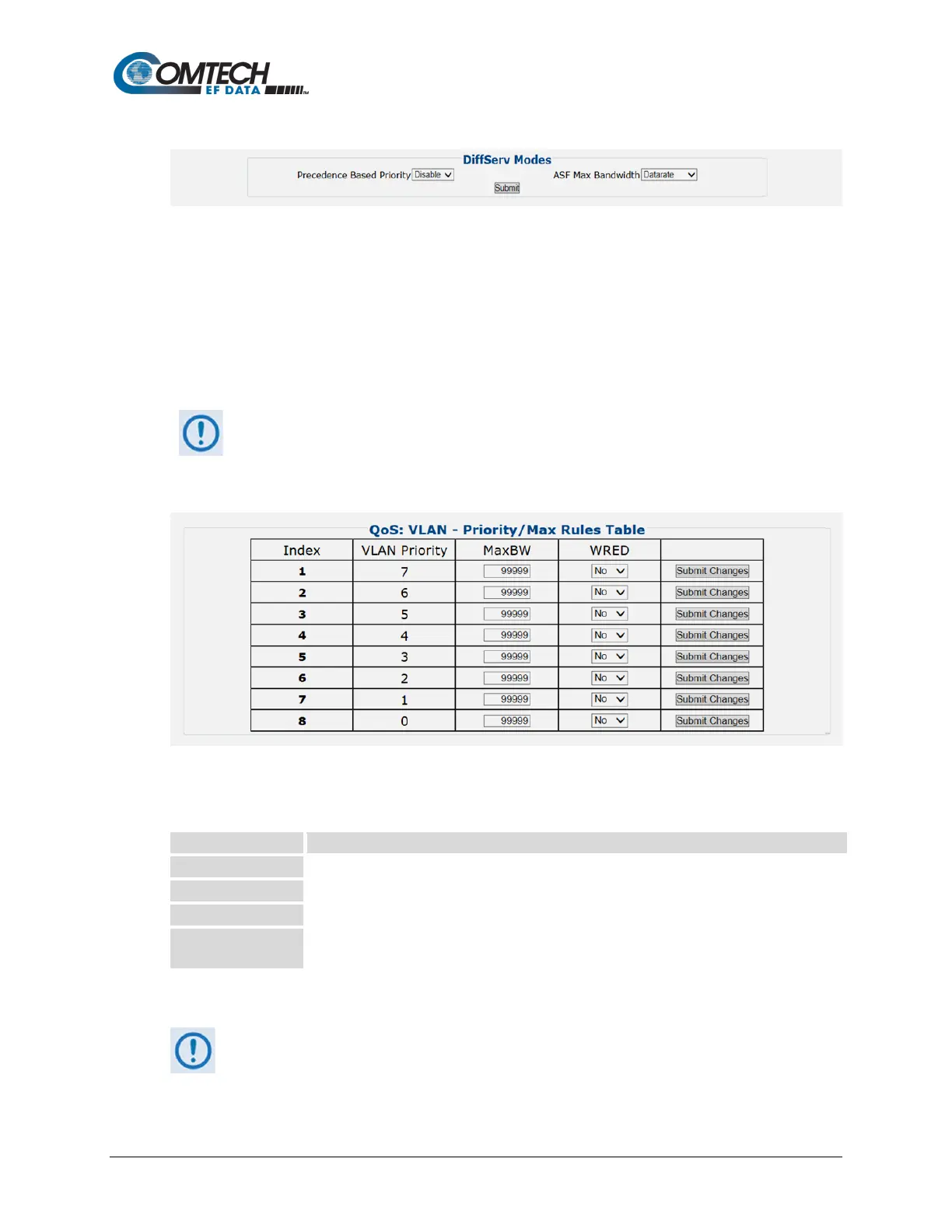
QoS DiffServ Modes
• Precedence Based on Priority – Use the drop-down list to Disable or Enable the
Packet Processor’s prioritization of traffic based upon the DSCP Class Selector
Precedence.
• ASF Max Bandwidth – Applicable to Assured Forwarding, this defines the value that is
used to restrict the maximum bandwidth that any particular flow will utilize. Use the drop-
down list to select Datarate or Percentage.
Click [Submit] to save.
The information that follows is applicable only when QoS Mode = VLAN –
Priority/Max Mode
QoS: VLAN – Priority/Max Rules Table
This section displays and permits you to modify all existing QoS VLAN – Priority/Max Rules
Table entries. From left to right:
This is the internal table index that is automatically assigned and cannot be edited.
Specifies the VLAN Priority established for the specific rule (0-7).
Specifies the Maximum Bandwidth value in kilobits per second.
Specifies the WRED (Weighted Random Early Detection) setting for the specific rule as Yes
or No.
Click [Submit Changes] to update the specified rule.
Make sure to also click [Save PaP Parameters] on the ‘Admin | PaP Save’ page
before proceeding further.



 To Next Page