Front Panel Operation Revision 4
CDM-760 Advanced High-Speed Trunking Modem MN-CDM760
6–49
On the bottom line – Use the arrow keys to select a digit, and then use the
arrow keys to change that digit. Press ENTER.
To disable Traps, set both Trap IP Addresses to 000.000.000.000.
6.2.2.11 (CONFIG:) Mask
Masks: RxAGC:Fault EsNo:Fault LNB:Alarm
Ref:Fault more... ()
Masks: DeCompInv:Alarm AUPC:Fault
EthLink: Alarm
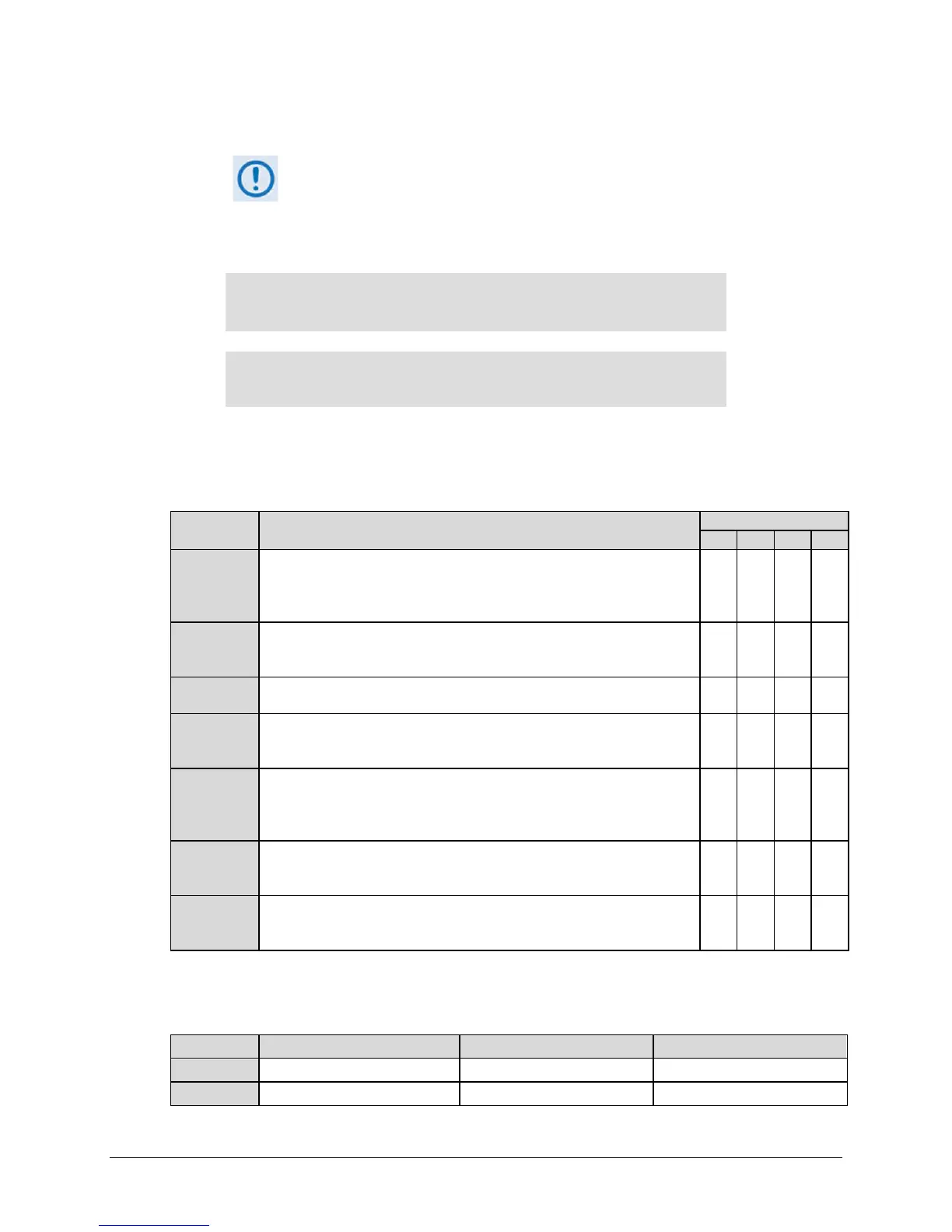
These menus set how the modem masks alarm or fault states. Use the arrow keys to select
RxAGC, EsNo, LNB, Ref, or more... to go to the next screen. There, use the arrow keys to
select DeCompInv, AUPC, or EthLink. Press ENTER. Note the following:
Description
RxAGC
This indicates that the Receive Input power level is either too high or too
low and the Automatic Gain Control to normalize this signal level has railed
high or low, as the signal level is outside of the specification provided in
X X X
EsNo
This indicates that the minimum Es/No (set in Section 6.2.2.3.4) has been
reached and the local demodulator Es/No level is at or below this
X X X
LNB
This indicates that the high or low current limits for the LNB have been
met.
X X X
Ref
If an external reference is selected (Section 6.2.2.12.1), this indicates that
the external reference being asserted to the modem does not meet that
X X X
DeCompInv
This indicates that the decompression (On/Off) as selected (Section
6.2.2.6.2) does not match the incoming data: i.e., Decompression is ON
but the data is not compressed, or Decompression is OFF but the data
appears to be compressed.
X X X
AUPC
This indicates that the Tx output power has reached the Nominal + Range
sum (upper limit) and the modem can no longer increase its Tx output
power, but the remote reported Es/No is still lower than the Target Es/No.
X X X
EthLink
This indicates that an Ethernet Interface is selected using the CONFIG: Intf
menu (Section 6.2.2.4) as the active interface, but an Ethernet cable with
Ethernet traffic has not been detected on this physical port.
X X X X
For each mask selection, use the arrow keys to set the available mask state as noted in the
previous table. Press ENTER. Note the following:
Mask Type Unit Status LED Color Fault State Visible Location
Alarm Amber None Monitor: Live Alarms menu
Fault Red J1 Alarm Connector Monitor: Stored-Events log



 To Next Page