Updating Firmware Revision 4
CDM-760 Advanced High-Speed Trunking Modem MN-CDM760
4–12
•
Use the Serial Remote Control Interface – Execute one of the following queries:
o Abbreviated – <0/SWR? (displays firmware versions)
o Detailed – <0/FRW?1 (for Image 1) or <0/FRW?2 (for Image 2) (displays complete
firmware load information)
4.4.3 Use the HTTP Interface to Perform the Ethernet FTP Upload
Procedure
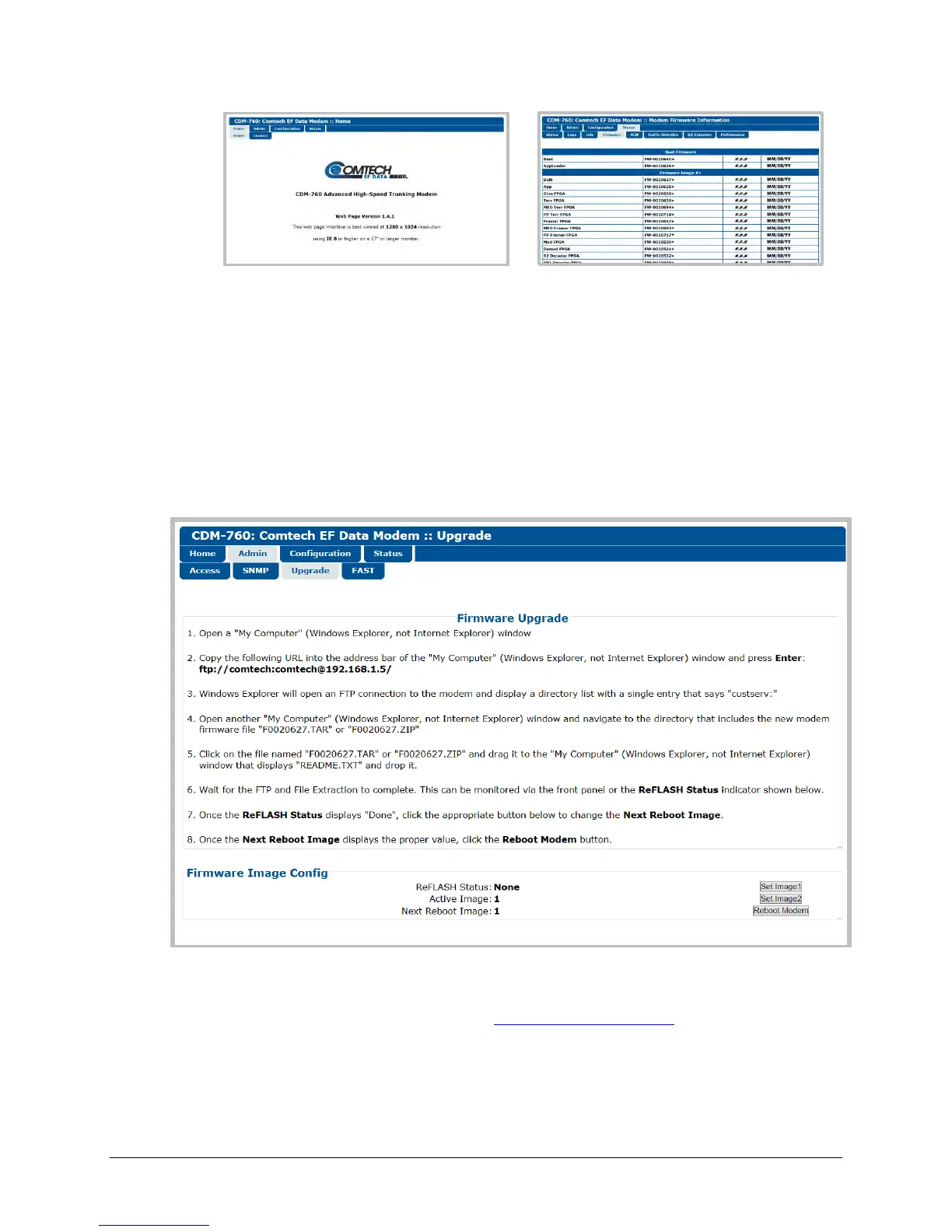
For Firmware Version 1.4.1 and later, the Administrator may use the Admin | Upgrade page to
manage the CDM-760 Firmware Upgrade process.
Figure 4-1. HTTP Interface Admin | Upgrade page
Do the steps displayed in the Firmware Upgrade section of this page to transfer the extracted
firmware update image ZIP file (available from
www.comtechefdata.com or Comtech EF Data
Product Support) from the User PC to the modem‘s Flash memory.
Note that Steps 6 through 8 prompt you to use the Firmware Image Config section of this page
to finalize the process.



 To Next Page