Appendix D Revision 4
CDM-760 Advanced High-Speed Trunking Modem MN-CDM760
D–3
D.4 CDM-760 Ethernet Overview
D.4.1 Ethernet Interfaces
InBand Modem Control allows remote Ethernet access via the Gigabit Ethernet data interfaces.
There are two operational modes for data flow while using the CDM-760. The selection of
InBand “Enable” or “Disable” will yield two different Ethernet circuit paths.
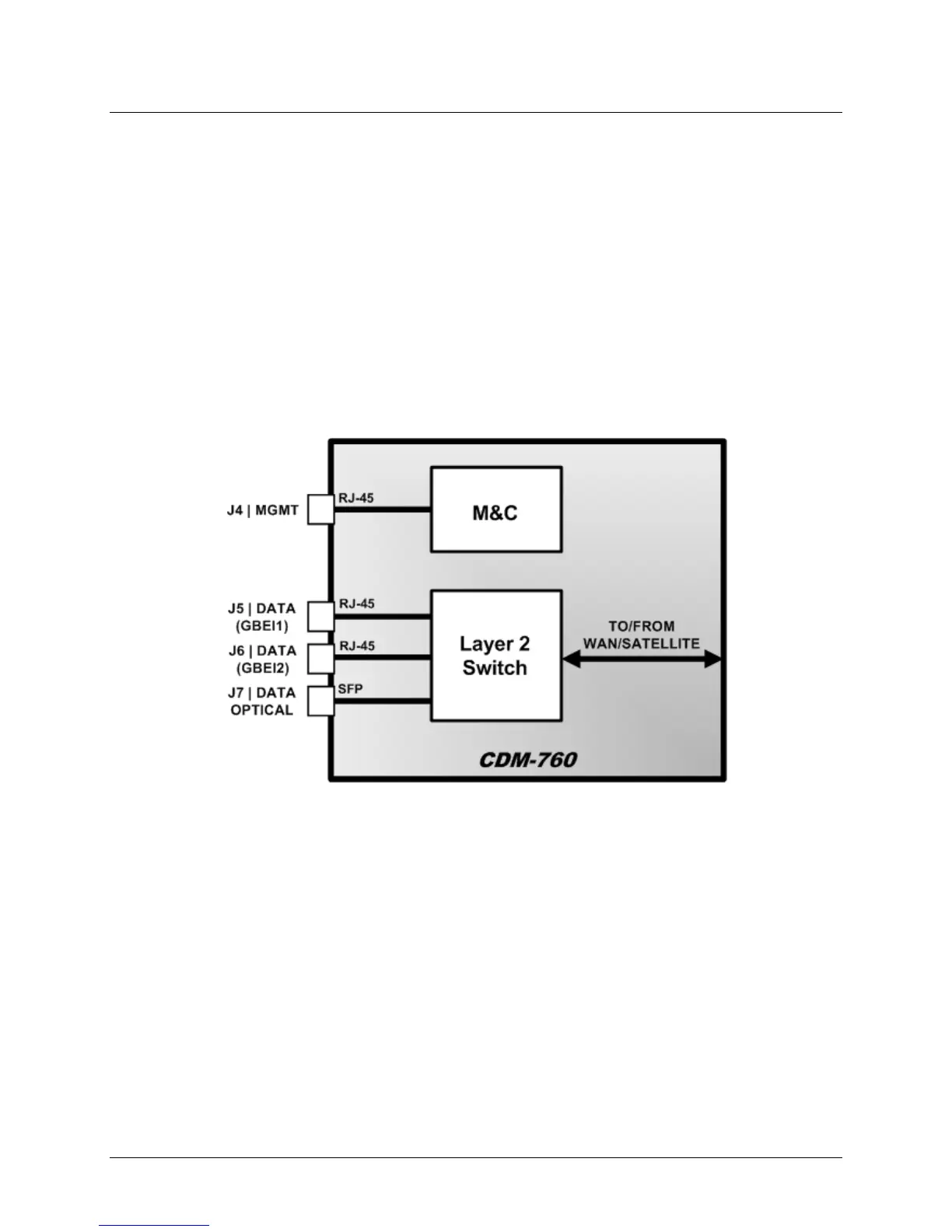
• InBand Disabled – Figure D-2 shows the internal Ethernet architecture for the CDM-760
when InBand is “Disabled”.
Typically, the management port is configured so that management traffic is physically
separated from the data traffic ports. Setting InBand as “Disabled” facilitates this
configuration.
Figure D-2. CDM-760 Architecture – InBand “Disabled”
In this setting the only way to communicate with the M&C via an Ethernet connection is
through the base unit J4 | MGMT GigE RJ-45 connection. In this configuration, it is common
to see remote M&C and data travel together over the satellite link separated by VLAN,
where a VLAN-aware switch will separate the traffic into user traffic and management traffic
as seen in Figure D-3.



 To Next Page