Chapter 11 DeviceNet Remote I/O Module AHRTU-DNET
11-41
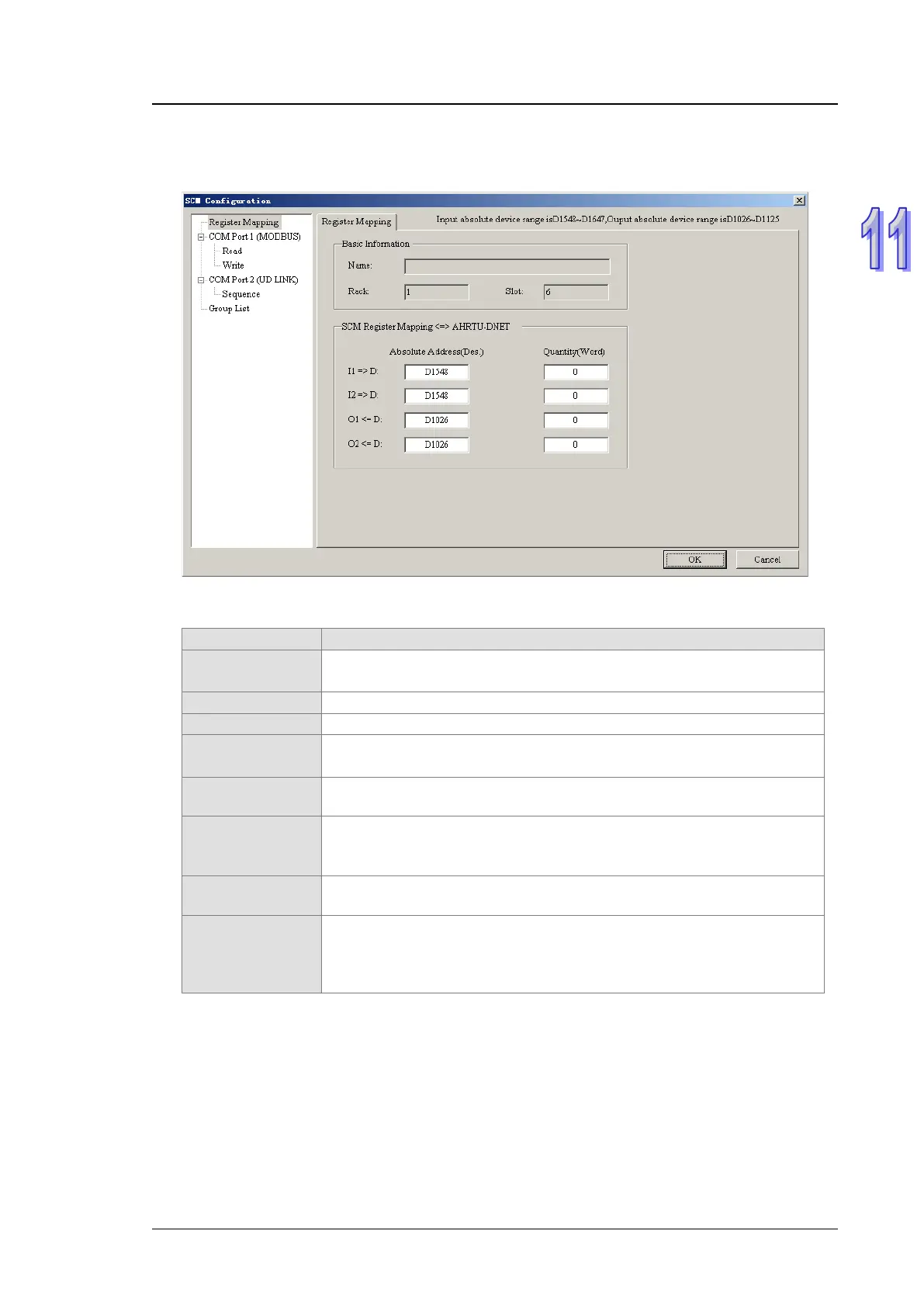
The AH10SCM-5A configuration interface contains the basic information of AH10SCM-5A, the
communication mode of every COM port (UD Link or Modbus), the mapping relations between
register mapping range and the internal register I and Q in AH10SCM-5A and etc.
Explanation of SCM Configuration interface:
(MODBUS)
To set the communication format of COM port 1; default: Modbus
mode, which can be switched to UD Link mode by a right click
Click Read to go to the Modbus mode—read setting interface.
Click Write to go to the Modbus mode—write setting interface.
(UD LINK)
To set the communication format of COM port 2; default: UD Link
mode, which can be switched to Modbus mode by a right click
Sequence
To enter Sequence setting interface and to place multiple groups to
Sequence and set the execution order
Group List
Right click to add a new group and the newly added group can be set in
packet and command on the group setting interface.
Information
To show the number of the rack and slot where AH10SCM-5A is
inserted.
SCM Register
Mapping
To set the mapping relations between the registers inside
AH10SCM-5A and those in PLC CPU
I1, I2, O1 and O2 will be used only when editing the variable
information in UD Link mode.



 To Next Page