*5 Infrastructure and Wi-Fi Direct modes or an Ethernet connection can be used simultaneously.
*6 Wi-Fi Direct only supports WPA2-PSK (AES) .
*7 Complies with WPA2 standards with support for WPA/WPA2 Personal.
Ethernet Specications
Standards
IEEE802.3i (10BASE-T)
*1
IEEE802.3u (100BASE-TX)
*1
IEEE802.3ab (1000BASE-T)
*1
IEEE802.3az (Energy
Ecient
Ethernet)
*2
Communication Mode Auto, 10 Mbps Full duplex, 10 Mbps Half duplex, 100 Mbps Full duplex, 100 Mbps
Half duplex
Connector RJ-45
*1 Use a category 5e or higher STP (Shielded twisted pair) cable to prevent risk of radio interference.
*2 The connected device should comply with IEEE802.3az standards.
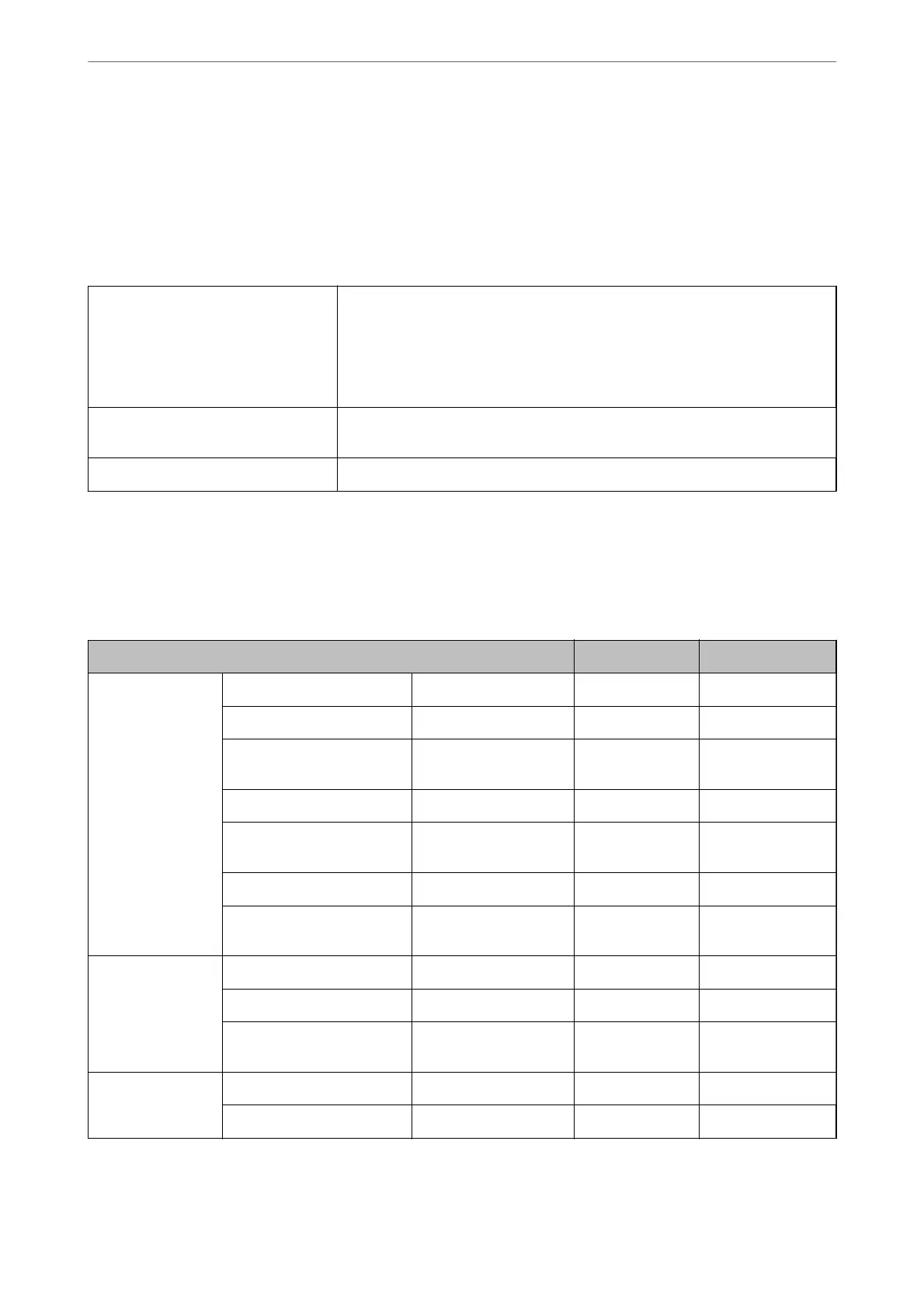
Network Functions and IPv4/IPv6
Functions Supported Remarks
Network Printing EpsonNet Print (Windows) IPv4 ✓ -
Standard TCP/IP (Windows) IPv4, IPv6 ✓ -
WSD Printing (Windows) IPv4, IPv6 ✓ Windows Vista or
later
Bonjour Printing (Mac OS) IPv4, IPv6 ✓ -
IPP Printing (Windows, Mac
OS)
IPv4, IPv6 ✓ -
PictBridge Printing (Wi-Fi) IPv4 - Digital camera
Epson Connect (Email Print,
Remote Print)
IPv4 ✓ -
Network Scanning Epson Scan 2 IPv4, IPv6 ✓ -
Event Manager IPv4 - -
Epson Connect (Scan to
Cloud)
IPv4 ✓ -
Fax Send a fax IPv4 ✓ -
Receive a fax IPv4 ✓ -
Product Information
>
Product Specications
>
Network Specications
445


 To Next Page
 Loading...