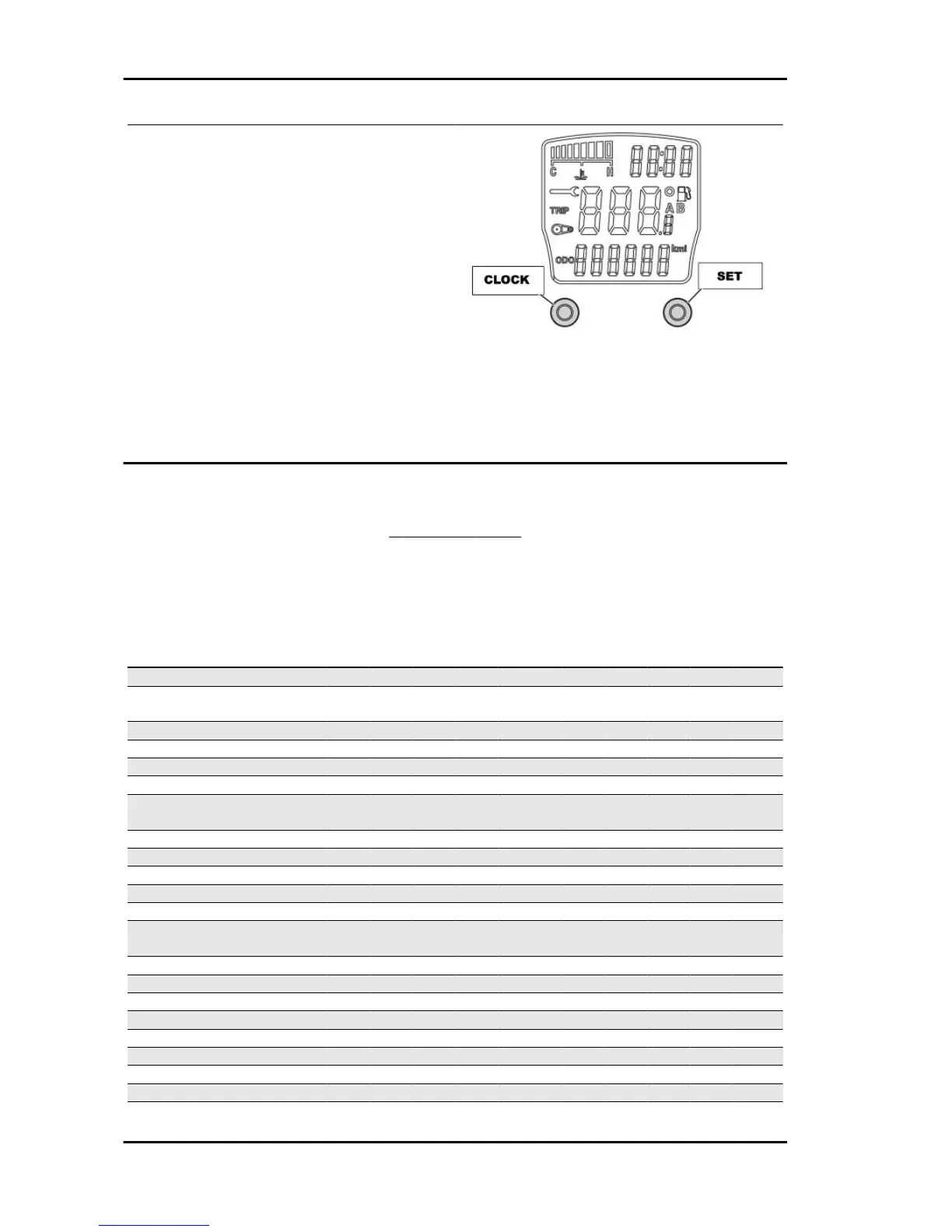
Follow these steps to reset the service icons:
1. With the key set to OFF, hold down the
"SET" button and turn the key to ON : the
"BELT" and "SERVICE" icons start flashing.
2. Push the "CLOCK" button for less than 1
second and the icons are displayed sequen-
tially. The icon selected remains ON and the
other is no longer displayed.
3. Press the "CLOCK" button again for more
than 3 seconds to reset the relative mainte-
nance step and the icon is no longer dis-
played.
Maintenance chart
MAINTENANCE TABLE
● Replacement
■ Check
* (Nominal: 0,15 mm INT and EXH) restore only if deviation exceeds 0.05 mm
** Replace every two years
Km x 1000 1 5 1
0
1
5
2
0
2
5
3
0
3
5
4
0
4
5
5
0
5
5
6
0
6
5
7
0
7
5
8
0
8
5
9
0
9
5
10
0
Engine Oil ● ● ● ● ● ● ● ● ● ● ●
Engine Oil - level check and
top-up
■ ■ ■ ■ ■ ■ ■ ■ ■ ■
Oil filter ● ● ● ● ●
CVT driving belt ● ● ● ● ●
Slide pads and variator rollers ● ● ● ● ● ● ● ● ● ●
Ignition spark plugs ● ● ● ● ●
CVT air filter (sponge-mesh)
cleaning
■ ■ ■ ■ ■
Air filter ■ ● ■ ● ■ ● ■ ● ■ ●
Throttle body (cleaning) ■ ■ ■
ECU software upgrade ■ ■ ■
Valve clearance * ■ ■ ■
Pinion supporting unit oil ■ ● ● ● ● ● ● ● ● ● ●
Final transmission (lubrica-
tion)
■ ■ ■ ■ ■ ■ ■ ■
Final transmission ● ● ● ● ●
Brake pads ■ ■ ■ ■ ■ ■ ■ ■ ■ ■ ■ ■ ■ ■ ■ ■ ■ ■ ■ ■ ■
Safety locks ■ ■ ■ ■ ■ ■
Throttle control - (adjustment) ■ ■ ■ ■ ■ ■ ■ ■ ■ ■ ■
Electrical system and battery ■ ■ ■ ■ ■ ■ ■ ■ ■ ■ ■
Coolant level ** ■ ■ ■ ■ ■ ■ ■ ■ ■ ■ ■
Brake fluid level ■ ■ ■ ■ ■ ■ ■ ■ ■ ■ ■
Tyre pressure and wear ■ ■ ■ ■ ■ ■ ■ ■ ■ ■ ■
Steering ■ ■ ■ ■ ■ ■ ■ ■ ■ ■ ■
Maintenance GP 800 i.e.
MAIN - 2



 To Next Page