Chapter 5: Console Operation
Output Channels: UM8 Processed Outputs
180/ 526 2.0 Eclipse User Guide
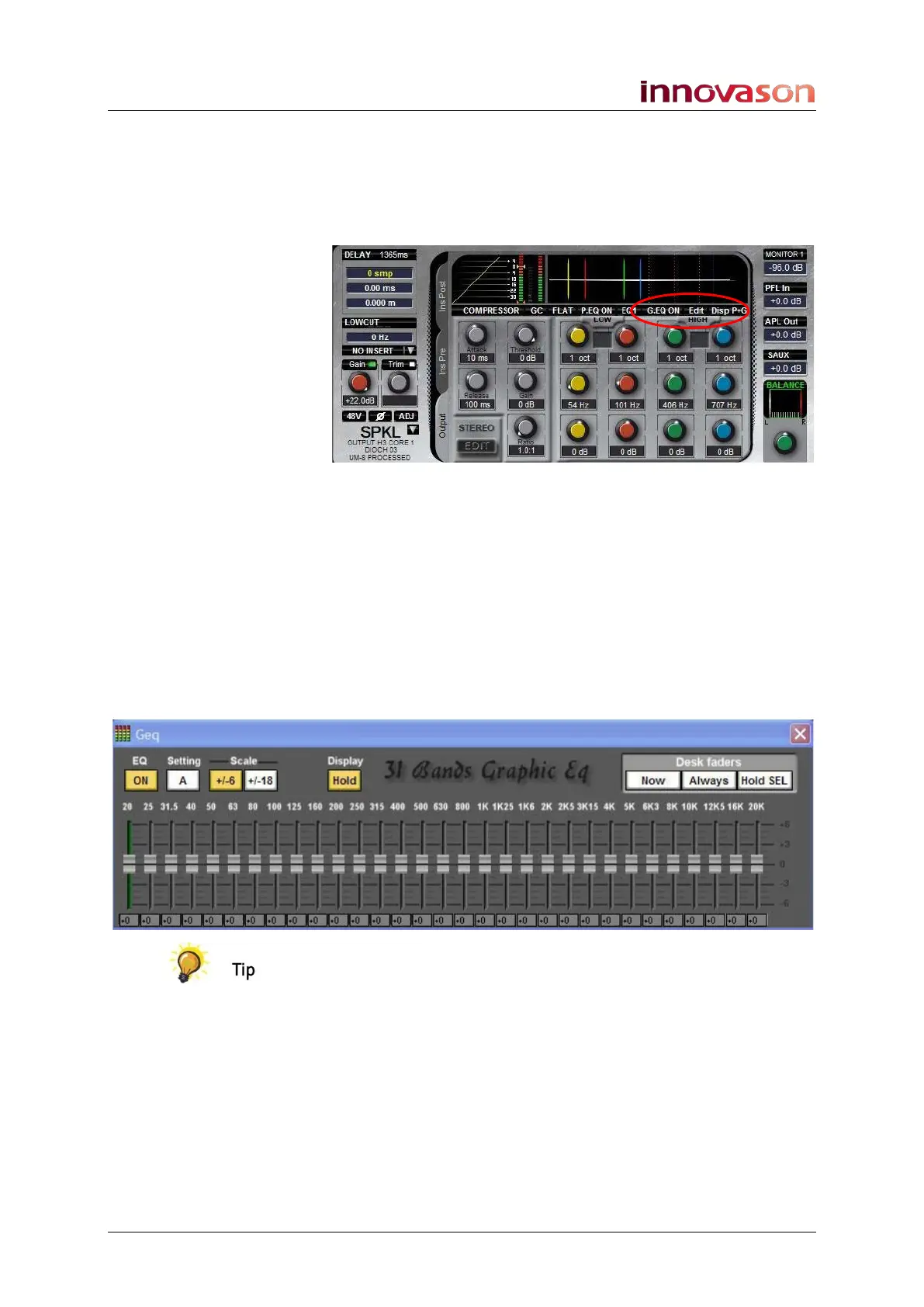
Controlling the 31-band Graphic Equaliser
The 31-band Graphic Equaliser is controlled from the Main Mix
display and Geq pop-up window.
1. On the Main Mix display you can select:
• G.EG ON – turns the Graphic EQ on or off (yellow = on)
• Edit – selects the Geq pop-up window.
• Disp P+G – toggle this on-screen button to view both
parameter and graphic EQ on the EQ curve (as above),
or display the 8-band parameter EQ only.
2. To open the Geq window, either click on Edit or press
the EQ1/EQ2 button on the PARAM EQ panel.
The Geq pop-up window appears and can be positioned
anywhere on the Main Mix display:
Note that a button on the User Defined Panel may be assigned
to open the Geq Editor window, see next page.
3. On the left of the Geq window are:
• EQ ON - turns the GEQ on or off (yellow = on)
• Setting A or B - toggles between 2 presets (A and B).
• Scale +/-6 or +/-18 – selects the fader range. You
choose between -6 to +6dB or -18 to +18dB.
• Display Hold – select this option and the Geq window
will automatically appear each time the bus is selected.



 To Next Page