Chapter 5: Console Operation
Stereo Channels: Adjusting LRC Independently
Eclipse User Guide 2.0 191/ 526
On output channels remember that some parameters are
applied to the channel and others to the UM8 output. For
example, if you adjust the right fader level for an Aux, then all
destinations fed from Aux Right are affected. However, if you
adjust the EQ, then only the selected UM8 output is adjusted.
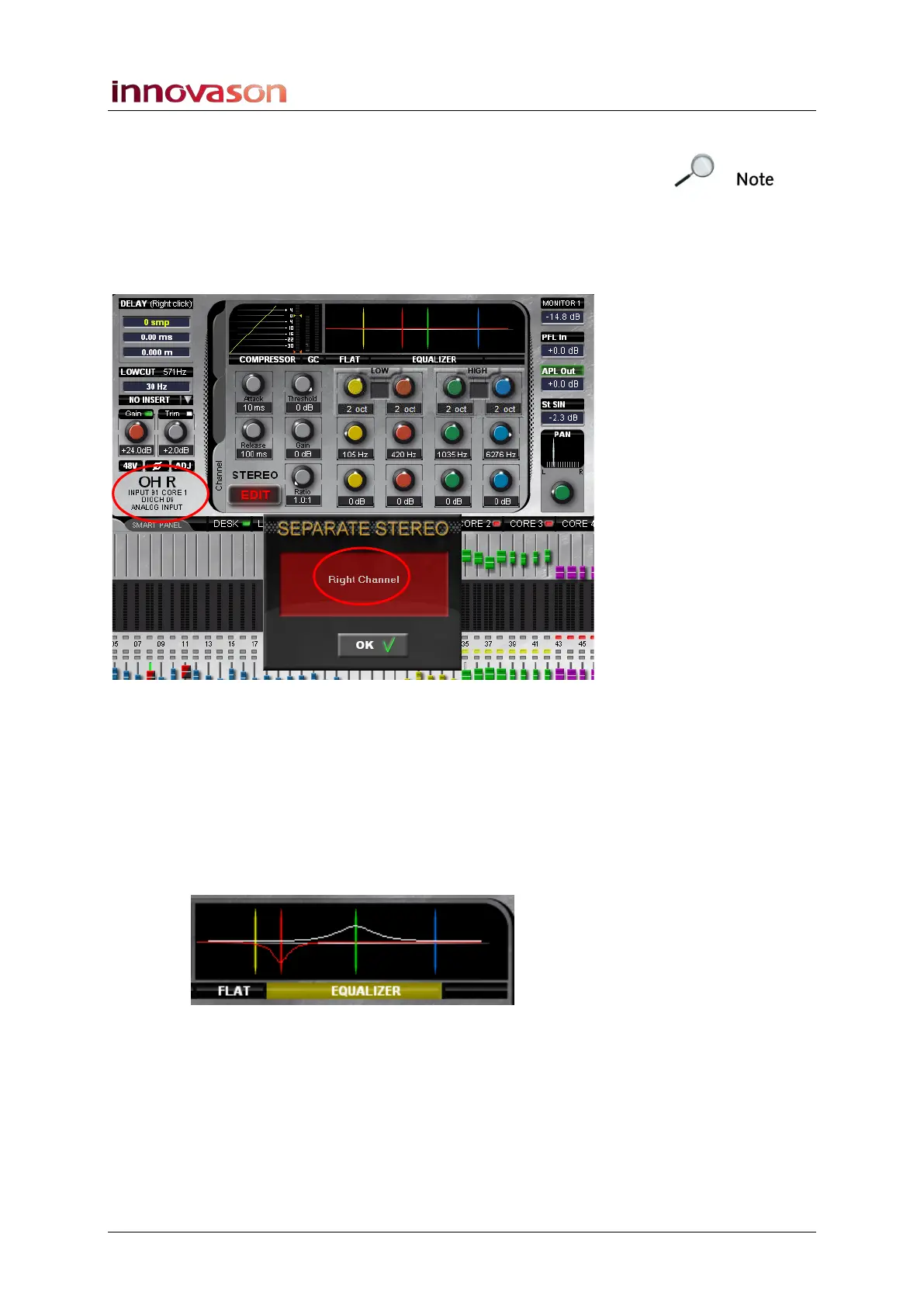
The SEPARATE STEREO pop-up shows whether you have
selected the Left, Right or Centre channel, and the Label
updates to show the input or output you are adjusting:
4. Press OK to exit the stereo edit mode.
The Smart Panel returns to its normal mode of operation.
5. Now return to the stereo Fader (or Smart Panel
controller) and notice the following:
For variable parameters, such as fader level and input gain, any
offsets are retained. This includes the EQ section; if offsets
have been applied, then the EQ graph shows the left channel in
white and the right channel in red:
Switched parameters, such as MUTE, update if you change the
state of the master. So, for example, if you have muted the left
input in stereo EDIT mode, and then press MUTE on the master
input fader, the status updates on both left and right sides.



 To Next Page