Chapter 5: Console Operation
Monitoring
Eclipse User Guide 2.0 213/ 526
Output Channels
On output channels, CUEs may operate as AFL, PFL or APL:
1. Press SEL on any output channel.
2. Then press the PFL/AFL/APL button to toggle between
the three options.
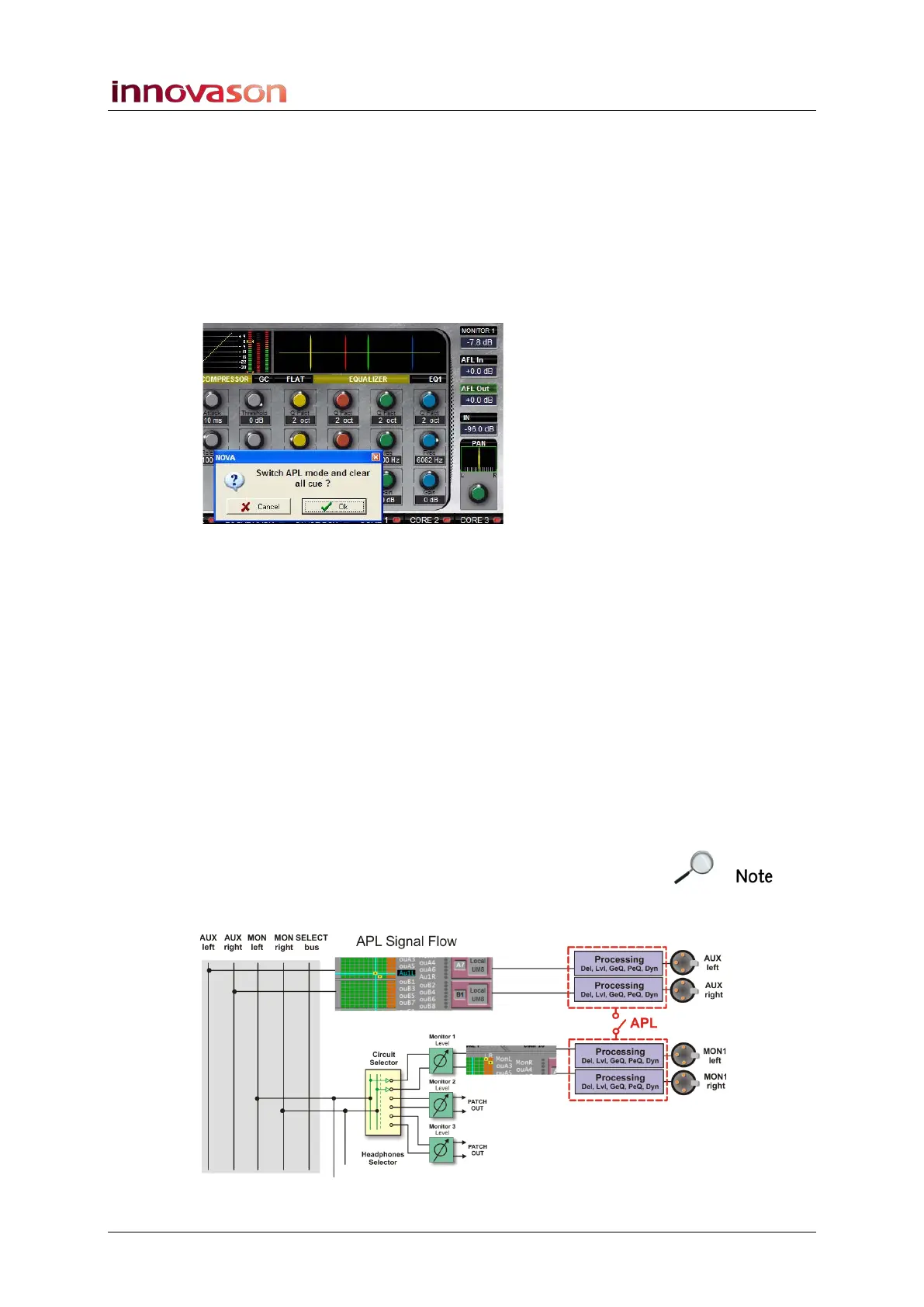
A confirmation box appears before you can select APL, as this
mode requires that all CUEs are cleared:
3. Press OK to confirm or Cancel to stay on AFL.
4. As before, you can use the Trim control to set the PFL
Out, AFL Out and APL Out levels for the different
modes.
The three levels are stored so that when you switch between
cue modes, they are automatically recalled.
5. CUE buttons on output channels always intercancel.
APL (After Processing Listen)
Each mix bus which is patched to a UM-8PO output can access
a full range of DSP processing provided by the card itself. APL
allows you to listen to an output channel after this processing.
Note that to use this feature, the monitor circuit(s) MUST be
patched to UM-8PO outputs. This is because the system uses a
clever method of “copying” the DSP parameters onto the
monitor output DSP. You can see this in the diagram below:



 To Next Page