Chapter 5: Console Operation
Monitoring
Eclipse User Guide 2.0 215/ 526
Solo-in-Place (SIP)
On input channels, the CUE button may operate as SIP (Solo-
In-Place). This is a destructive solo mode which mutes all other
channels feeding the Master bus, enabling you to check
individual input channels through your main PA mix.
Note that you cannot Solo-in-Place an output channel; when
SIP is active the CUE buttons on outputs have no function.
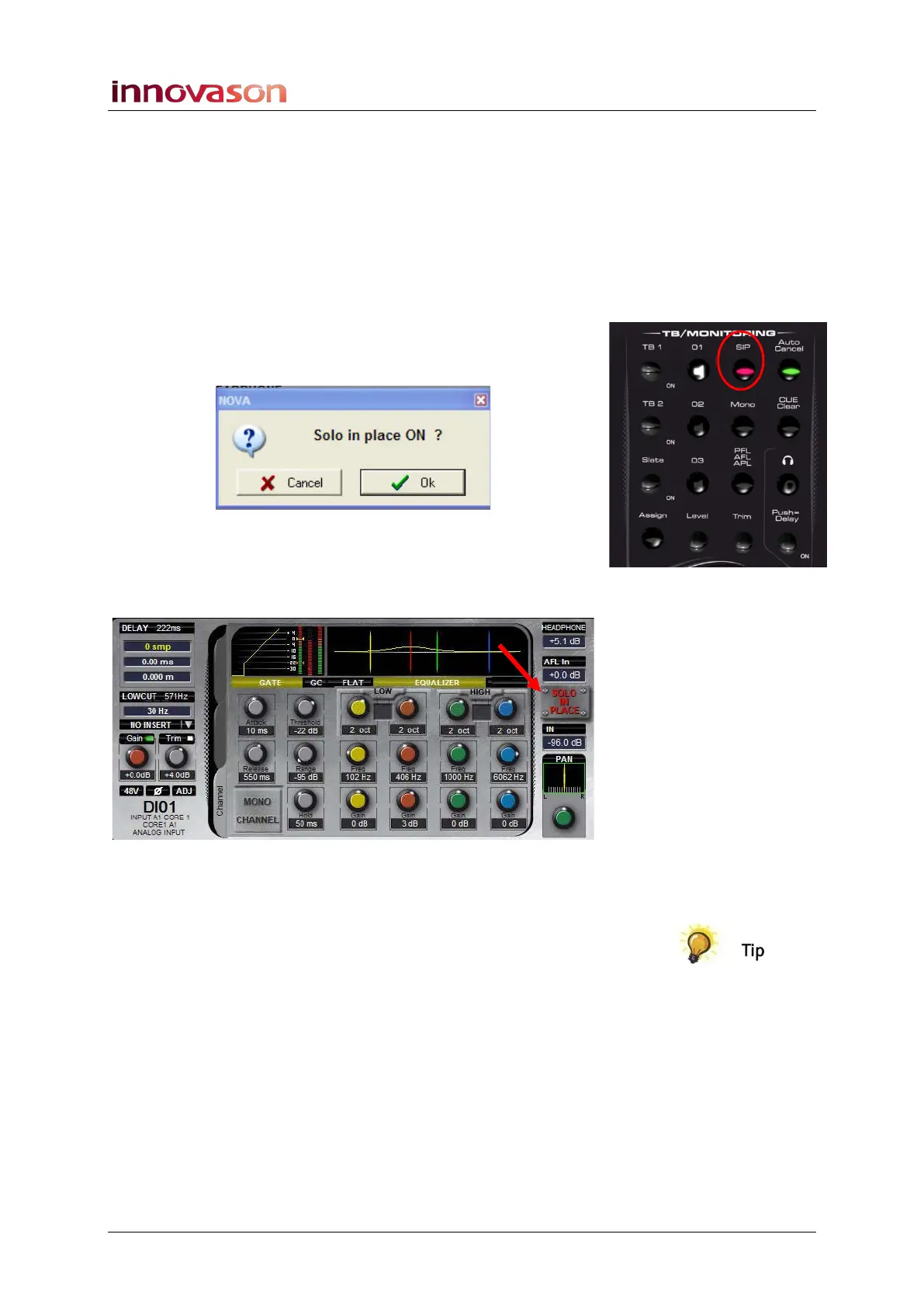
1. Turn on Solo-in-Place by pressing the SIP button on the
TB/MONITORING panel:
A confirmation box appears:
2. Confirm by pressing OK.
Solo-in-Place is now active.
When SIP is active, the Main Mix display looks as follows:
3. You can now press CUE buttons to solo input channels.
Solo-in-place may work with or without Auto Cancel.
If you have channels which you do not want to be muted by the
Solo-in-Place function (e.g. effects returns), then you can put
them into “Solo Safe” mode as follows:
4. Press and hold the CUE button on the input channel for
at least 300ms.
The CUE button flashes to indicate it is now set for “Solo Safe”.
5. Now press CUE a different input channel.
Any channels in Solo Safe mode are not muted by the Solo-in-
Place selection.



 To Next Page