Chapter 5: Console Operation
Monitoring
216/ 526 2.0 Eclipse User Guide
Automatic Monitor Switching
This feature allows you to configure automatic monitor
switching in response to different channel CUEs. For example,
if some musicians use wedge monitors while others use in-ears,
you can setup your monitor switching to respond to the different
channel CUEs.
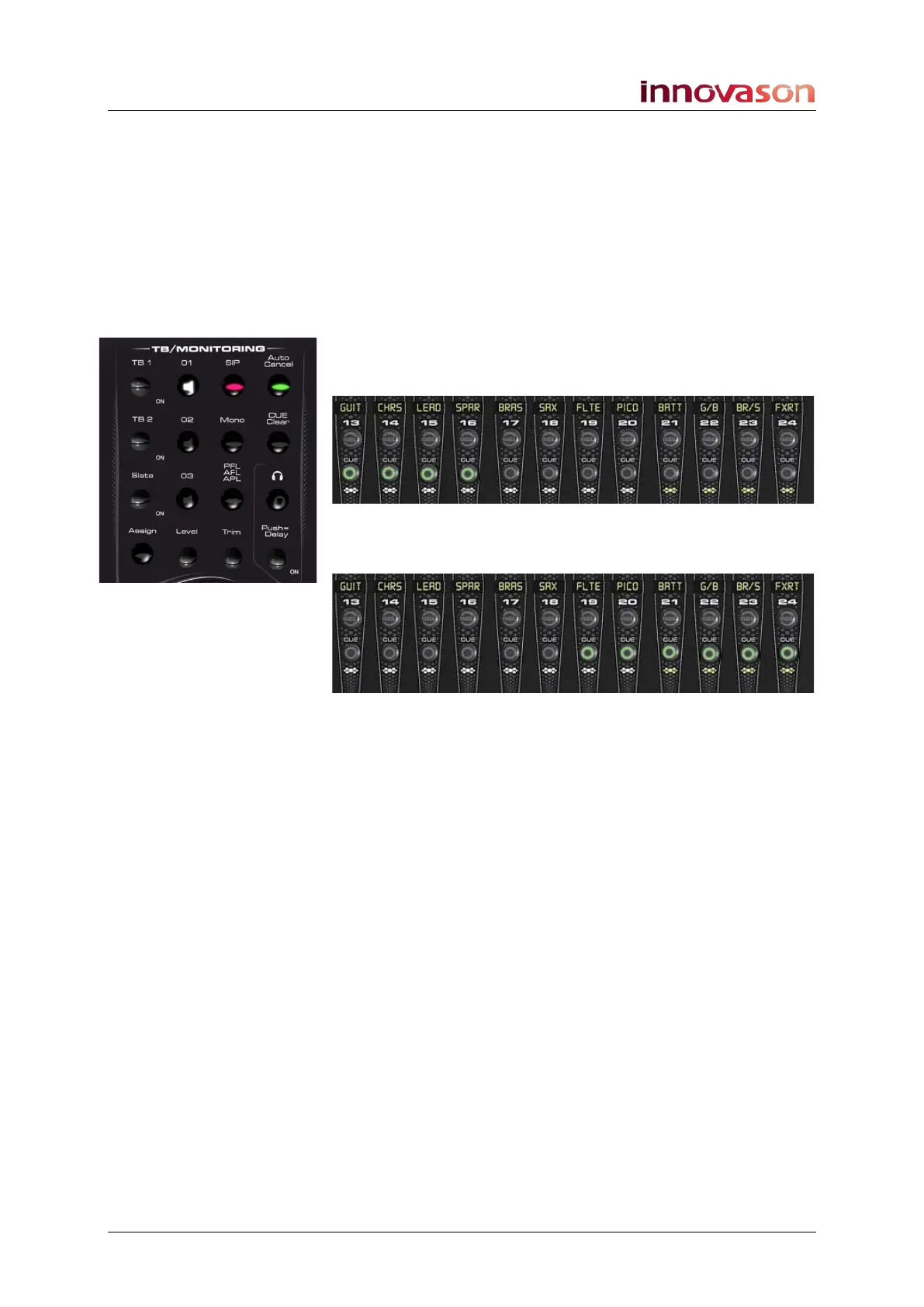
Let’s take an example of configuring automatic monitor
switching on monitor outputs 1 and 2:
1. Press and hold the 01 button on the TB/MONITORING
panel while you press the CUE buttons on the channels
you wish to assign to this monitor circuit:
2. Now press and hold the 02 button, and press the CUEs
you wish to assign to monitor circuit 2:
3. You can check which channels are assigned to each
circuit at any time by pressing the 01 or 02 buttons.
All CUEs assigned to the selected circuit become active.
4. To remove a channel, press and hold the 01 or 02
button and deselect the CUE.
Having configured the two monitor circuits:
5. Press a CUE button on faders 13 to 16 and monitor
circuit 01 is automatically selected.
6. Press a CUE button on faders 19 to 24 and monitor
circuit 02 is automatically selected.
You can configure this operation for up to three monitor circuits.



 To Next Page