Chapter 6: Console Configuration
Internal Effects (the FM-8VB Card)
Eclipse User Guide 2.0 293/ 526
Patching the Internal Effects
You can use any of your internal effects bays as you would an
outboard device.
So, to feed a mix of channels to an effect and bring the return
back to your master or other output busses, you should use an
aux send and create some effects return input channels.
Alternatively, to insert the effect on a single channel or bus, you
can insert the effects bay directly into the input or output
channel.
Here we will deal with the use of an aux send and effects
return. For details on inserting an effects bay see Page 309.
Patching an Aux Send and Effects Return
In our example, we are going to patch a stereo effects bay from
a mono auxiliary and return the effect to a stereo input channel:
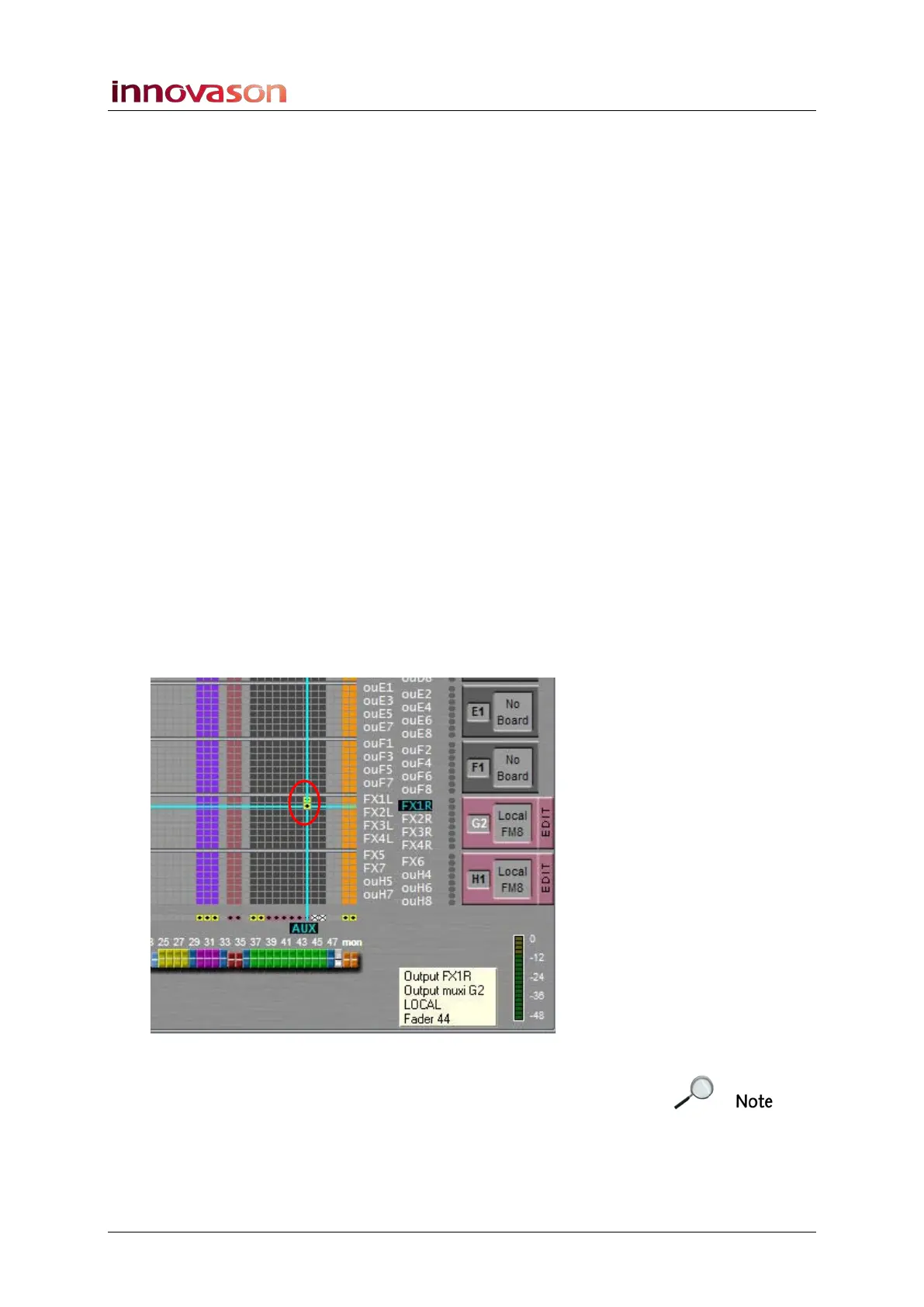
1. Open the PATCH OUT grid.
2. Select the LOCAL / MUXI tab and locate the Local FM8
card which is providing the stereo effects bay.
We are using a card fitted to slot G where the first two outputs
to the card (G1 and G2) have been named FX1L and FX1R.
3. Patch the mono AUX (in our example, Fader 37) to both
inputs of the stereo bay:
Remember to patch the mono aux to both sides of the stereo
effects bay. If you don’t you will get strange results from your
stereo effect!



 To Next Page