Chapter 7: Reset and Automation
Page Management
358/ 526 2.0 Eclipse User Guide
Recalling a Page (Load Page and Goto)
Having created a number of Pages, you can use the Next and
Prev buttons to step through the Pages in memory, see Page
363.
Or, the following functions to jump to any Page:
• Goto – loads a Page from memory (RAM).
• Load Page – loads a Page from the active File on disk.
Note that the Load Page function replaces the current Page
held in RAM, whereas Goto simply switches to a different
Page. This means that if you have been mixing and use Goto,
when you return to the previous Page your mix will remain
intact. Whereas, if you use Load Page, your mix settings have
gone, unless you saved them before using Load Page. So, only
use Load Page if you don’t like the settings in the current Page,
and wish to revert to something saved earlier.
Both operations are similar:
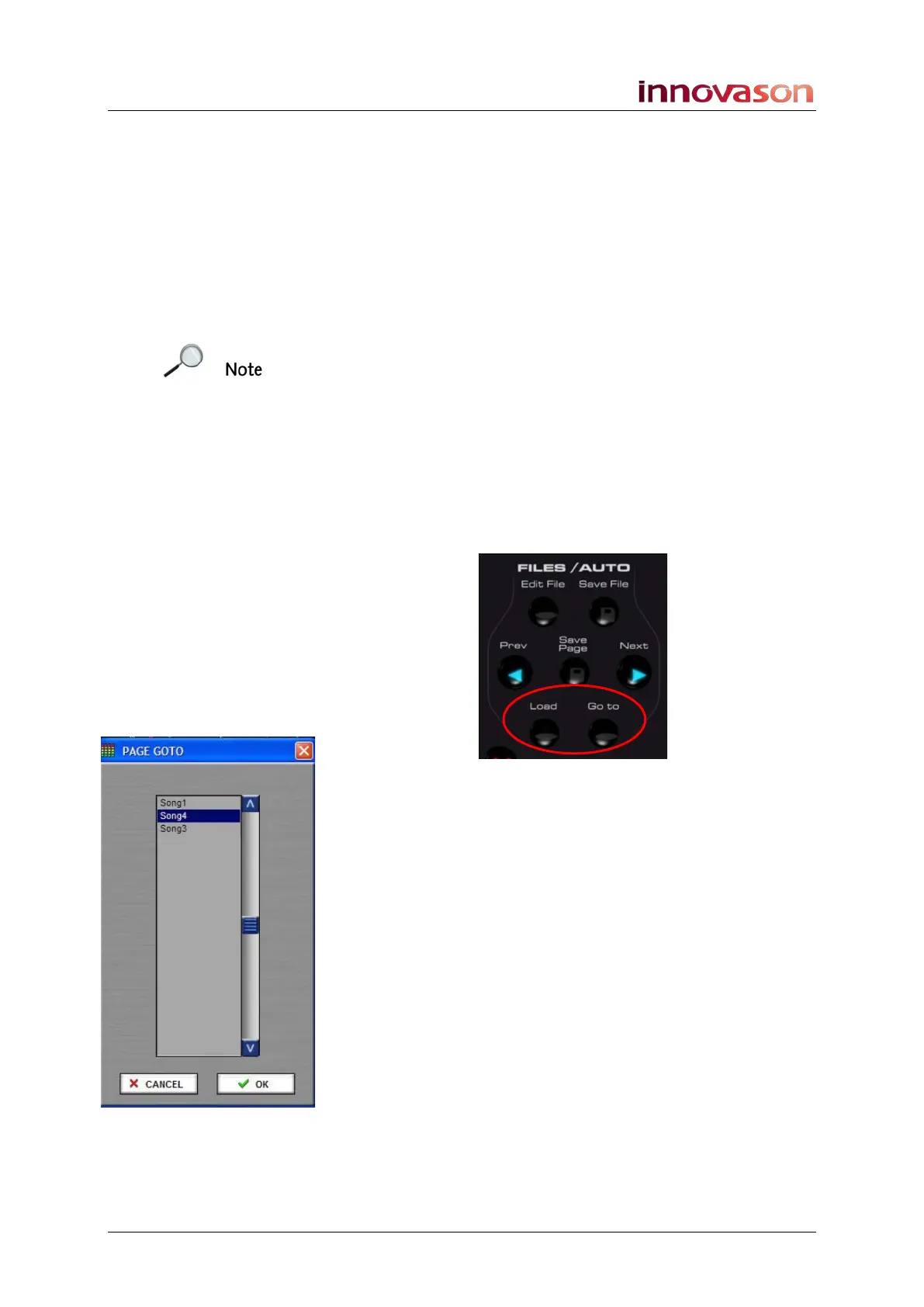
1. Press Goto or Load on the FILES/AUTO panel:
A selection window appears.
Note that the Page list in RAM may differ from the Page list on
disk so the Goto and Load Page options may not be identical.
2. Select the Page – e.g. Song4.
3. Confirm by pressing OK.
The console settings update.
Note that you can isolate channel parameters so that they are
not reset using the Relax function, see Page 404.



 To Next Page