Chapter 8: Utilities & Preferences
Copy and Paste
Eclipse User Guide 2.0 395/ 526
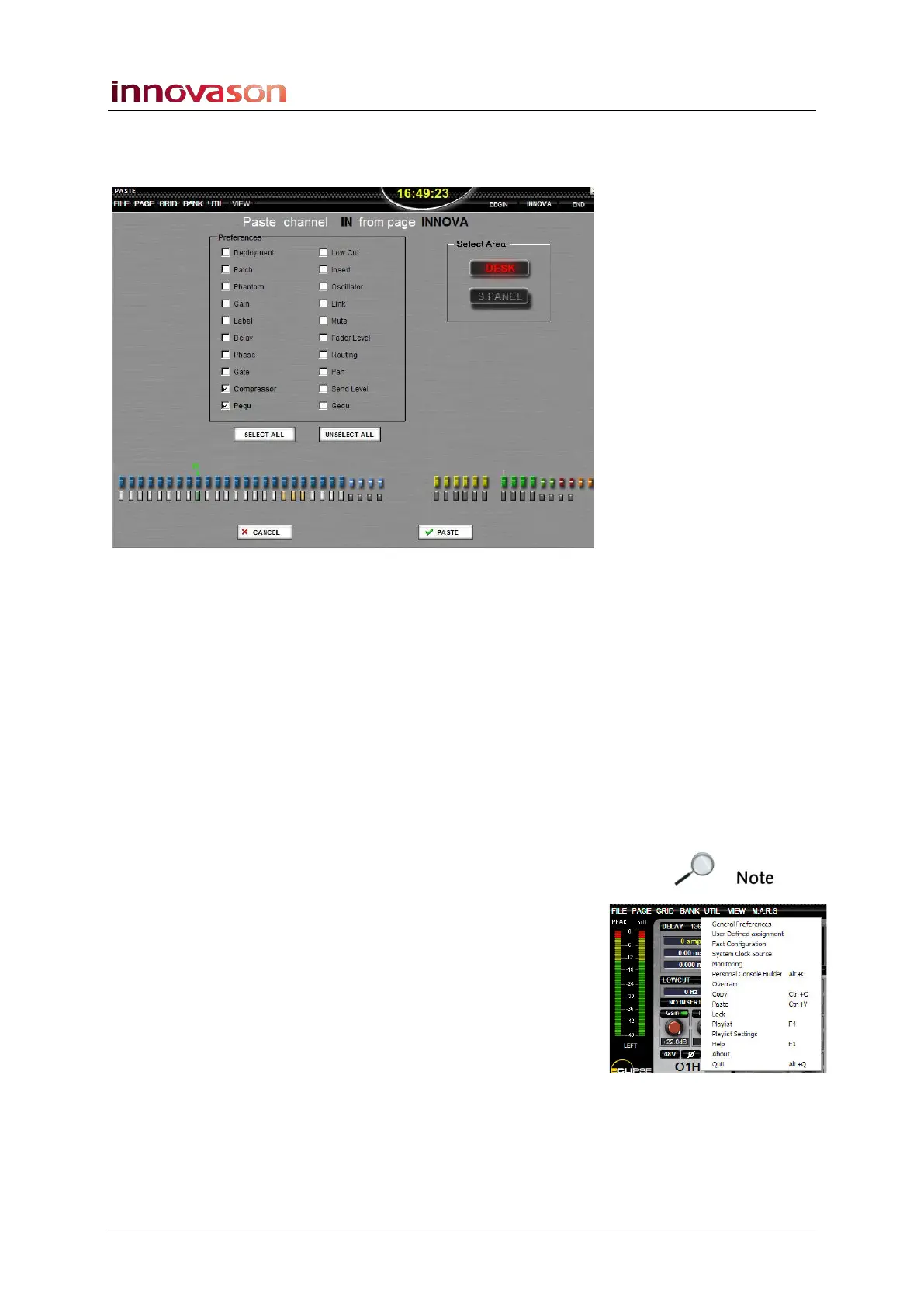
3. In the Preferences area, select the parameters you
wish to paste – in our example, Compressor and
Parametric EQ:
You can use SELECT ALL or UNSELECT ALL to tick or untick
all options.
4. Now select the channels to paste to by pressing their
SEL buttons.
The selected channel is marked with a yellow box below its
fader.
You can select multiple channels, and you can paste to Fader
strips or Smart Panel controllers (DESK or S.PANEL).
5. When you are ready, press OK to perform the PASTE.
The copied parameters are pasted to the selected channels,
and the PASTE display closes.
Note that you cannot undo the paste, other than to reload a
saved Page.
If you are working offline, you can select Copy and Paste from
the UTIL main menu:
Or, use the console keyboard:
• Press [Ctrl] + [C] to copy the selected channel.
• Press [Ctrl] + [P] to open the PASTE display.



 To Next Page