Chapter 2: Installation
System Connections
46/ 526 2.0 Eclipse User Guide
Connecting the DioCore
To connect the DioCore, you must re-configure the Ethersound
network.
Ethersound is a bidirectional interface, which can receive and
transmit 64-channels of digital audio along a standard CAT5
network cable.
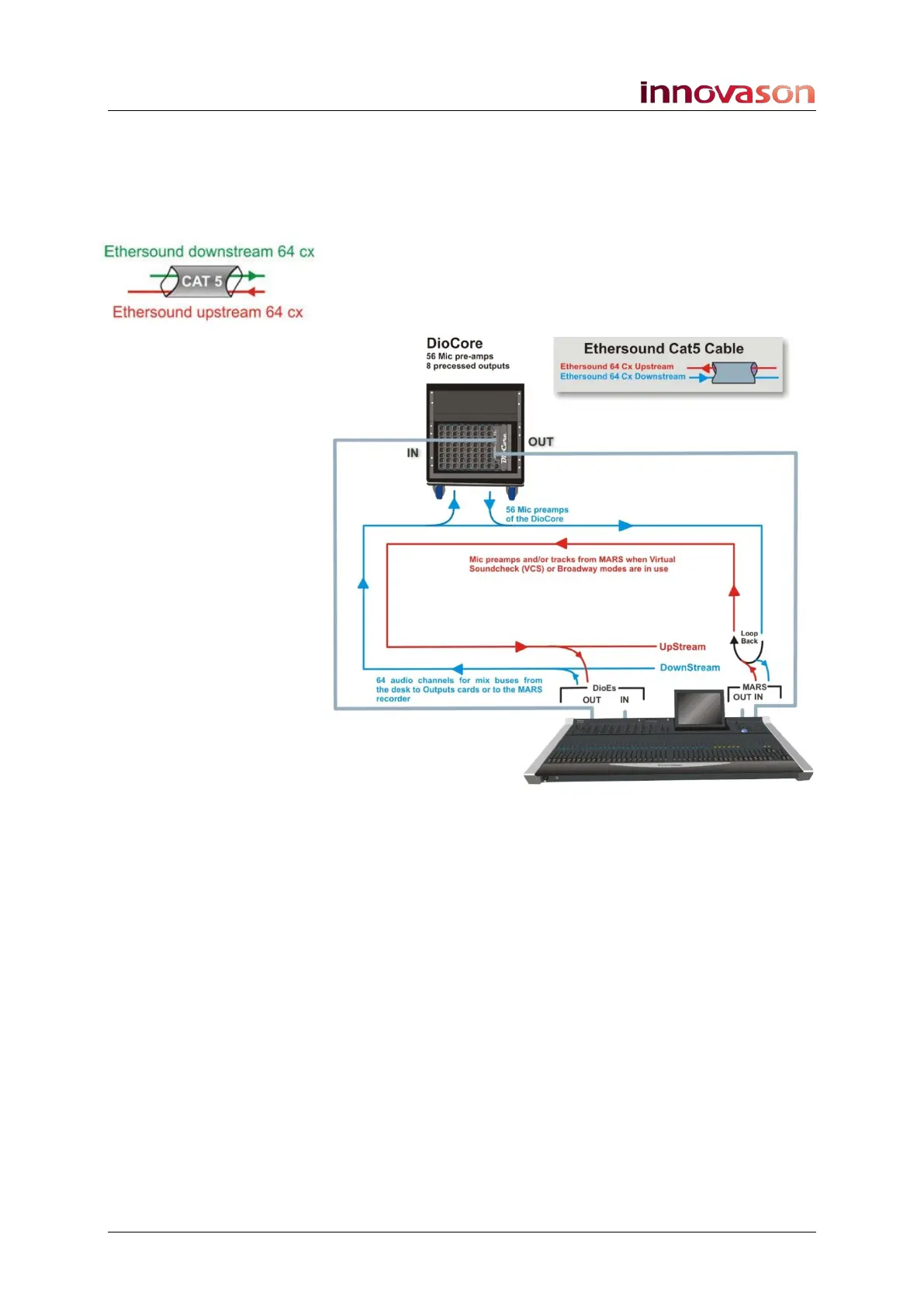
The diagram below shows the Ethersound connections and
audio streaming for a standard Eclipse package:
Eclipse is the Primary Master of this network; M.A.R.S. is
connected at the end of the chain.
Mic preamps from the DioCore are patched downstream onto
the Ethersound channels so that they can be recorded to
M.A.R.S.
The Ethersound channels are automatically looped back to the
console, and patched upstream to its input channels.
Mix busses from the console are patched downstream so that
they will reach the DioCore or M.A.R.S.
In the unlikely event of a M.A.R.S. failure, the DioCore becomes
the last device in the chain, and automatically loops the
downstream data back onto the upstream path without any
break in audio.



 To Next Page