Page 44
Alterations reserved Stand 12/02
Operating Manual T 700 / T 800 - FP ENG
5.0 Operation of the machine
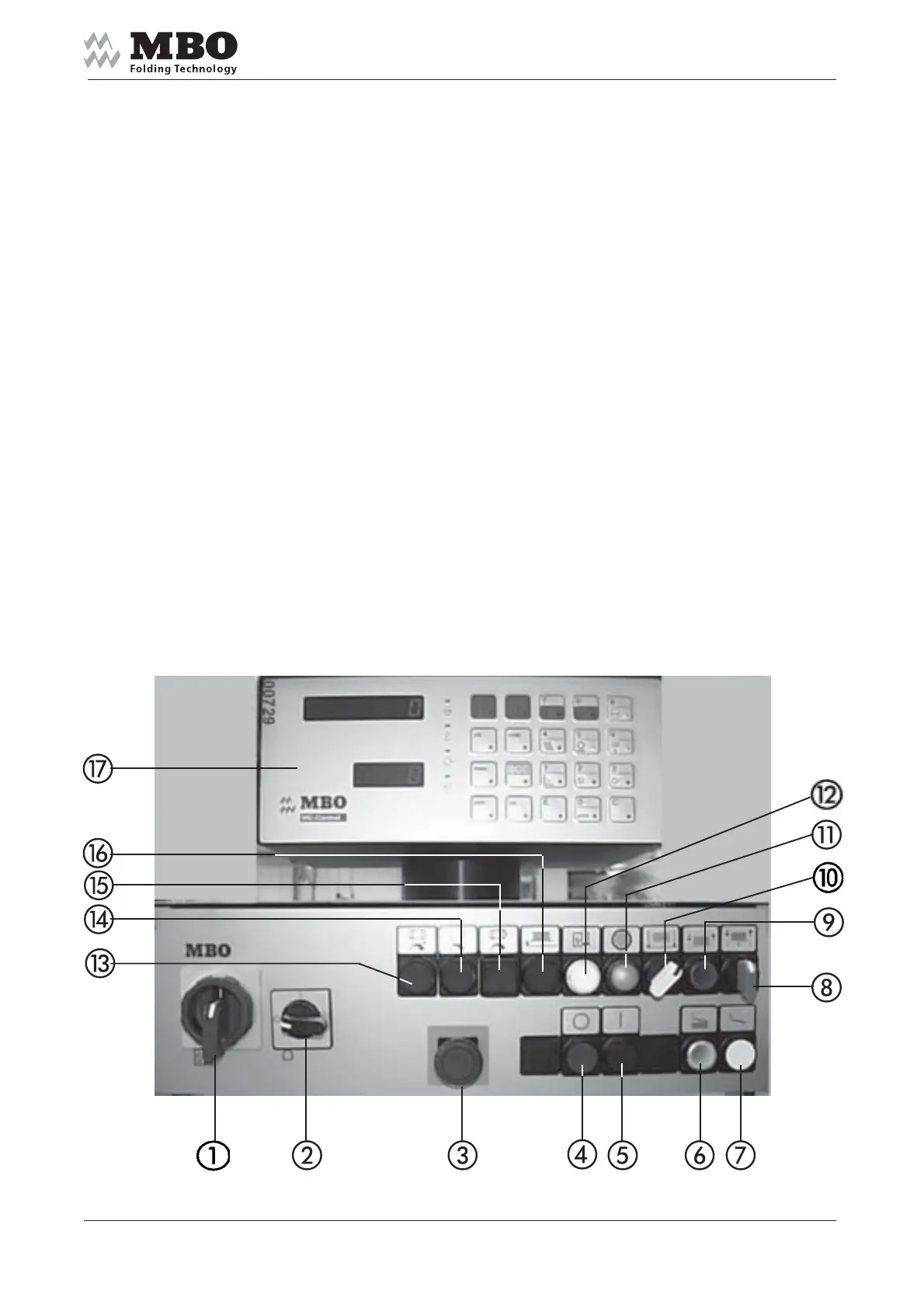
5.1 Main control panel
1 MAIN SWITCH
2 ON/OFF switch for AIR PUMP
3 Red mushroom button with locking for EMERGENCY STOP
4 Button to STOP the machine
5 Button to START the machine
6 Button for SHEET INFEED during PRODUCTION and feeder START/STOP
7 Button for SINGLE SHEET INFEED
8 Switch to release PILE PLATE UP/DOWN
9 Button to RELEASE PILE TRANSPORTATION
10 Selector switch for pallet operation/manual piling
11 INDICATOR LIGHT for main drive
12 INDICATOR LIGHT for main switch
13 Push button to increase the speed of folding unit I
14 Push button to decrease the speed of folding unit I
15 Push button for joint speed alteration of all folding units
(activate simultaneously with buttons 13 or 14).
16 Push button PILE PLATE down: For safety reasons the pile plate will stop approx. 15 cm
above the floor. The pile plate will move down to the floor if you push the button 16 permanently.
17 MC-Control with integrated sheet infeed control and preselection counter.
See separate Operating Manual „MC-Control“ for detailed description.


 To Next Page