Seite 56
Alterations reserved
Stand 05/2008
Operating manual T700/T800.1 - en
5.5.2 Photocells (Standard)
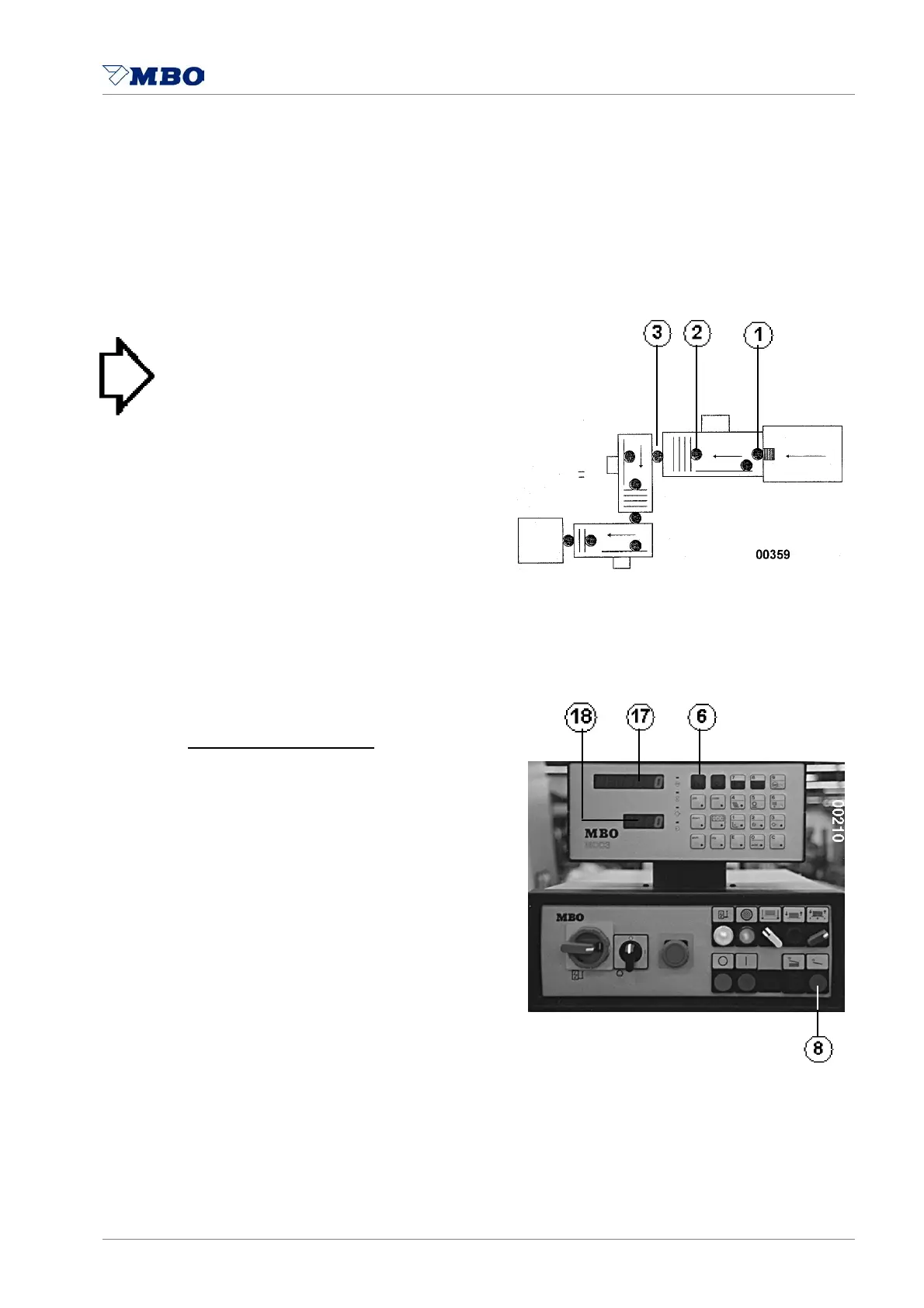
Photocell 1 controls the sheet infeed at suction wheel / the Vacubelt
and is counting the infeeded sheets.
Photocell 2 controls the infeed of parallel unit and calculates the sheet or suction length.
Photocell 3 controls the exit of parallel unit and counts the sheets at exit.
> NOTICE < The machine will stop
if one sheet fails to pass one of these
photocells at the exact calculated time
or is passing this photocell
longer than calculated.
The MC-counter 14 will display
an ERROR REPORT 18.
It will show the position of the error
- see also Operating Manual
attached separately.
Calibration of photocells:
Adjust the machine completely
(folding length, foldrollers, etc.)
and push buttons 6 and 8
simultaneously.
A “learning sheet” is passing the machine. The photocells detect lengths and times of
passage. This will automatically program sheet control and sheet monitoring.


 To Next Page