Page 77Alterations reserved Stand 12/02
Operating Manual
T 700 / T 800 - FP ENG
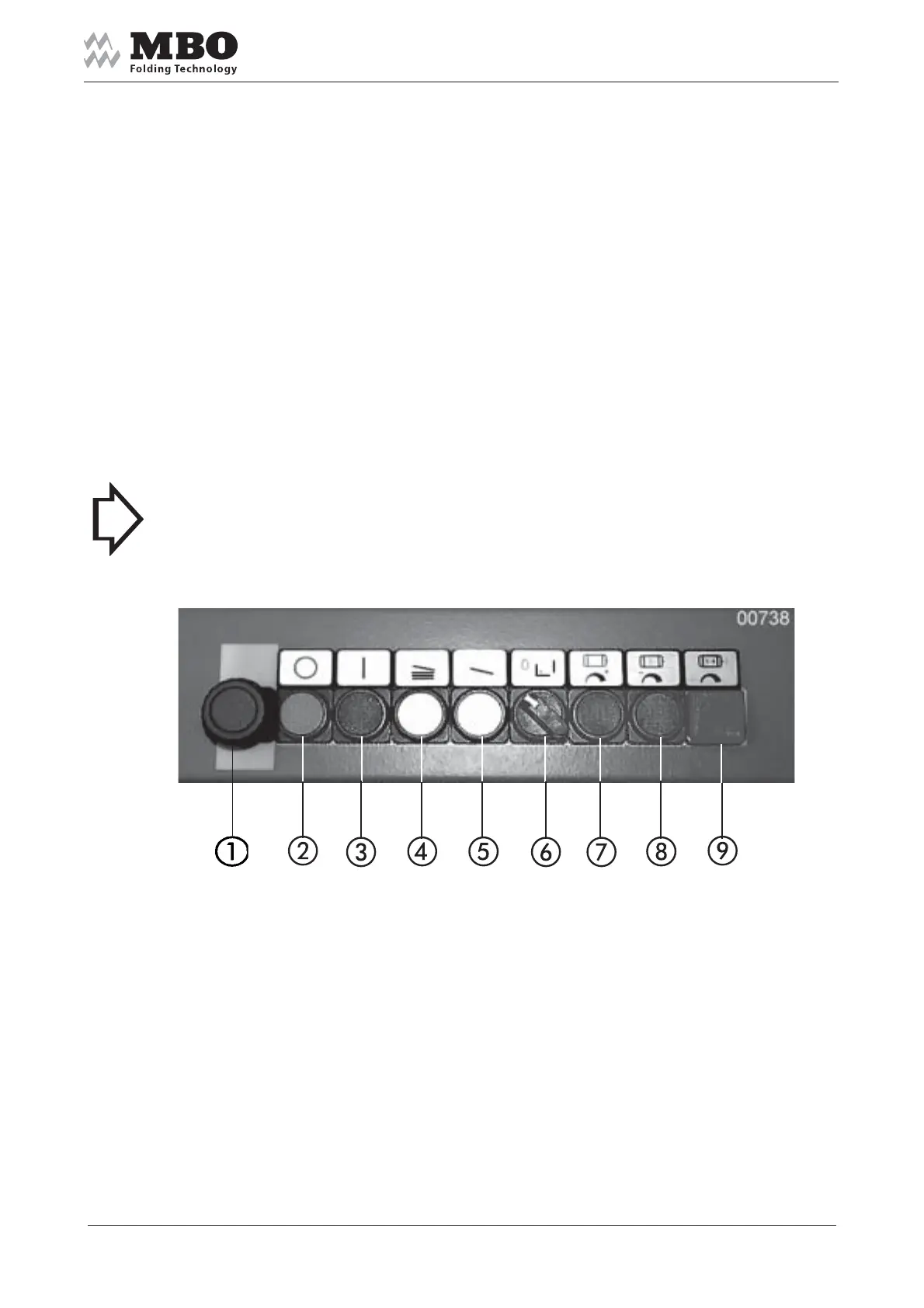
5.6.3 Control panel
1 Red mushroom button with locking for EMERGENCY STOP
2 Button to STOP the machine
3 Button to START the machine
4 Sheet infeed button for PRODUCTION
5 Button for SINGLE SHEET INFEED
6 Selector switch for set-up mode (see para. 5.6.4).
Position I: Set-up mode.
Position 0: Position of switch during production
7 Push button to increase speed of folding unit
8 Push button to reduce the speed of folding unit
9 Push button for joint speed alteration of all folding units
(push simultaneously with buttons 7 or 8).
> NOTICE < If the guard above the slitter shaft is opened the machine will stop immediately.
ERROR 22 will appear on the MC counter.


 To Next Page