Page 46
Alterations reserved Stand 12/2002
Operating Manual T 700 / T 800.1 - FP ENG
5.2.2 Pallet operation
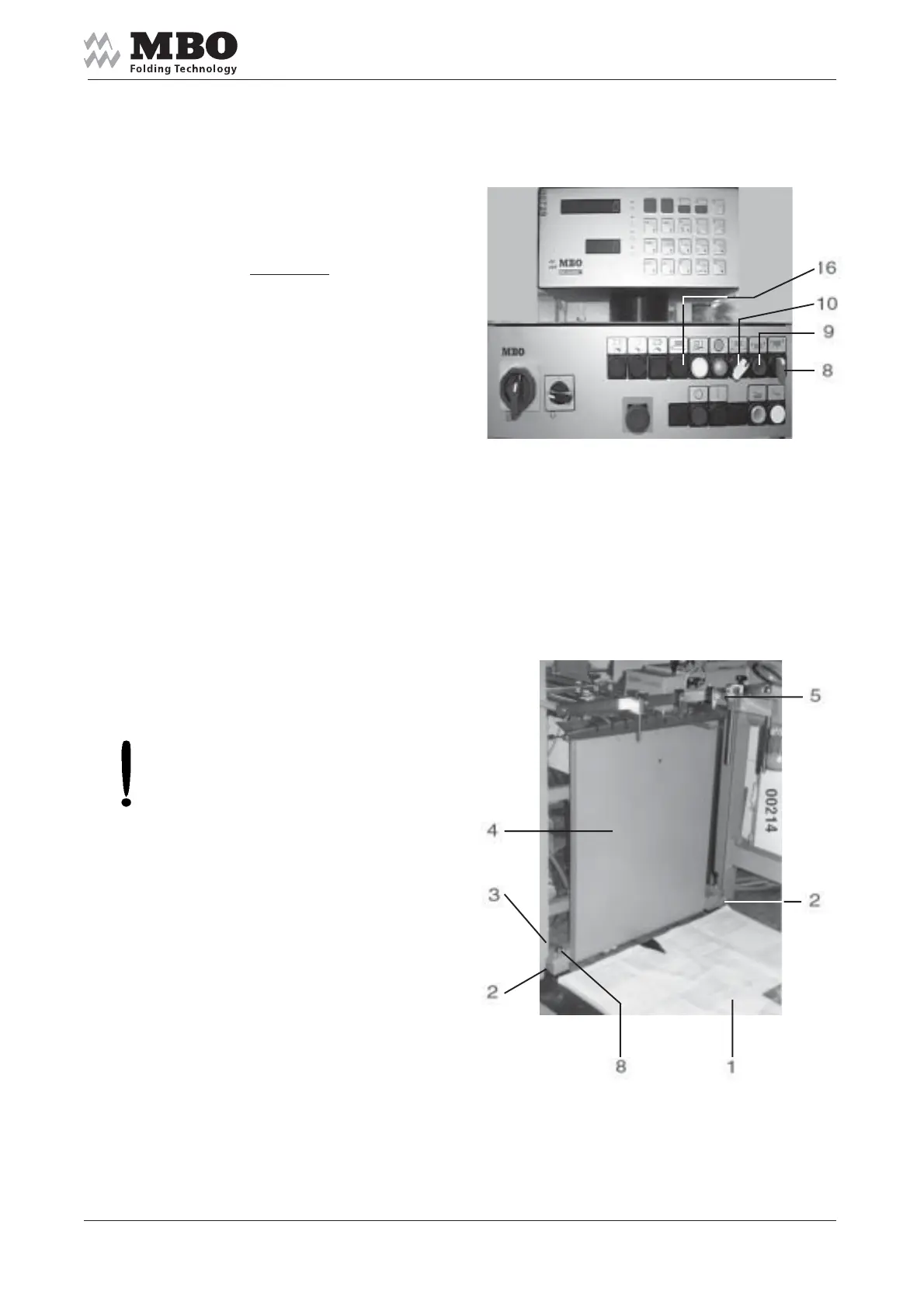
Switch 8 must show the position
”DOWN”; push button 9 must be
lightening, selector switch 10 must
indicate to
continuous line !
The pile plate 1 moves down and stops
at a safety margin of approximately
15 cm above the floor.
Push the button 16 continuously
for further down movement.
>ATTENTION< Feet of other persons
being in the immediate vicinity
of the pile plate may be injured!
Enter the pallet from
the rear or operators side.
In its lowest position, the pile plate 1
aligns itself by the wedge-shaped
angles 2 laterally into the centre position.
In the guide rail, these angles 3
push the pile plate 1 approximately
2 cm to the rear, i.e. when the plate
moves up the pile is sitting close
on the front panel 4.
Prior you enter the pallet:
Set the pile stop 5 to appropriate
size (½ of sheet width).


 To Next Page