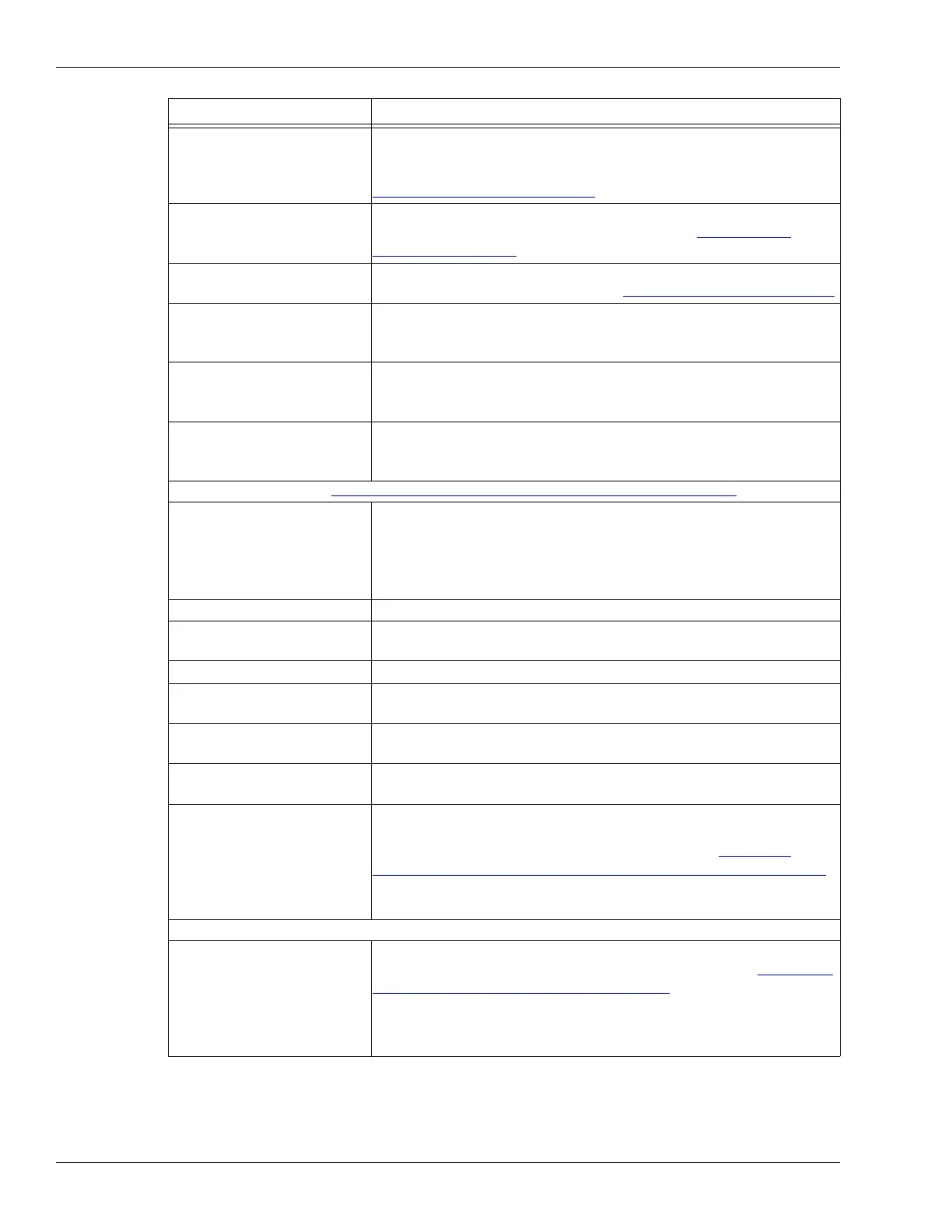
Calibration overview
Page 188 OmniTrax Product Guide
Transmitter Coding Used in conjunction with the Duty Cycle to set the time slot in which
the Transmitter for the selected cable side is ON (Do NOT adjust the
Coding without direct engineering support from Senstar) see
Transmitter Coding
on page 194
Target Speed Settings Adjust the detection frequency filters to better detect fast and slow
moving targets on the selected cable side (see Target speed
settings on page 208)
STC Filter Enable Select the check box to enable the switched time constant (STC)
filter for the selected cable side (see STC filter settings
on page 209)
STC LPF Enable Select the STC LPF (low pass filter) check box to provide enhanced
detection of targets moving erratically at very low speeds
(default = ON)
STC Ratio
(factory setting)
Sets the rate of change for the switched time constant (default = 8)
(Do NOT adjust the STC Ratio without direct engineering support
from Senstar)
Bounce Back Suppression
(factory setting)
Reduces the potential incidence of “ghost alarms” caused by slowly
resetting signal filters (Do NOT adjust the Bounce Back Suppression
without direct engineering support from Senstar)
Segment Settings (see Defining the cable segments and alarm zones
on page 205)
Segment Identifies which cable segment is currently selected,
the segment number increments each time you select the Split
button,
the segment number decrements each time you select the Delete
button
Range (m) Set or display the start point in meters of the selected segment
Margin Set the segment cable margin as a delta to the full length cable
margin for the selected cable segment
Zone Select the zone to which this cable segment is assigned
Relay (Local Control mode) Select the Relay which will activate in response to an alarm
condition in this cable segment
Split button Select the Split button to divide the currently selected segment into
two equal segments
Delete button Select the Delete button to merge the currently selected segment
with the preceding segment
Profile button The OmniTrax Sensitivity Profile records the response magnitude
for each meter of sensor cable based on a valid target moving
lengthwise at the center of the detection field (see OmniTrax
calibration - Sensitivity Profile and Transmitter Power on page 197),
The Sensitivity Profile is used as a baseline for the cable margin
settings
Common Configuration
Accept Sync Signal Select the Accept Sync Signal check box for processors, which are
connected to other processors through decouplers (see Specifying
the processor synchronization on page 193),
deselect for the Sync master,
deselect for processors which are not connected to other processors
through decouplers
Configuration parameter Descriptions



 To Next Page