Installing the backup battery kit
OmniTrax Product Guide Page 167
Installing the backup battery kit
The OmniTrax sensor supports the addition of an optional rechargeable 6 VDC backup battery,
that can be installed on the enclosure door. The battery kit includes a 6 VDC battery, a mounting
bracket and hardware, a battery harness and a fuse. The processor includes an intelligent
charging circuit, that when enabled, keeps the battery fully charged (see Using the optional local
backup battery on page 196).
CAUTION Use ONLY the battery specified for Silver Network devices (GE0487).
DO NOT substitute any other batteries.
Battery installation procedure
Check the battery fuse BEFORE
replacing the battery.
1. Disconnect the power to the
processor.
2. Fit the mounting bracket over the
4 studs on the enclosure door so
that the open end of the bracket
is oriented toward the door’s
locking brackets.
3. Use 3 sets of the supplied
hardware to attach the mounting
bracket to 3 of the 4 studs
(2 outside ends and the stud on
the processor side of the door).
4. Lift the hinged lid and install the
battery in the compartment.
5. Close the hinged lid and install
the 4th set of mounting hardware.
6. Connect the battery leads to T4
on the processor.
7. Connect the battery leads to the
battery terminals (observe
polarity).
8. Use 3 cable ties to secure the
battery harness to the bracket.
9. Reapply power to the processor.
CAUTION If you are replacing a battery,
refer to the local hazardous waste
regulations for information about
battery disposal.
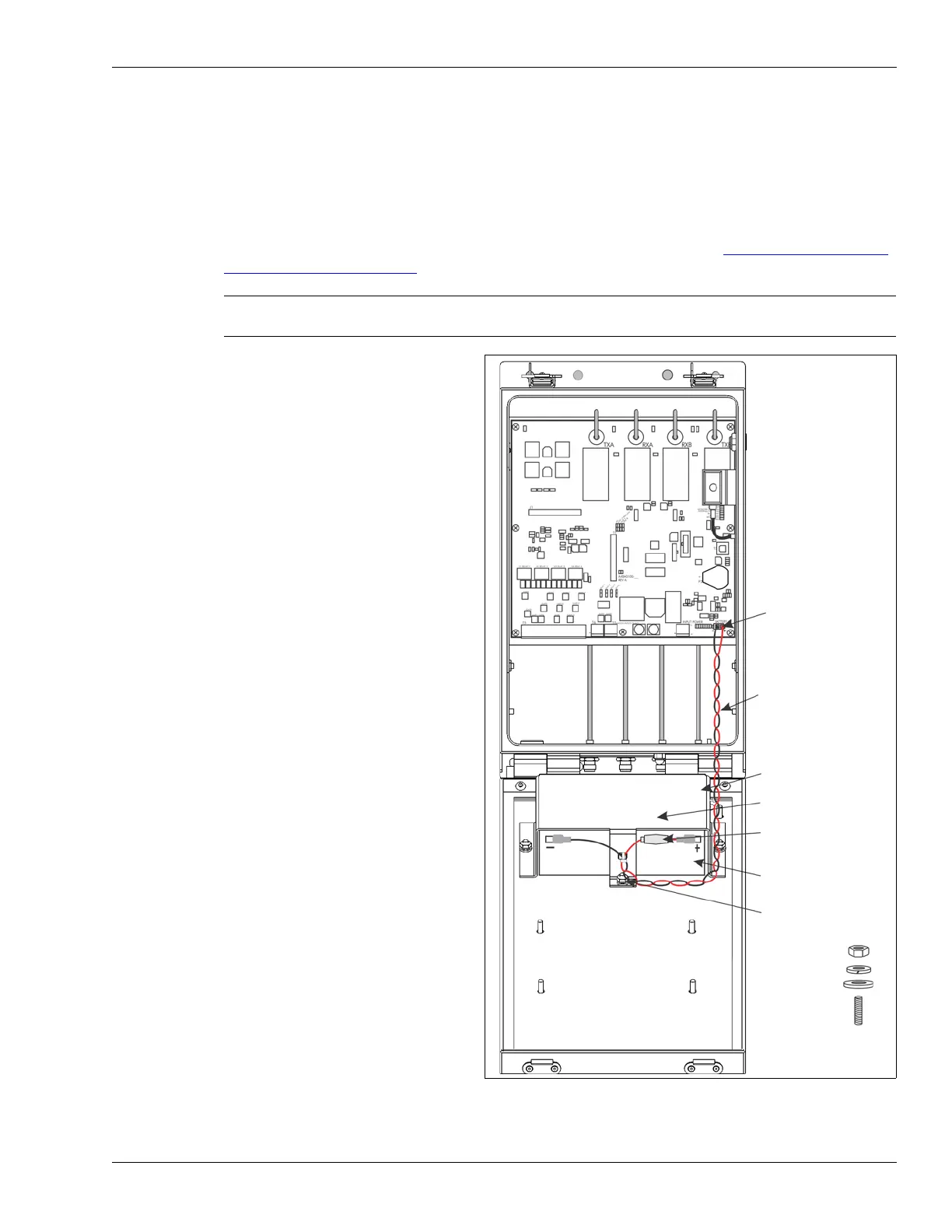
Figure 147: Battery replacement
T4 - battery
connection (- +)
battery leads
(red = +, black = -)
battery bracket
hinged lid
battery
mounting hardware
(X 4)
battery compartment
battery fuse
flat washer
hex nut
lock washer
mounting stud
battery kit components
(p/n 00KT0900-001):



 To Next Page