Sensor cable lightning protection
OmniTrax Product Guide Page 181
Replacing the gas capsule
Lightning strikes will break down and destroy the gas capsules over time. There is no general rule
of thumb, or obvious way to determine if the gas capsules in your lightning arrestors need to be
replaced. If your site frequently experiences active weather including electrical/thunder storms,
you should replace the capsules on a regular basis. If your local climatic conditions rarely include
electrical/thunder storms, you may never have to change the gas capsules. One factor to consider
when setting up a gas capsule replacement schedule is the value of the protected equipment, as
compared to the low cost of the gas capsules.
1. Label and disconnect the sensor cables.
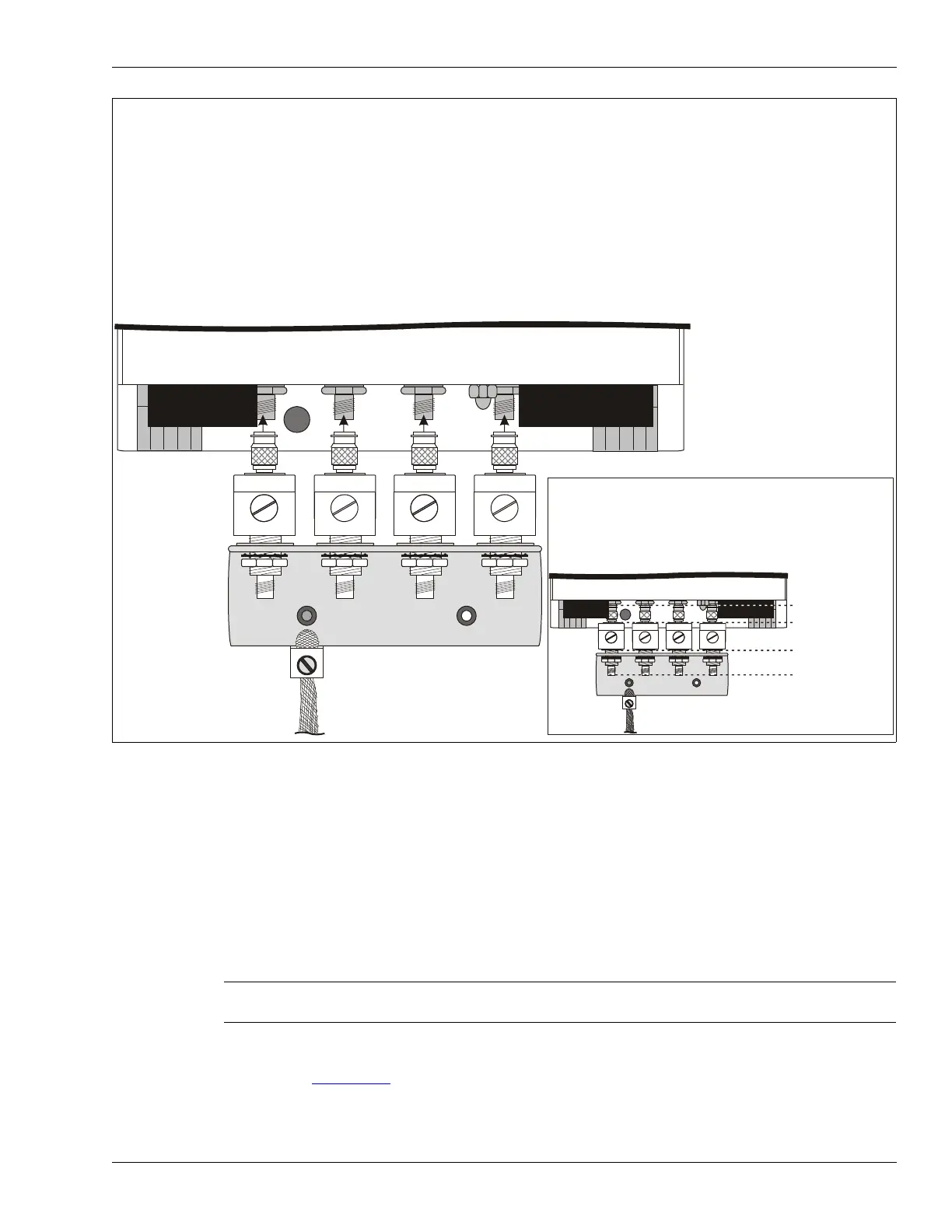
2. Refer to Figure 161:
to disconnect the lightning arrestors from the processor (turn each
lightning arrestor connector a few turns in sequence).
Figure 161: Connecting the lightning arrestors to the processor
CAUTION Use only Senstar P/N GE0507 - GDT/90V replacement gas capsules
and holders.
CAUTION: The cable inputs on the bottom of the enclosure are pressure fitted. If you attempt to connect the lightning arrestors
to the processor completely, one piece at a time, the cable inputs on the enclosure will likely be damaged.
With the lightning arrestors installed loosely in the mounting bracket, connect the male TNCs on the cable inputs on the bottom of the enclosure
as follows:
a) Begin with the two outside arrestors, tightening each only a few turns at a time until they are both loosely connected to the outside cable
inputs.
b) Next, loosely connect the two inside arrestors, also tightening each only a few turns at a time.
c) When all four arrestors are loosely connected to the cable inputs, continue tightening each one sequentially, a few turns at a time, until all
four are finger tight.
d) Finger tighten the hardware securing the lightning arrestors to the mounting bracket, a few turns at a time, in the same order as above outside,
outside, inside, inside, outside, outside, etc.) until all four lightning arrestors are finger tight on the bracket. Use a 16 mm (5/8 in.) open-ended
wrench, to fully tighten the mounting hardware in the same manner as indicated above (tighten each a few turns at a time). Tighten the
mounting hardware securely.
OmniTrax processor enclosure
lightning arrestors
lightning arrestor
mounting bracket
ground lug
ground strap
seating plane:
connectors
seating plane:
arrestors
CAUTION
Verify that the seating planes for the connectors, the
lightning arrestors and the lightning arrestor mounting plate
are LEVEL and EVEN BEFORE tightening the connectors
or the mounting hardware. Otherwise, the cable inputs on
the processor WILL be damaged.
seating plane:
mounting bracket
seating plane: cable
connectors



 To Next Page