Page 250 OmniTrax Product Guide
UCM configuration
To use UltraLink modular I/O system outputs to report OmniTrax alarm and supervision conditions
establish a UCM connection to the OmniTrax processor.
Select the Remote Cfig tab and specify the outputs that will activate to annunciate the required
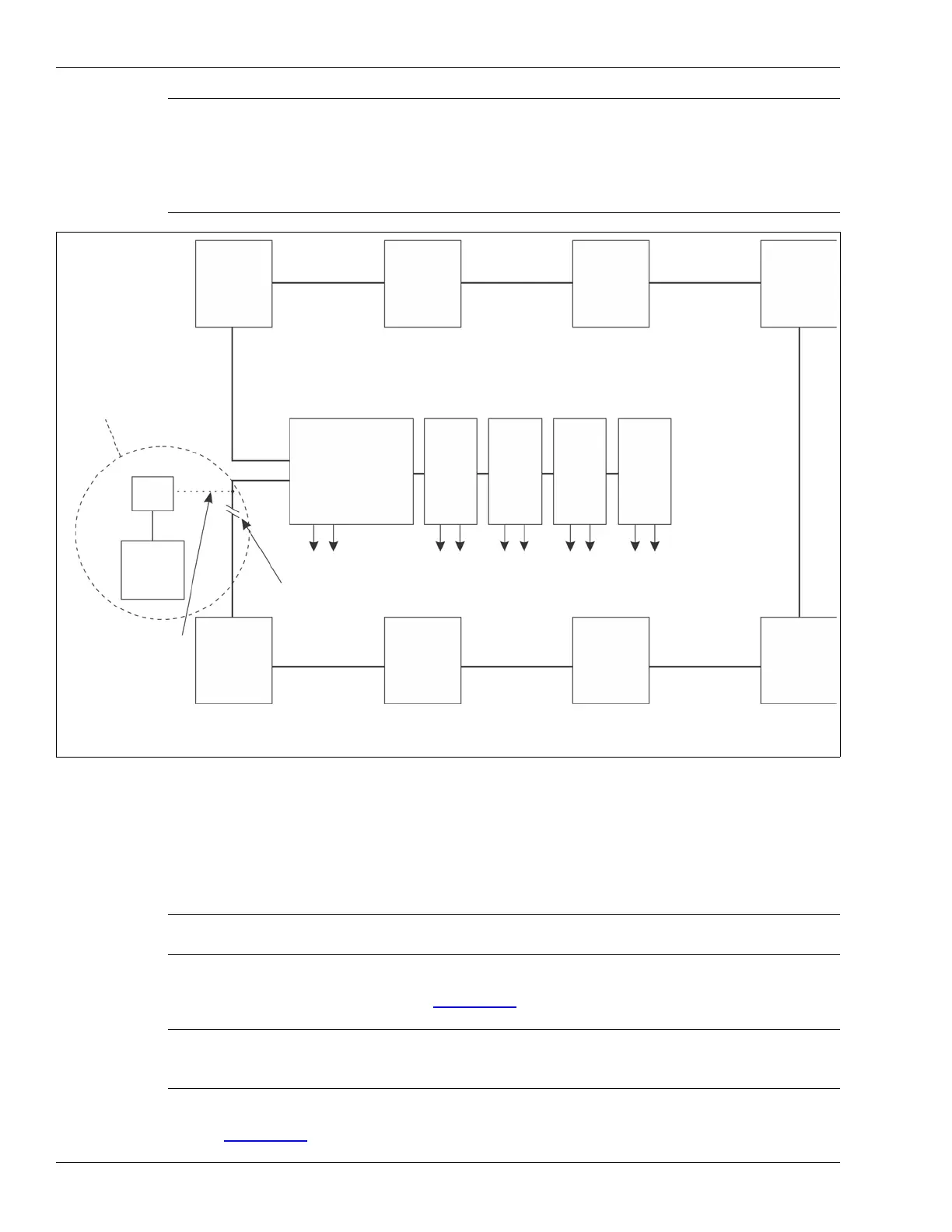
alarm and supervision conditions (see Figure 203:
).
Select the Side A Cfig or Side B Cfig tabs to assign outputs to Cable segments for reporting Zone
alarms (Figure 205:
).
Note Each sensor connected to the UltraLink I/O system (operating in NM Mode)
requires a Network Interface card with the exception of a connected block
of FlexZone processors. For a connected block of FlexZone sensors, one
FlexZone requires an NIC to connect to the UltraLink I/O processor and the
other FlexZone processors can communicate over their connected sensor
cables.
Figure 203: NM Mode block diagram
Note Refer to the UltraLink Modular I/O system instruction sheet and the
UCM help file for additional details on NM Mode operation.
Note Output assignments for Comm Fail and device mismatch for each
connected device are made via a UCM connection to the UltraLink
processor (see 00DA1003).
To setup and access a Silver Network for maintenance access the UltraLink I/O processor must be taken
UltraLink I/O processor
card 1
O/P
card 3
O/P
card 4
O/P
card 2
O/P
UltraLink I/O output modules
A-side
B-side
FlexPS
processor
FlexZone
processor
FlexZone
processor
UltraWave
receiver
processor
OmniTrax
processor
OmniTrax
processor
XField
Senstar
LM100
node 1
node 2
node 3
node 4
node 5
node 6
node 7
node 8
Comm Fail
O/P
alarms alarms
alarms alarms
alarms
Mismatch
nodes 1 - 8
Silver Network
mini
NM
PC
temporary connection
temporary break in Silver Loop *
NIU
optional temporary
*
out of NM Mode, and a temporary connection is required between the NM PC (via a mini-NIU) and the
Silver Loop. A temporary break in the NM Mode Silver Loop network is also required.
to Silver Network for
maintenance access
Loop configuration
connection to Silver Network
Manager to provide remote
maintenance access to the
UltraLink I/O and the
connected sensors



 To Next Page