Installing cable fittings
Page 132 OmniTrax Product Guide
Installing decouplers and terminators
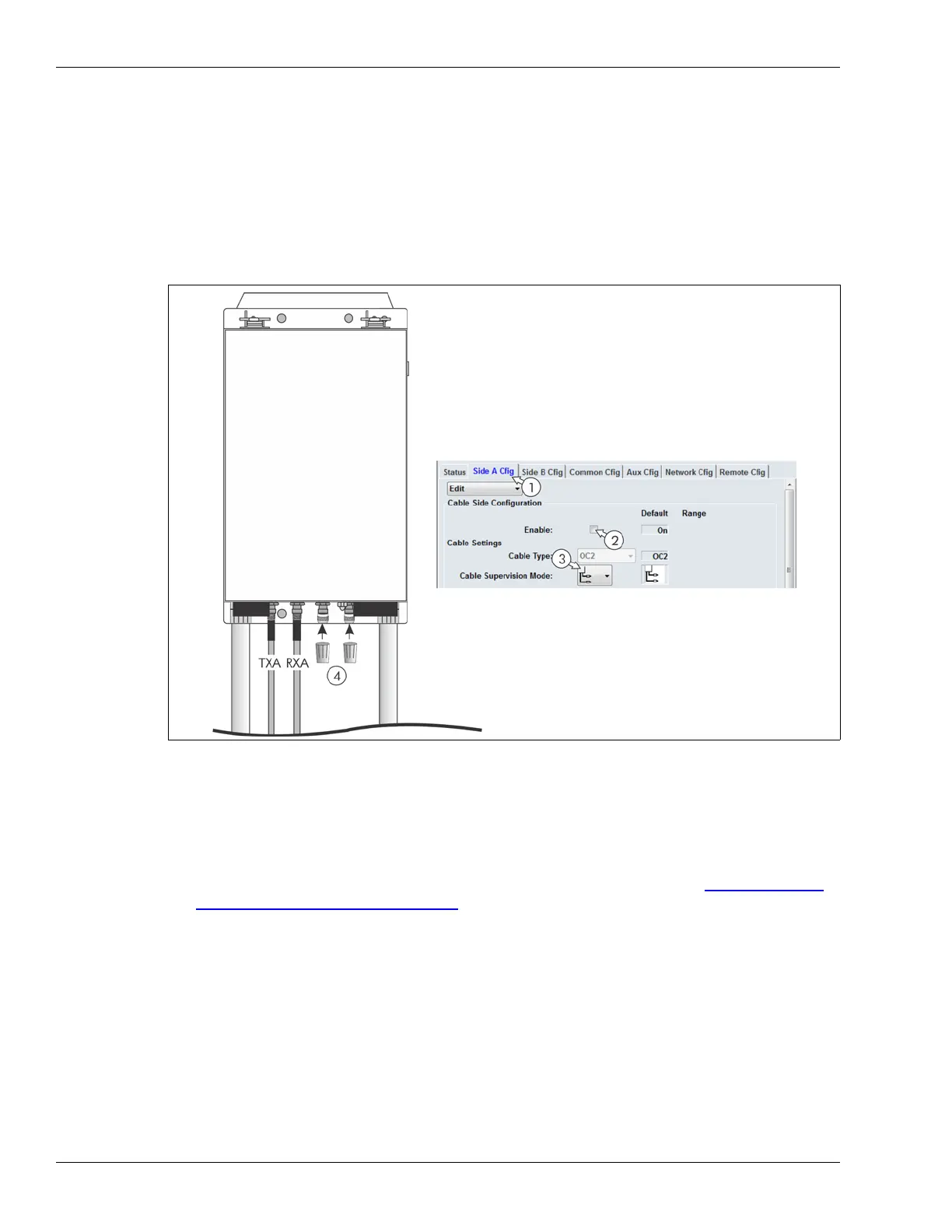
Terminating an unused cable side
For a processor, which uses only one of the two cable sides, you must disable the transmitter and
select clutter supervision for the unused side (via the UCM) and install the supplied dust caps on
the cable inputs.
Unused cable side termination procedure
1. Start the UCM application and connect to the OmniTrax processor.
2. On the Cable Side Cfig tab, Select the unused Side (A or B).
3. Disable the unused Cable Side by deselecting the Enable check box (see Setting the initial
configuration parameters on page 195).
4. Select Clutter Supervision for the unused Cable Side.
5. Save the changes and download the configuration settings to the processor.
6. Fit the supplied dust caps on the unused cable inputs.
Figure 109: Terminating an unused cable side
enclosure
1. Select the cable Side.
2. Deselect the transmitter (uncheck Enable).
3. Select Clutter Supervision.
4. Install dust caps on the cable inputs.
A-side cable connections
B-side unused
UCM settings



 To Next Page