Setup
Page 210 OmniTrax Product Guide
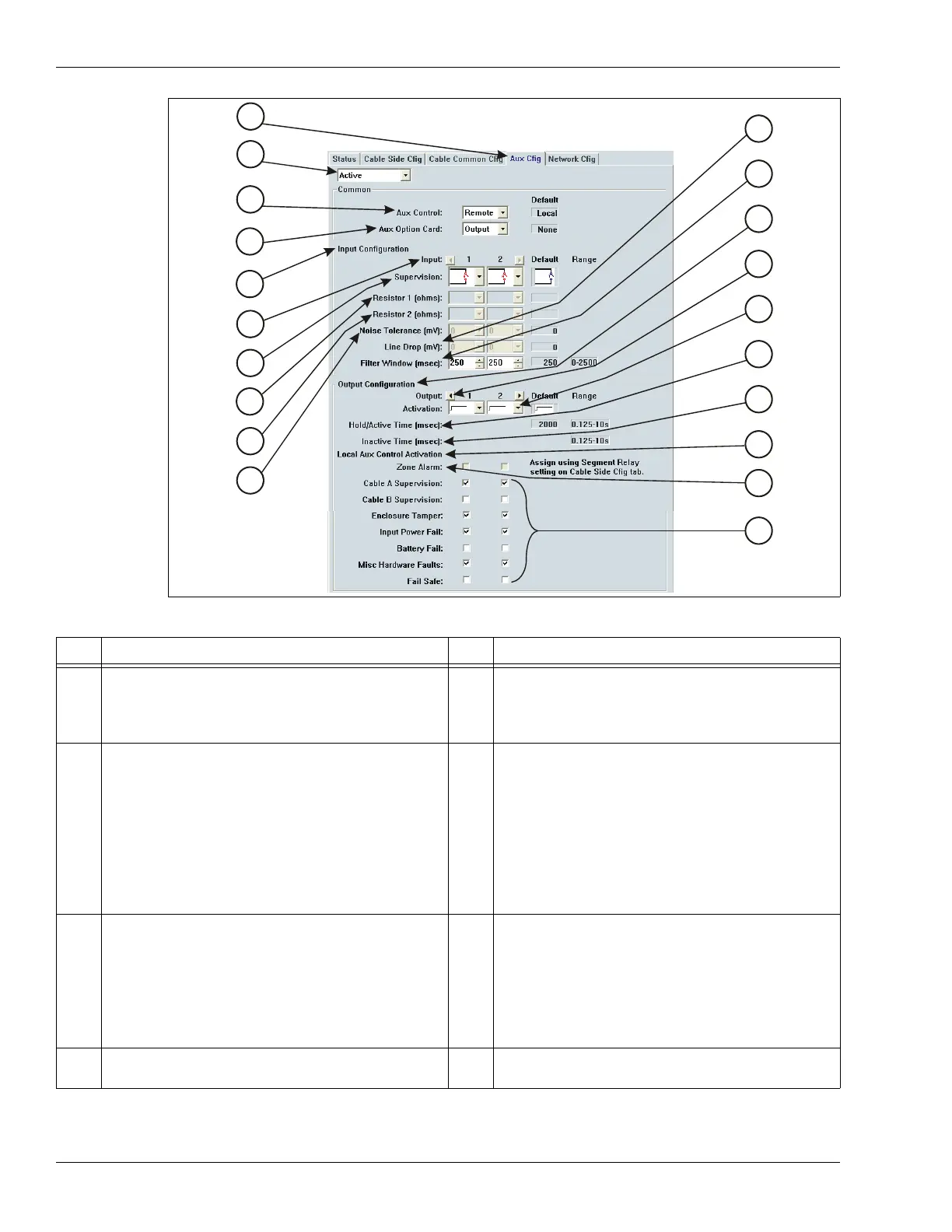
Figure 188: Auxiliary Configuration (Aux Cfig) window
Item Description Item Description
1 Aux Cfig tab - select to display the Auxiliary
Input/Output configuration screen
2 Activity display drop down:
Edit - displays modified configuration
Active - displays processor’s current settings
File - displays saved/loaded UCM configuration
3 Aux Control (default = local control mode)
Local control mode - auxiliary I/O is controlled by
the OmniTrax processor, relays signal alarm and
supervision conditions (user configurable
response) inputs activate Side A and B self-test
Remote control mode - auxiliary I/O is controlled
by the host security management system, relays
are output control points and inputs report alarm
and supervision conditions for auxiliary devices
4 Aux Option Card (default = none)
Each OmniTrax processor can use one auxiliary
option card, either an input card or an output
card.
Input card - provides 8 additional inputs
Output card - provides 8 additional outputs
5 Input Configuration section
The input configuration parameters listed below
each selected input apply only to the selected
input. First you select an input, then you configure
the selected input’s parameters.
inputs 1 and 2 on the OmniTrax processor
inputs Opt1 to Opt8 on the auxiliary input card
6 Input selection arrows - click on the arrows to
scroll through and select the available inputs
The default setting for each parameter is
indicated beside the parameter selection drop
down
Applicable Range is displayed beside the
parameter selection drop down
7 Supervision drop down - select the input relay
and supervision resistor wiring configuration
8 Resistor 1 - available when single or dual
resistor supervision is selected
I/O configuration parameters
1
2
3
4
5
6
7
8
11
12
13
14
15
16
17
18
9
10



 To Next Page