EasyManua.ls Logo

Sony CCD-TRV118 - Connecting the Power Cord; Inserting a Cassette; Quick Start; Recording on a Tape

Sony CCD-TRV118
268 pages
Print Icon
To Next Page IconTo Next Page
To Previous Page IconTo Previous Page
Loading...
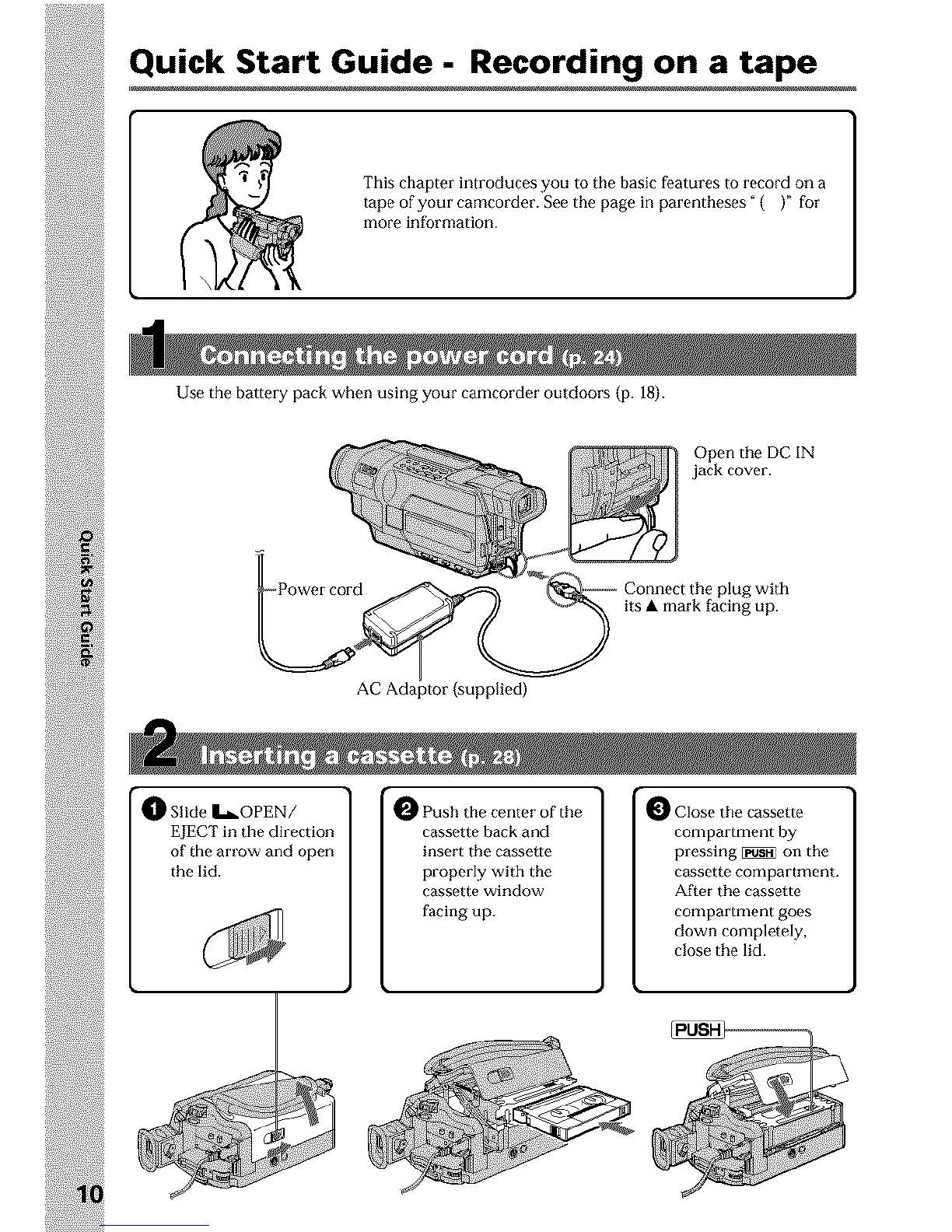
Quick Start Guide - Recording on a tape
This chapter introduces you to the basic features to record on a
tape of your camcorder. See the page in parentheses" ( )" for
more information.
Use the battery pack when using your camcorder outdoors (p. 18}.
Open the DC IN
jack cover.
plug with
its mark facing up.
AC Adaptor (supplied)
_]_ Slide I_OPEN/
EJECT in the direction
of the arrow and open
the lid.
O Push the center of the
cassette back and
insert the cassette
properly with the
cassette window
facing up.
0 Close the cassette
compartment by
pressing _ on the
cassette compartment.
After the cassette
comparmmnt goes
down completely,
close the lid.

Table of Contents

Other manuals for Sony CCD-TRV118

Related product manuals