Using the wide mode
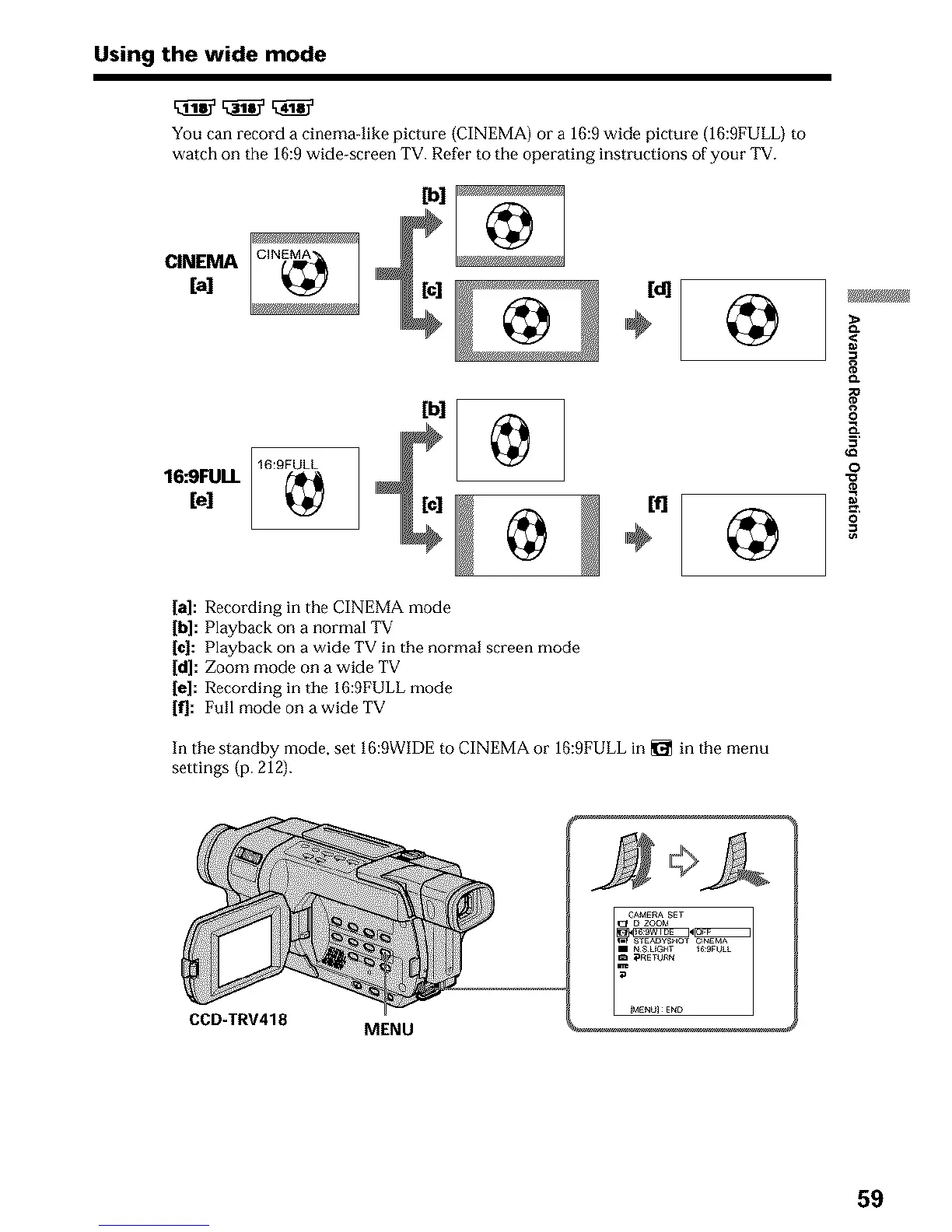
You can record a cinemaqike picture {CINEMA) or a 16:9 wide picture (16:9FULL) to
watch on the 16:9 wide-screen TV. Refer to the operating instructions of your TV.
CINENIA
[a]
CIN_
16:9FUU.
[el
16:9FULL
[bl
<
8
0
o
0
[a]: Recording in the CINEMA mode
[hi: Playback on a normal TV
[c]: Playback on a wide TV in the normal screen mode
[d]: Zoom mode on a wide TV
[e]: Recording in tile 16:9FULL mode
If]: Full mode on a wide TV
In the standby mode, set 16:9WIDE to CINEMA or 16:9FULL in _l_ in the menu
settings (p. 212).
CCD-TRV418
MENU
59












 To Next Page