Dubbing a tape easily - Easy Dubbing
Signals to control the VCR are sent fl'om your camcorder's infrared rays emitter to the
VCR's remote sensor.
When you connect using tile A/V connecting cable, follow the procedure below, steps
(1) to (4), to send the control signal correctly.
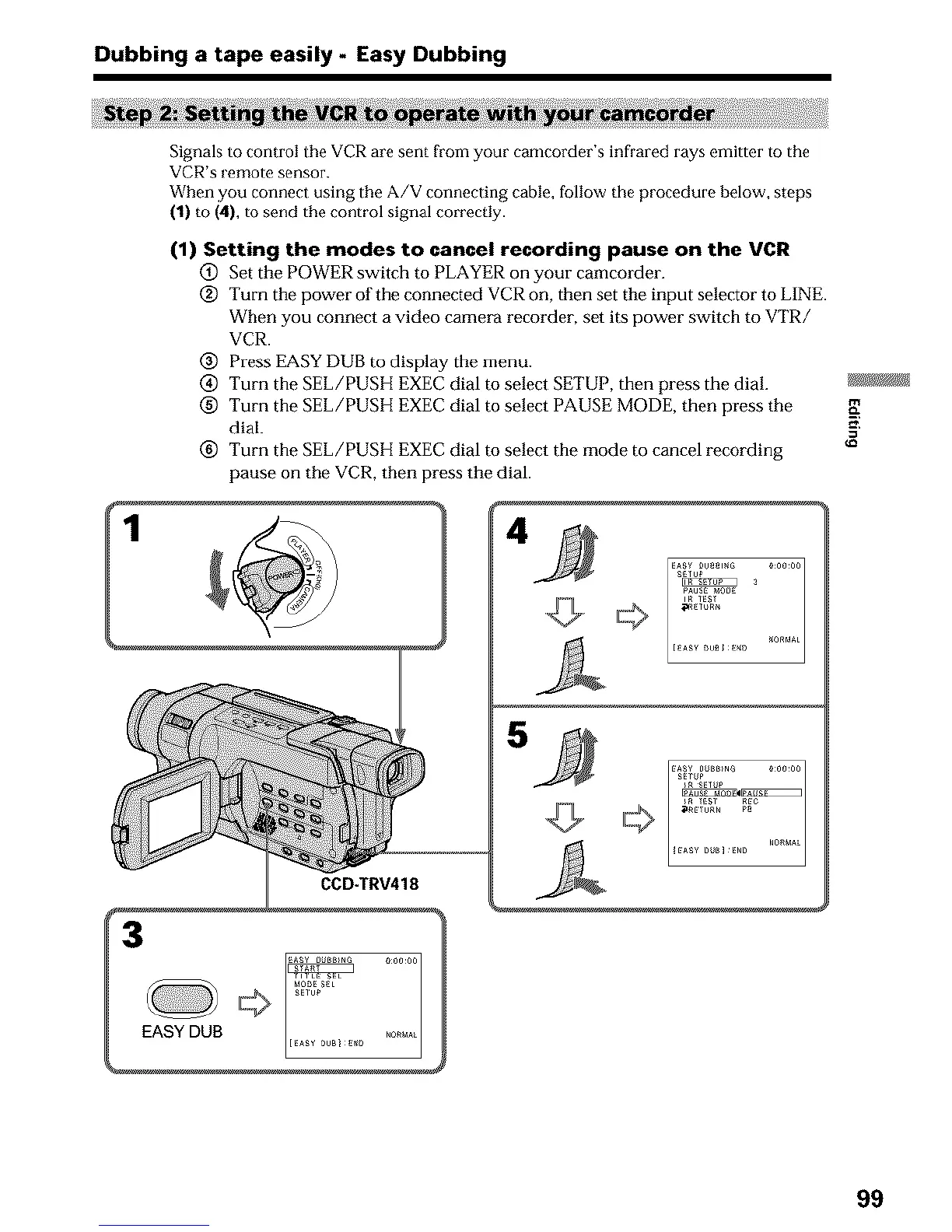
(1) Setting the modes to cancel recording pause on the VCR
@ Set the POWER switch to PLAYER oi1 your camcorder.
@ Turn the power of the connected VCR on, then set the input selector to LINE.
When you connect a video camera recorder, set its power switch to VTR/
VCR.
@ Press EASY DUB to display the menu.
@ Turn the SEL/PUSH EXEC dial to select SETUP, then press the dial.
(_) Turn the SEL/PUSH EXEC dial to select PAUSE MODE, then press the
dial.
(_) Turn the SEL/PUSH EXEC dial to select the mode to cancel recording
pause on the VCR, then press the dial.
CCD-TRV418
EASY DUB
£Er_P
A
99












 To Next Page