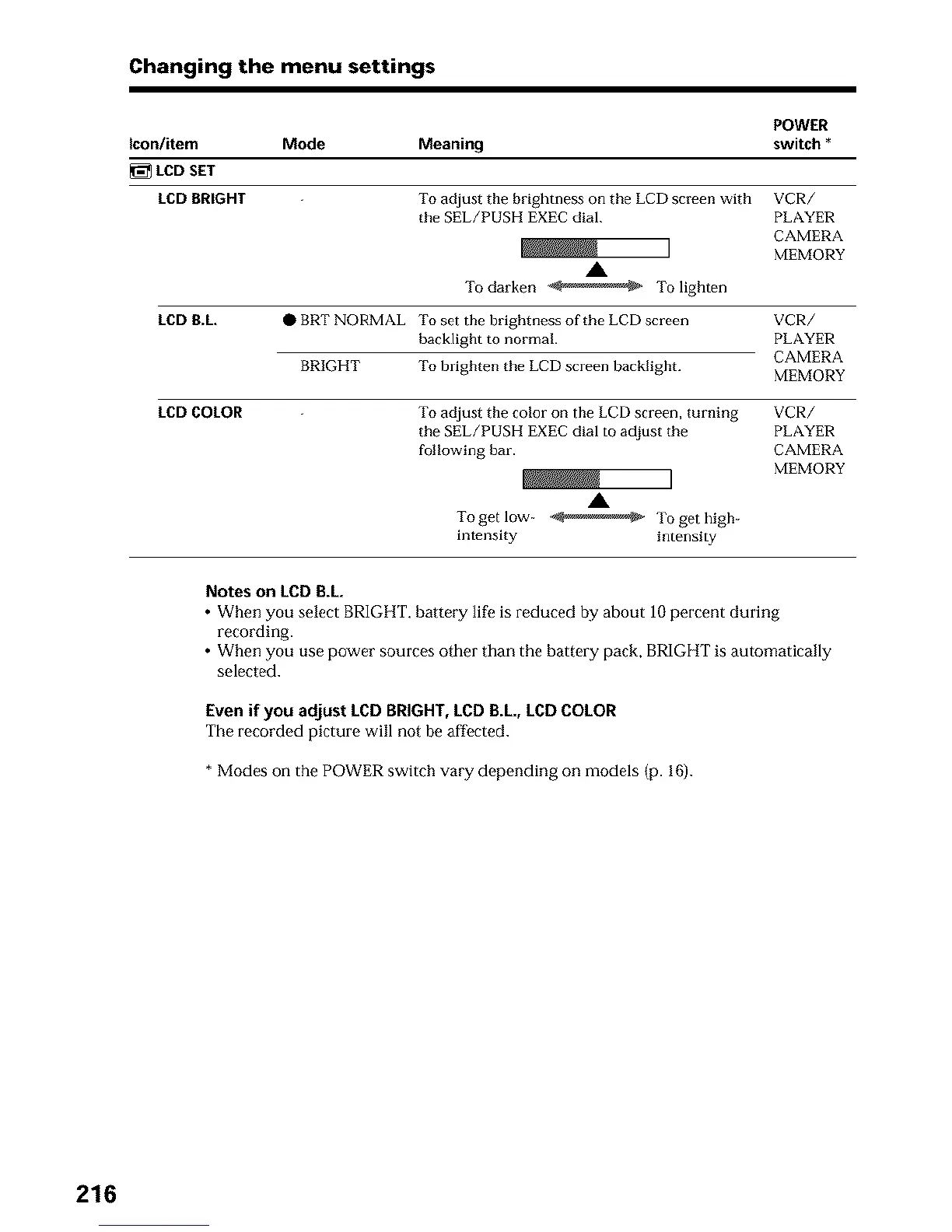
Changing the menu settings
POW£R
icon/item Mode Meaning switch *
LCD SET
LCD BRIGHT To adjust the brightness on the LCD screen with VCR/
the SEL/PUSH EXEC dial. PLAYER
CAMERA
MEMORY
A
Todarken _ Tolighten
LCD B.L. O BRT NORMAL To set the brightness of the LCD screen VCR/
backlight to normal PLAYER
CAMERA
MEMORY
LCD COLOR
BRIGHT To brighten the LCD screen backlight.
To adjust the color on the LCD screen, turning VCR/
the SEL/PUSH EXEC dial to adjust the PLAYER
following bar. CAMERA
MEMORY
A
Togetlow- _ Togethigh-
intensity intensity
Notes on LCD B.L
• When you select BRIGHT, battery life is reduced by about 1Opercent during
recording.
• When you use power sources other than the battery pack, BRIGHT is automatically
selected.
Even if you adjust LCD BRIGHT, LCD B.L, LCD COLOR
The recorded picture will not be affected.
* Modes on the POWER switch vary depending on models (p. 16).
216





 To Next Page