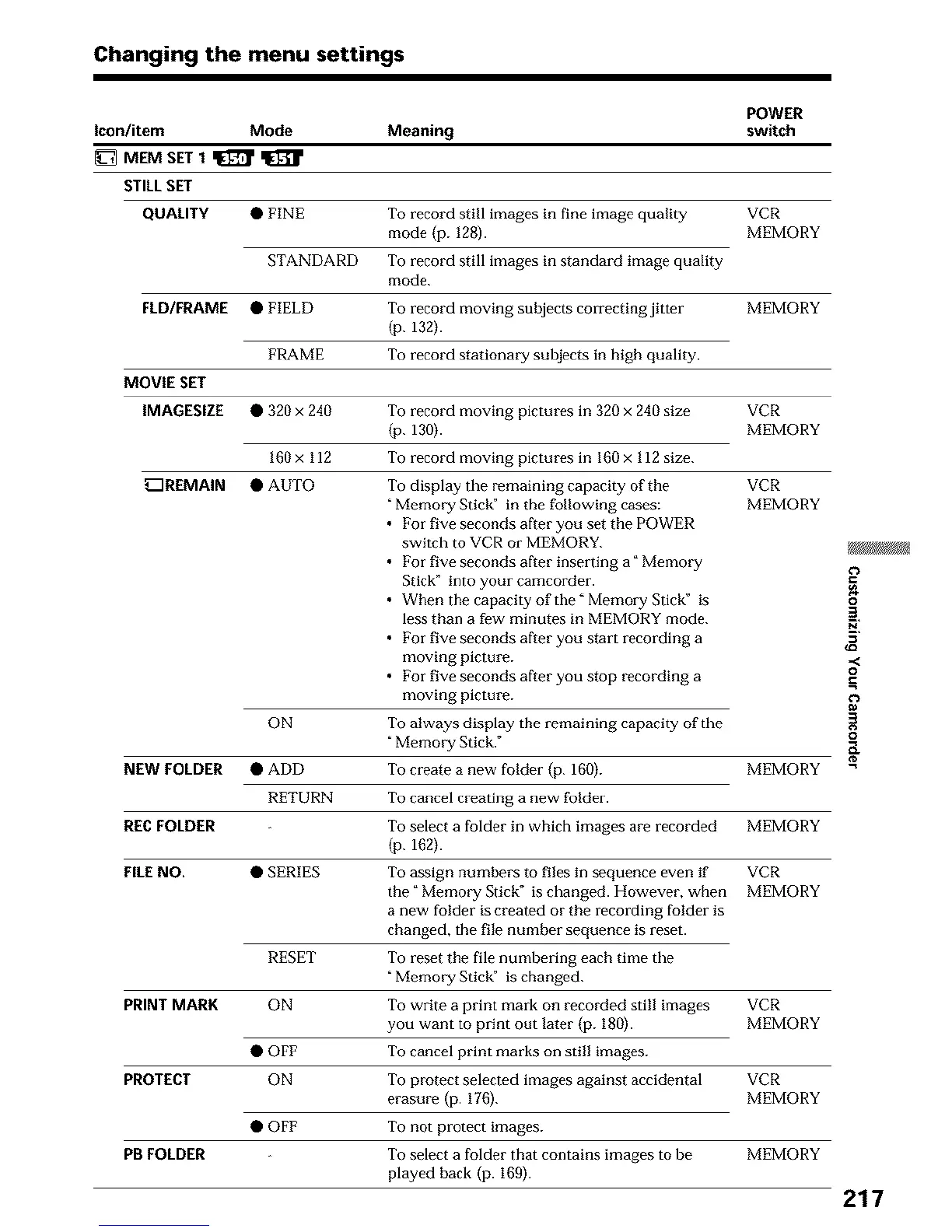
Changing the menu settings
POWER
Icon/item Mode Meaning switch
_ MEM SET 1 q_ q_
STILLSET
QUALITY • FINE To record still images in fine image quality VCR
mode (p. 128). MEMORY
STANDARD To record still images in standard image quality
mode.
FLD/FRAME • FIELD
To record moving subjects correcting jitter
(p. 132).
FRAME To record stationary subjects in high quality.
MOVIE SET
IMAGESIZE • 320 x 240
MEMORY
To record moving pictures in 320 x 240 size VCR
(p. 130). MEMORY
160 x 112 To record moving pictures in 160 x 112 size.
_REMAIN • AUTO VCR
MEMORY
ON
To display the remaining capacity of the
"Memory Sticg' in the following cases:
• For five seconds aRer you set the POWER
switch to VCR or MEMORY.
• For five seconds after inserting a °Memory
Stick" into your camcorder.
• When the capacity of the" Memory Stick" is
less than a few minutes in MEMORY mode.
• For five seconds after you start recording a
moving picture.
• For five seconds aRer you stop recording a
moving picture.
To always display the remaining capacity of the
"Memory Stick."
NEW FOLDER • ADD To create a new folder (p. 160). MEMORY
RETURN To cancel creating a new folder.
RE€ FOLDER To select a folder in which images are recorded MEMORY
(p. 162).
FILENO. • SERIES To assign numbei,'s to files in sequence even if VCR
the _Memory Stick" is changed. However, wben MEMORY
a new folder is created or the recording folder is
changed, the file number sequence is reset.
To reset the file numbering each time the
Memory Stick" is changed.
RESET
To write a print mark on recorded still images VCR
you want to print out later (p. 180). MEMORY
PRINT MARK ON
To cancel print marks on still images.
• OFF
To protect selected images against accidental VCR
erasure (p. 17fi). MEMORY
PROTECT ON
• OFF To not protect images.
PB FOLDER To select a folder that contains images to be MEMORY
played back (p. 169).
o
2.
,,<
o
217





 To Next Page