Recording a picture
The NightShot function enables you to shoot a subject in a dark place. For example, you
can satisfactorily record the environment of nocturnal animals for observation when
you use this function.
Using NightShot
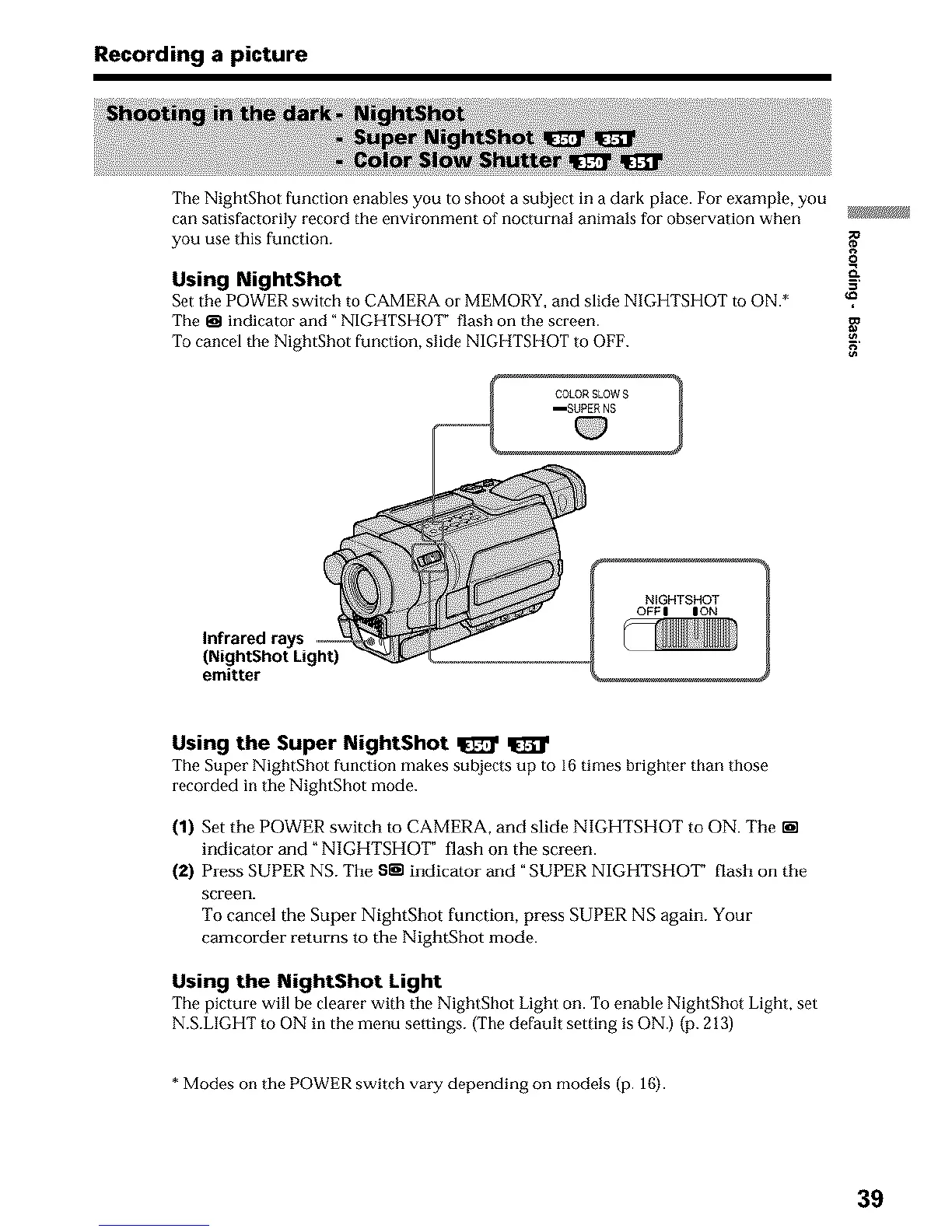
Set the POWER switch to CAMERA oi' MEMORY, and slide NIGHTSHOT to ON.*
The _ indicator and" NIGHTSHOI _ flash on the screen.
To cancel the NightShot function, slide NIGHTSHOT to OFF.
I COLORSLOWS 1
mSUPER NS
g_
o
&
g
Infrared rays
(NightShot Light)
emitter
NIGHTSHOT
OFFI ION
Using the Super NightShot _
The Super NightShot function makes subjects up to 16 times brighter than those
recorded in the NightShot mode.
(1) Set the POWER switch to CAMERA, and slide NIGHTSHOT to ON. The _n
indicator and" NIGHTSHOT" flash on the screen.
(2) Press SUPER NS. The S_-nindicator and "SUPER NIGHTSHOT" flash on the
screen.
To cancel the Super NightShot function, press SUPER NS again. Your
camcorder returns to the NightShot mode.
Using the NightShot Light
The picture will be clearer with tile NightShot Light on. To enable NightShot Light, set
N.S.LIGHT to ON in the menu settings. (The default setting is ON.) (p. 213)
* Modes on the POWER switch vary depending on models (p. 16).
39












 To Next Page