Recording images from a tape as still images
Before operation
Set DISPLAY to LCD in tile menu settings. (The default setting is LCD.) (p. 222)
(1) Set the POWER switch to VCR.
(2) Play back the recorded tape, or turn the TV on to see the desired program.
The picture fi-om TV or VCR appears on the screen of your camcorder.
(3) Follow steps (3) and (4) on page 136.
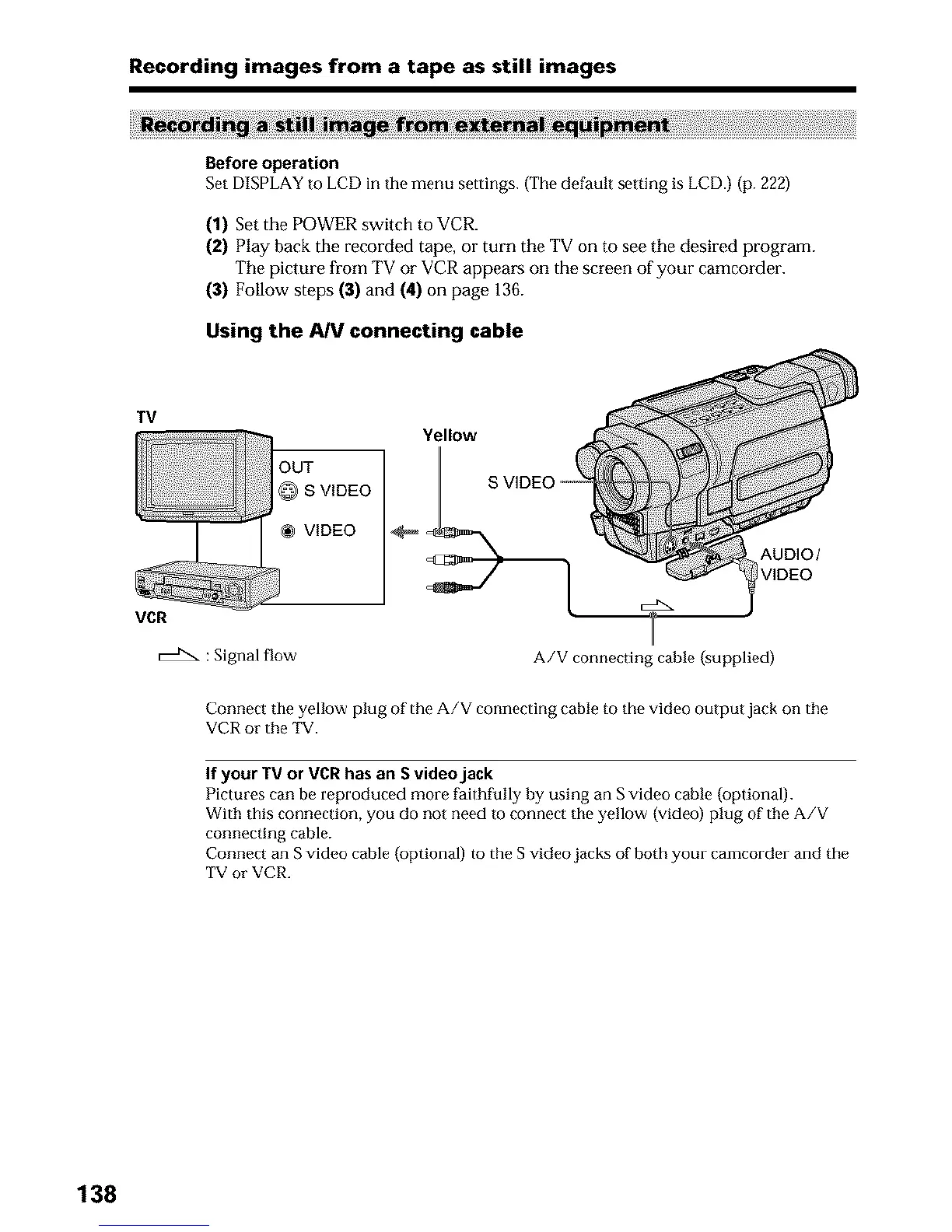
Using the AIV connecting cable
TV
VCR
OUT
@ S VIDEO
VIDEO
Yellow
AUDIO/
VIDEO
: Signal flow
A/V connecting cable (supplied)
Connect tile yellow plug of the A/V connecting cable to the video output jack on the
VCR or the TV.
If your TV or VCR has an S video jack
Pictures can be reproduced more faithfully by using an S video cable (optional).
With this connection, you do not need to connect the yellow (video) plug of the A/V
connecting cable.
Connect an S video cable (optional) to the S video jacks of both your camcorder and the
TV or VCR.
138












 To Next Page