Preventing accidental erasure
- Image protection
You can protect selected images to prevent accidental erasure.
Before operation
Insert a" Memory Stick" into your camcorder.
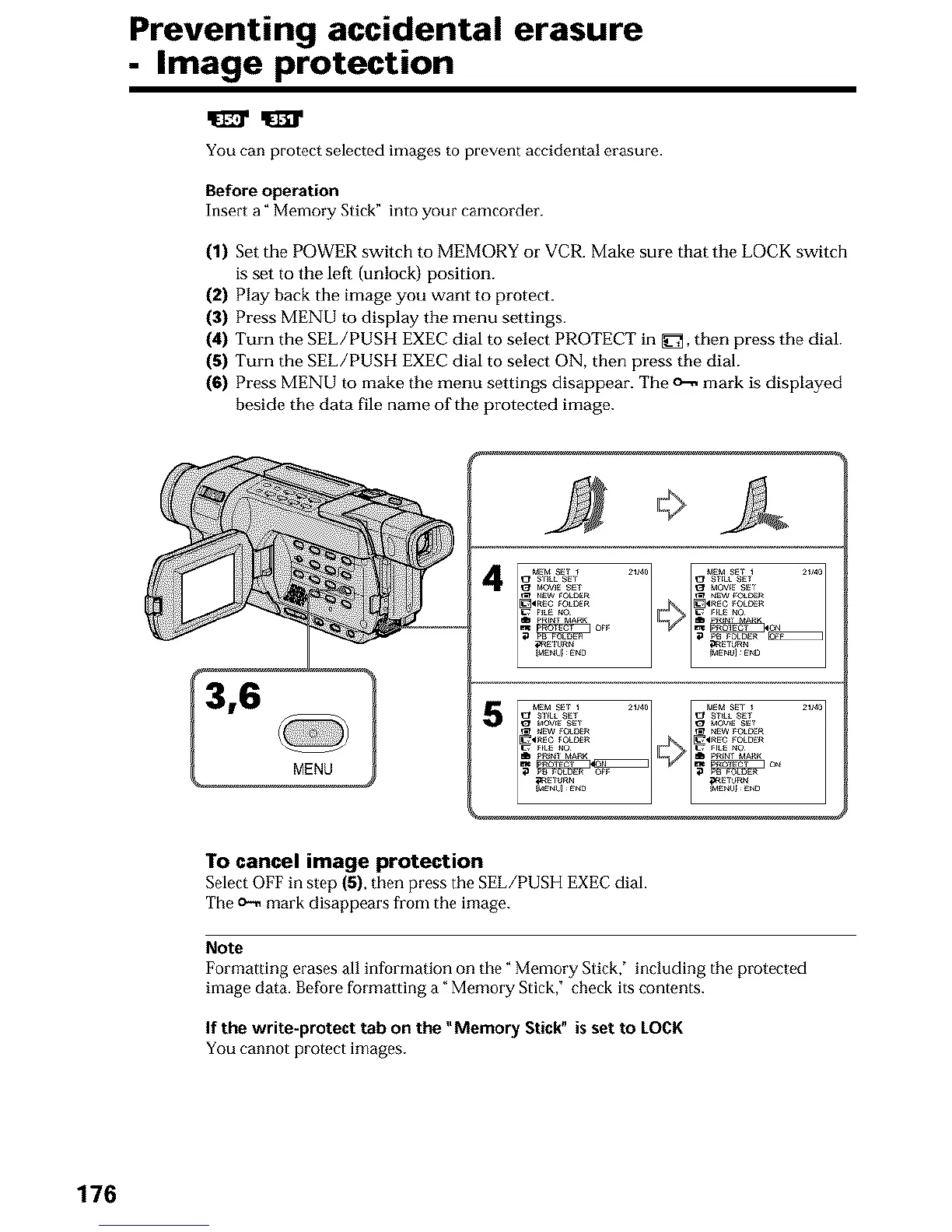
(1) Set the POWER switch to MEMORY or VCR. Make sure that the LOCK switch
is set to the left (unlock) position.
(2) Play back the image you want to protect.
(3) Press MENU to display the menu settings.
(4) Turn the SEE/PUSH EXEC dial to select PROTECT in _, then press the dial.
(5) Turn the SEE/PUSH EXEC dial to select ON, then press the dial.
(6) Press MENU to make the menu settings disappear. The _ mark is displayed
beside the data file name of the protected image.
4
5
To cancel image protection
Select OFF in step (5), then press the SEE/PUSH EXEC dial.
The o_ mark disappears from the image.
Note
Formatting erases all information on the" Memory Slick," including the protected
image data. Before formatting a _Memory Stick," check its contents.
If the write-protect tab on the "Memory Stick" is set to LOCK
You cannot protect images.
176












 To Next Page