Dubbing a tape easily - Easy Dubbing
Note
You can put a title only into the tape of the VCR.
Title setting
• The title color changes as ftJllows:
WHITE _ YELLOW _ VIOLET _ RED _ CYAN _ GREEN _ BLUE
• The title size changes as follows:
SMALL _ LARGE
• The background color changes as fullows:
FADE _ WHITE _ YELLOW _ VIOLET _ RED _ CYAN _ GREEN
BLUE _ BLACK
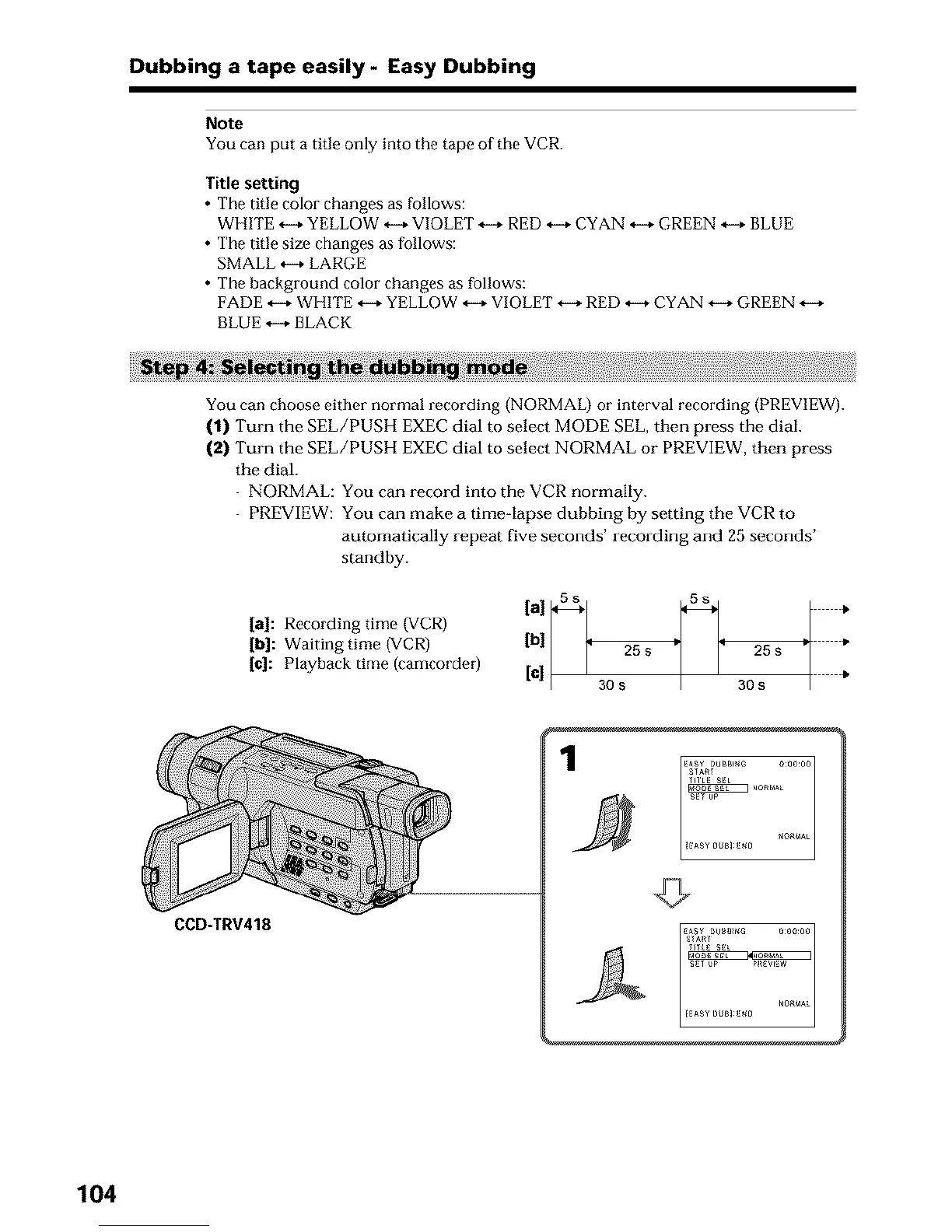
You can choose either normal recording (NORMAL) or interval recording (PREVIEW).
(1) Turn the SEL/PUSH EXEC dial to select MODE SEL, then press the dial.
(2) Turn the SEL/PUSH EXEC dial to select NORMAL or PREVIEW, then press
the dial.
NORMAL: You can record into the VCR normally.
PREVIEW: You can make a timeqapse dubbing by setting the VCR to
automatically repeat five seconds' recording and 25 seconds'
standby.
[al: Recording time (VCR)
[b]: Waiting time (VCR)
[e]: Playback time (camcorder)
[al 5s 5s *
[¢] | 30s 30s •
CCD-TRV418
104






 To Next Page