Playing back images continuously
- SLIDE SHOW
Your camcorder can play back images in sequence automatically. This function is useful
especially when checking recorded images or during a presentation.
Before operation
Insert a" Memory Stick" into your camcorcler.
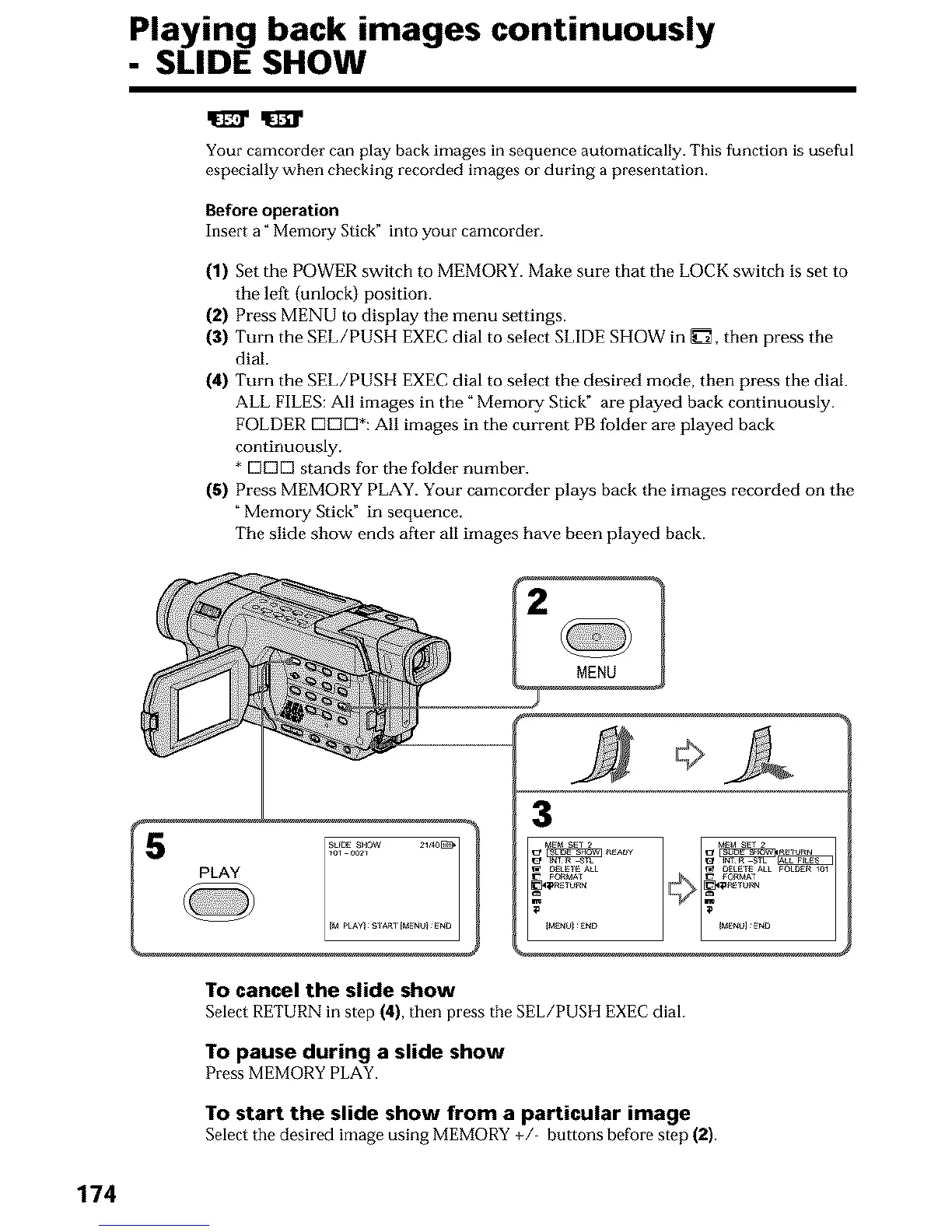
(1) Set the POWER switch to MEMORY. Make sure that the LOCK switch is set to
the left (unlock) position.
(2) Press MENU to display the menu settings.
(3) Turn the SEE/PUSH EXEC dial to select SLIDE SHOW in _7_, then press the
dial,
(4) Turn the SEE/PUSH EXEC dial to select the desired mode, then press the dial.
ALL FILES: All images in the" Memory Stick" are played back continuously.
FOLDER DE]D*: All images in the current PB folder are played back
continuously,
* [_D[_ stands for the folder number.
(5) Press MEMORY PLAY. Your camcorder plays back the images recorded on the
Memory Stick" in sequence,
The slide show ends after all images have been played back.
[2 MENU 1
MEM S_r 2
IME_Ul _E_O
To cancel the slide show
Select RETURN in step (4), then press the SEL/PUSH EXEC dial.
To pause during a slide show
Press MEMORY PLAY.
To start the slide show from a particular image
Select the desired image using MEMORY +/ buttons before step (2).
174












 To Next Page