Superimposing a title
You can select one of the eight preset titles and the two custom titles (p. 77). You can
also select the language, color, size and position of titles.
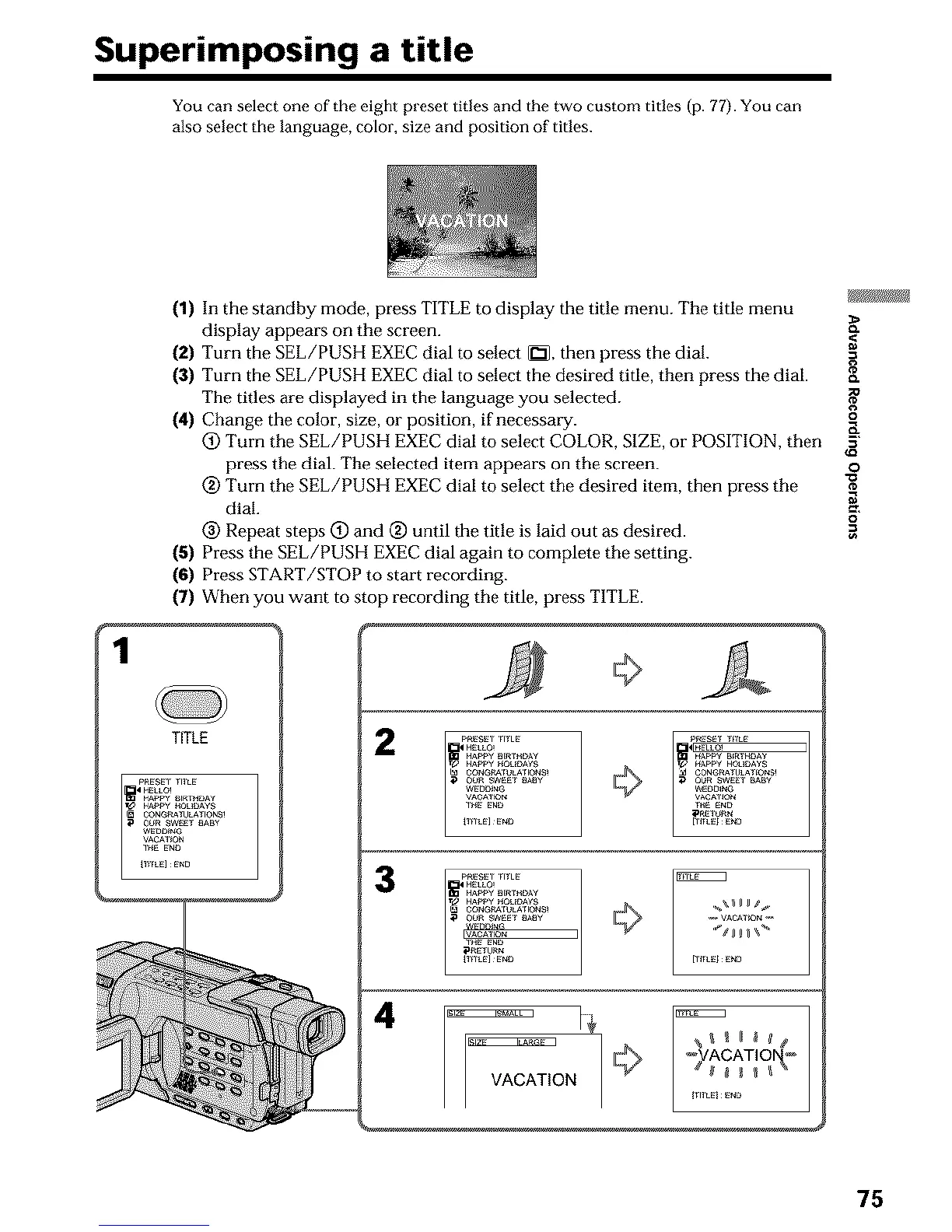
(1) In the standby mode, press TITLE to display the title menu. The title menu
display appears on the screen.
(2) Turn the SEL/PUSH EXEC dial to select _2_, then press the dial.
(3) Turn the SEL/PUSH EXEC dial to select the desired title, then press the dial.
The titles are displayed in the language you selected.
(4) Change the color, size, or position, if necessary. ,_
(_) Turn the SEL/PUSH EXEC dial to select COLOR, SIZE, or POSITION, then =
press the dial. The selected item appears on the screen, o
(_) Turn the SEL/PUSH EXEC dial to select the desired item, then press the "_
dial. _,
(_ Repeat steps (_) and _) until the title is laid out as desired.
(5) Press the SEL/PUSH EXEC dial again to complete the setting.
(6) Press START/STOP to start recording.
(7) When you want to stop recording the title, press TITLE.
1
TITLE
2
3
4
75












 To Next Page