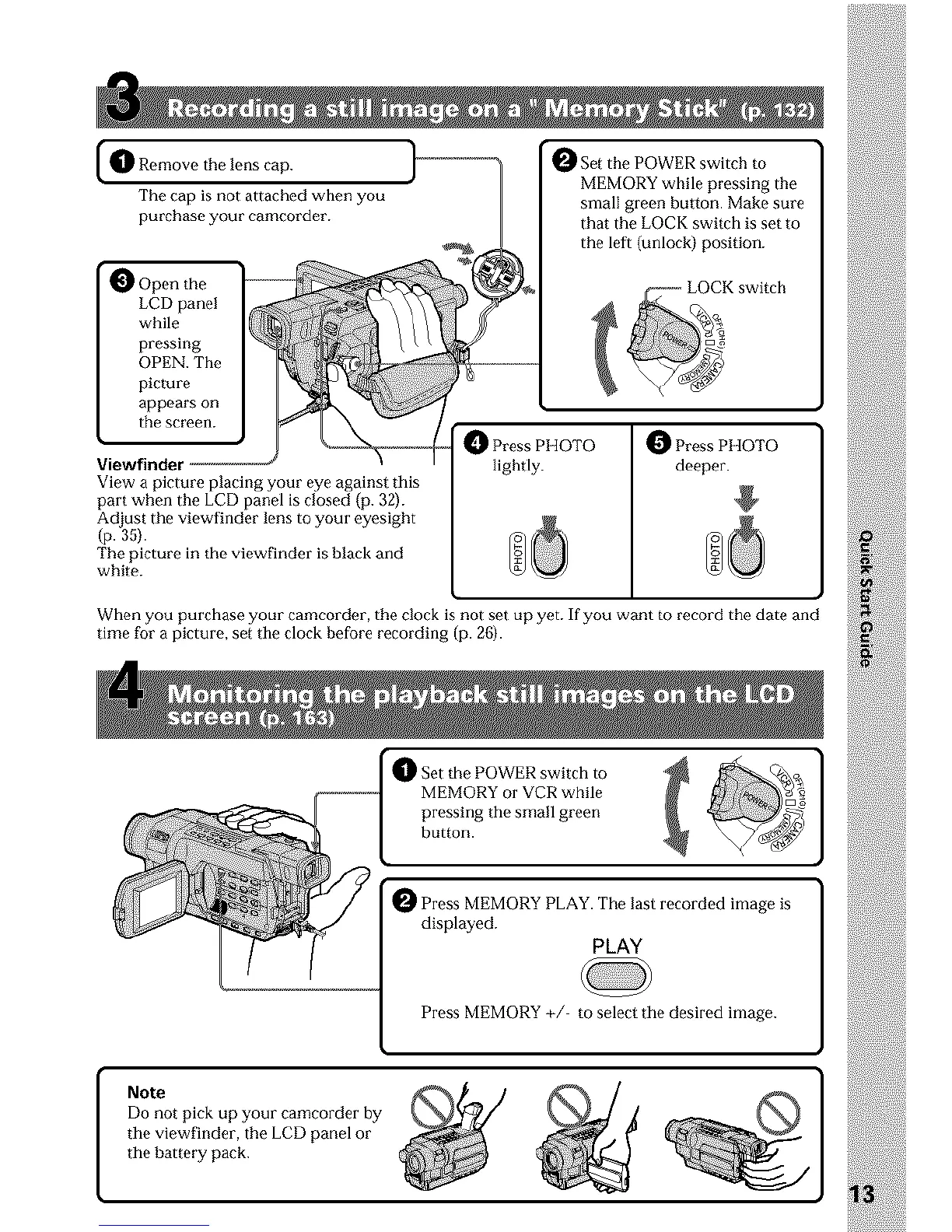
O emove the lens cap. 1-_-_-_-_-_-_-'
The cap is not attached when you
purchase your camcorder.
O Open the
LCD panel
while
pressing
OPEN. The
picture
appears on
the screen.
Viewfindet
View a picture placing your eye against this
part when the LCD panel is closed (p. 32).
Adjust the viewfinder lens to your eyesight
(p.35).
The picture in the viewfinder is black and
white.
_Set the POWER switch to
MEMORY while pressing the
small green button. Make sure
that the LOCK switch is set to
the left (unlock) position.
_ Press PHOTO
lightly.
_ Press PHOTO
deeper.
When you purchase your camcorder, the clock is not set up yet. If you want to record the date and
time for a picture, set the clock before recording (p. 26).
Set the POWER switch to
MEMORY or VCR while
pressing the small green
button.
_ Press MEMORY PLAY. The last recorded image is
displayed.
PLAY
Press MEMORY +/ to select the desired image.
Note
Do not pick up your camcorder by
the viewfinder, the LCD panel or
tile bat teI_y pack.












 To Next Page