Using special effects - Digital effect
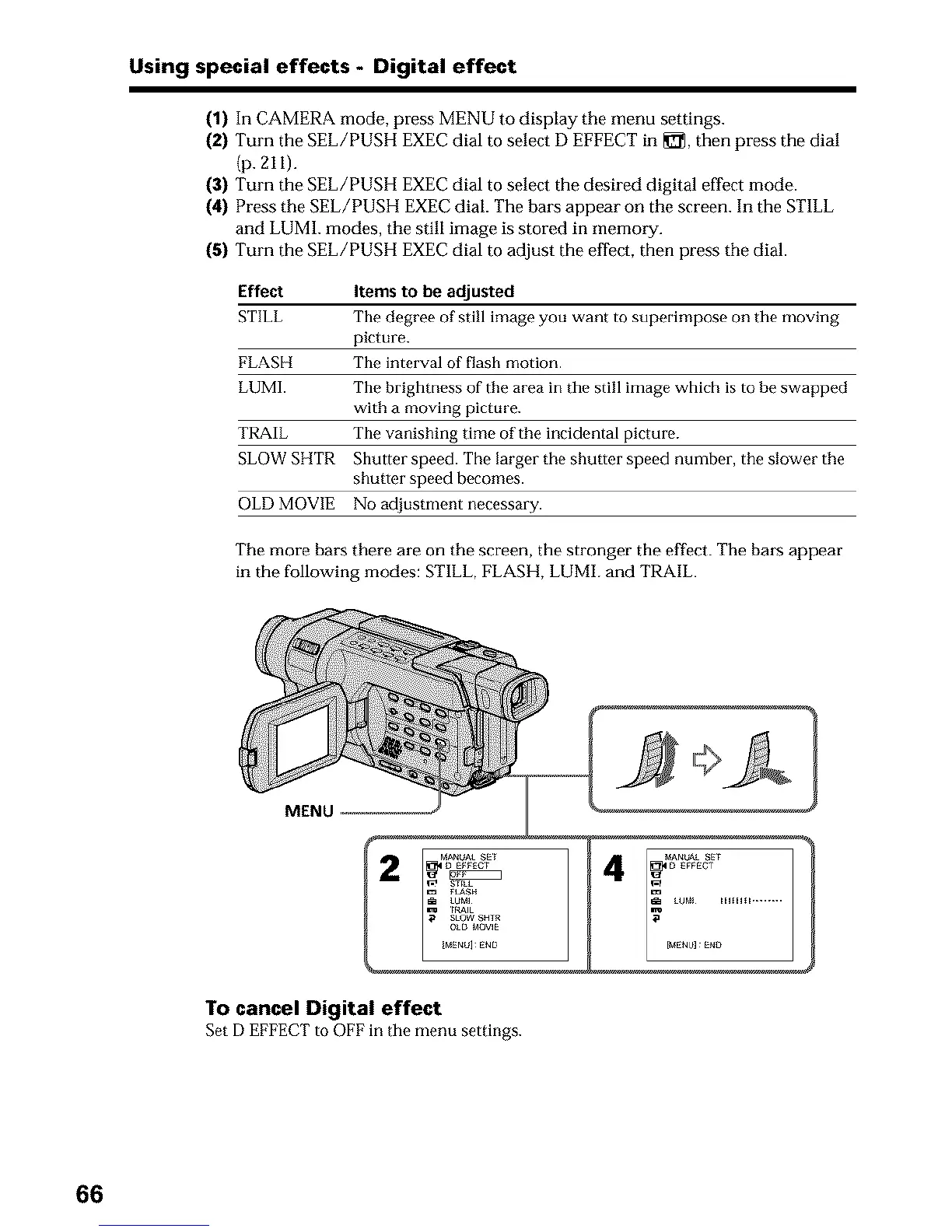
(1) In CAMERA mode, press MENU to display the menu settings.
(2) Turn the SEL/PUSH EXEC dial to select D EFFECT in _, then press the dial
(p. 21I).
(3) Turn the SEL/PUSH EXEC dial to select the desired digital effect mode.
(4) Press the SEL/PUSH EXEC dial. The bars appear on the screen. In tim STILL
and LUM1. modes, the still image is stored in memory.
(5) Turn the SEL/PUSH EXEC dial to adjust the effect, then press the dial.
Effect Items to be adjusted
STILL The degree of still image you want to superimpose on the moving
picture.
FLASH The interval of flash motion.
LUMI. The brightness of the area in the still image which is to be swapped
with a moving picture.
TRAIL The vanishing time of the incidental picture.
SLOW SHTR Shutter speed. The larger the shutter speed number, the slower the
shutter speed becomes.
OLD MOVIE No adjustment necessary.
The more bars there are on the screen, the stronger the effect. The bars appear
in the following modes: STILL, FLASH, LUMh and TRAIL.
MENU
To cancel Digital effect
Set DEFFECT to OFF in tile menu settings.
66












 To Next Page