Capturing images from an analog video unit
on your computer - Signal convert function
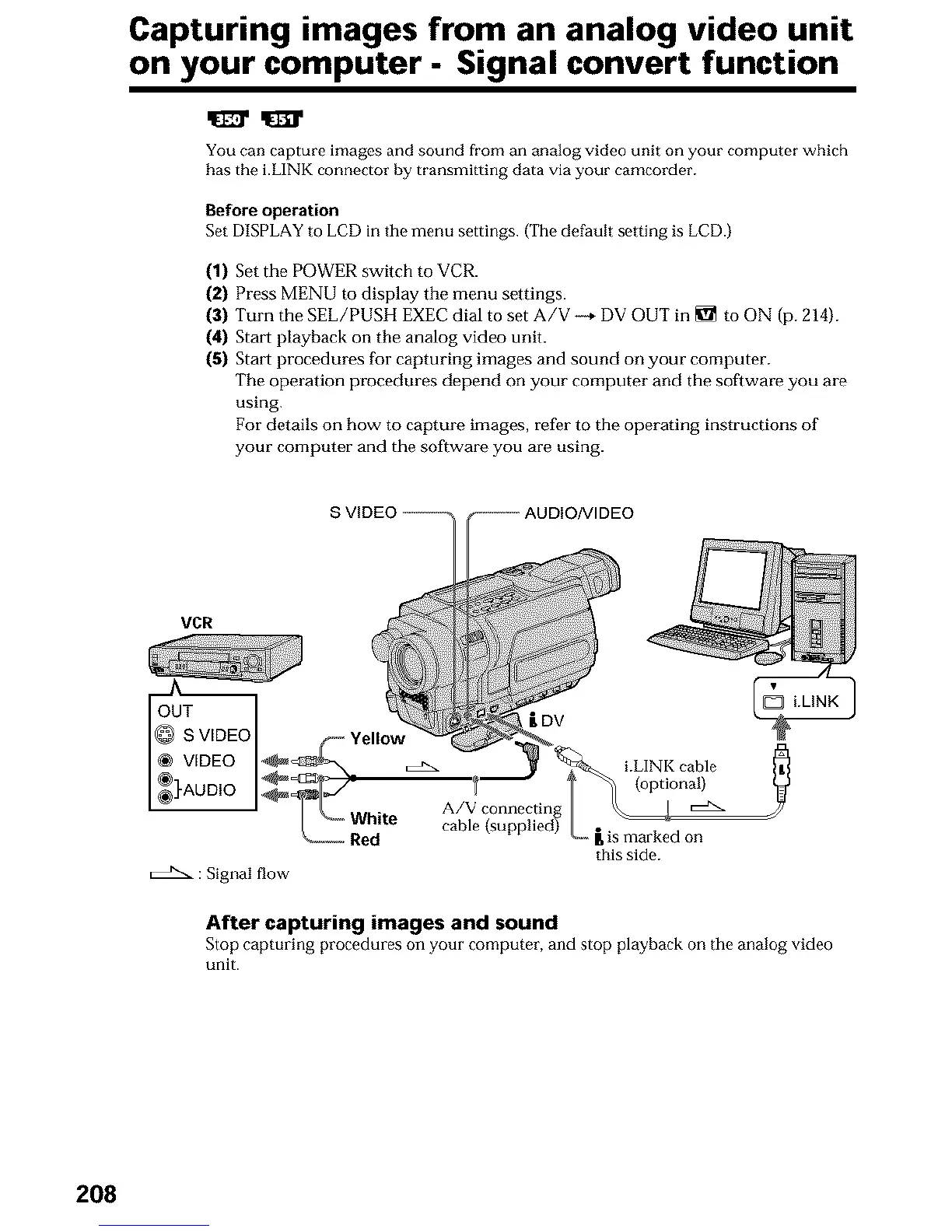
You can capture images and sound from an analog video unit on your computer which
has the i.LINK connector by transmitting data via your camcorder.
Before operation
Set DISPLAY to LCD in tile menu settings. ('file default setting is LCD.)
(1) Set the POWER switch to VCR.
(2) Press MENU to display the menu settings.
(3) Turn the SEL/PUSH EXEC dial to set A/V --+ DV OUT in _ to ON (p. 214).
(4) Stait playback on the analog video unit.
(5) Stait procedures for capturing images and sound on your computer.
The operation procedures depend on your computer and the software you are
using.
For details on how to capture images, refer to the operating instructions of
your computer and the software you are using.
VCR
S VIDEO I _ Yellow i DV
VIDEO I_
@]-AUDIO _ _)'
[{} J _ A/V connectlng
'-_ White cable (supplied)
Red
: Signal flow
l, is marked on
this side.
After capturing images and sound
Slop capturing procedures on your computer, and stop playback on tile analog video
unit.
208












 To Next Page